lsof Command in Linux (original) (raw)
Last Updated : 2 May, 2026
The lsof command in Linux stands for List Open Files. It provides a list of files that are currently opened and the processes that are using them. This command is extremely useful for monitoring file usage, network connections, and process activity.
- Lists open files and the processes using them
- Displays PID, user, file descriptor, file type, and file path
- Supports files, directories, devices, pipes, sockets, and network connections
- Commonly used for debugging file locks, process activity, and network usage
Example: List All Open Files
This command lists out all the files that are opened by any process in the system.
**Command:
lsof
**Output:

**File Descriptor (FD) Types:
- **cwd: Current working directory.
- **txt: Text file or executable file.
- **mem: Memory file.
- **mmap: Memory mapped device.
- **REG / DIR / CHR / IPv4 / IPv6: File or network types
Syntax
lsof [option]
- **lsof: Command itself, used to list open files.
- **[options]: Flags to filter and customize output.
**Files that can be listed include:
- Regular files (e.g., text or binary files)
- Directories
- Block special files (e.g., devices)
- Character special files
- Pipes
- Sockets (both UNIX and internet)
- Network connections (TCP and UDP)
Options of lsof Command
1. -u: List Files Opened by a Specific User
Each user on a system runs processes that may open different files such as configuration files, logs, devices, or network sockets. The -u option allows you to filter the output and display only the files opened by a particular user.
**Syntax:
lsof -u username
- **username: Replace with the desired username.
**Example: Lists out all the files opened by ubuntu user
**Command:
lsof -u ubuntu
**Output:

2. -u ^user: Exclude a Specific User
The caret symbol (^) is used to exclude a user from the results. This option lists files opened by all users except the specified user.
**Syntax:
lsof -u ^root
**Command:
lsof -u ^root
This command lists files opened by all users except the specified user.
**Output:

3. -c: List Files Opened by a Command Name
The -c option filters the output based on the process (command) name. It displays files opened by processes whose names match the given string. This is useful when troubleshooting a specific application or service.
**Syntax:
lsof -c process_name
**Example: Files opened by Mysql process
The files and their description opened by Mysql process
**Command:
lsof -c mysql
**Output:

**Example 2: Files opened by the apache process
The files that are opened by the apache process
**Command:
lsof -c apache
**Output:

4. -p: List Files Opened by a Process ID
Every running process in Linux has a unique Process ID (PID). The -p option allows you to check all files opened by a specific process using its PID.
**Syntax:
lsof -p process ID
**Output:

**Exclude a Specific PID
Lists files opened by all processes except the specified PID
**Syntax:
lsof -p ^process ID
**Output:

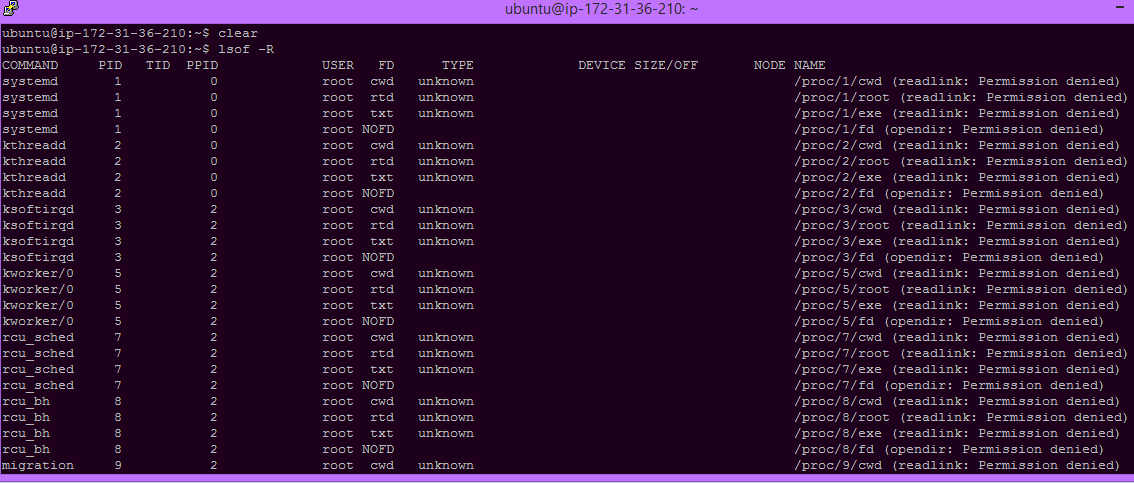
5. -R : Show Parent Process IDs
Processes in Linux have parent-child relationships. The -R option displays the Parent Process ID (PPID) along with the standard output columns.
**Syntax:
lsof -R
**Output:
6. +D: List Files Opened in a Specific Directory
Lists files opened by processes within a specified directory.
Syntax:
lsof +D /directory/path
**Output:

7. -i: List Open Network Connections
In Linux, network connections (TCP/UDP sockets) are treated similarly to files. The -i option displays all open network connections along with the processes using them.
**Syntax:
lsof -i
**To filter:
lsof -i tcp
**Output:

8. Manual Page
To view detailed documentation and all available options
**Command:
man lsof
**Output:
