nohup Command in Linux with Examples (original) (raw)
Last Updated : 6 Nov, 2025
The nohup (short for no hang up) command in Linux allows a process to continue running even after the user has logged out or the terminal is closed. It ignores the HUP (hangup) signal, which would normally terminate a running process when the session ends.
- nohup prevents processes from being stopped when the user logs out.
- It automatically redirects the command’s output to a file named nohup.out (if no other output file is specified).
- It can be used with & to run the process in the background.
Example
Starting a Process Using Nohup
To start a process using Nohup, simply prepend the desired command with nohup. For example, if you want to execute a bash script named geekfile.py using Nohup, you would use the following command:
nohup bash geekfile.sh
**Output:

To redirect the output to the **output.txt file:
nohup bash geekfile.sh > output.txt
**Output:

Nohup Command Syntax
The syntax for using the Nohup command is straightforward:
nohup command [options] &
`command`: Specifies the command or script that you want to execute.`[options]`: Optional arguments or flags that modify the behavior of the command.`&`: Placing an ampersand (&) at the end of the command instructs the shell to run the command in the background.
Starting a Process in the Background Using Nohup
To run the command in the background, the '****&'** symbol is appended at the end of the command. After executing, it doesn’t return to the shell command prompt after running the command in the background. It can be brought back to the foreground with the **fg command.
nohup bash geekfile.sh &
fg
**Output:

**Note: The number within square brackets represents the **job id and the number next to it is the **process id.
**To run multiple commands in the background
nohup command can be used to run multiple commands in the background.
nohup bash -c 'commands'
**Example:
nohup bash -c 'cal && ls'
**Output:
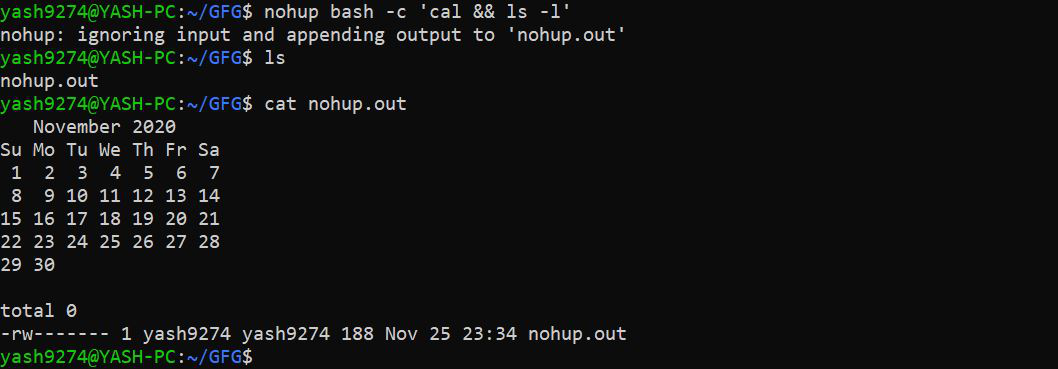
Here, the output will be by default stored in **nohup.out. To redirect it, type:
nohup bash -c 'commands' > filename.txt
**Example:
nohup bash -c 'cal && ls' > output.txt
**Output:

**Checking the version of Nohup
Checking the version of Nohup is a simple process. You can typically check the version of Nohup installed on your system by using the ` --version` flag. Simply execute the following command:
nohup --version
**Output:
