Ping Command in Linux (original) (raw)
Last Updated : 11 Jun, 2026
The ping command is a network utility used to test the reachability of a host and measure the time it takes for packets to travel to and from that host. It helps diagnose network connectivity issues by sending ICMP Echo Request packets and analyzing the responses.
- Sends ICMP Echo Requests to check if a system or server is reachable.
- Measures round-trip time (RTT) for packets to travel between devices.
- Helps identify packet loss, network delays, or connection failures.
- Commonly used for troubleshooting DNS, routing, and basic network health.
Example: Checking Internet Connection in Linux
To check internet connection, this command sends ICMP echo requests to google.com to check if the website is reachable and displays the response time for each packet.
**Command:
ping www.google.com
**Output:
The internet connection to www.google.com is working correctly with 0% packet loss, successful transmission and reception of 4 packets, and low round-trip time (RTT) values averaging 1.264 ms, indicating a responsive and stable connection.

testing internet connection using ping command
- **min: minimum time to get a response
- **avg: average time to get responses
- **max: maximum time to get a response
Syntax
ping [OPTION]
- **[options]: Flags to control behavior (number of packets, timeout, interval, etc.)
- **destination: The hostname or IP address of the target system you want to ping.
PING Command Options
1. -c COUNT: Specifying the Number of Pings
Specifies the number of ICMP packets to send before stopping.
- By default, ping runs continuously.
- This option is useful when you want limited output or quick testing.
**Example: Send 2 ping requests
**Command:
ping -c 2 www.geeksforgeeks.org
**Output:

Specify the number of pings in Linux
2. -s SIZE: Controlling Packet Size
Sets the size of the packet payload to be sent.
- Useful for testing network performance and packet fragmentation.
- Helps simulate different traffic conditions.
**Example: Send packets of size 40 bytes
**Command:
ping -s 40 -c 5 www.geeksforgeeks.org
**Output:

3. -i INTERVAL: Changing the Time Interval Between Pings
Modifies the delay (in seconds) before sending the next packet.
- Default interval is 1 second.
- Useful for slowing down or speeding up ping requests.
**Example: Set interval to 2 seconds
**Command:
ping -i 2 www.geeksforgeeks.org
**Output:

Changing time interval in Ping Command
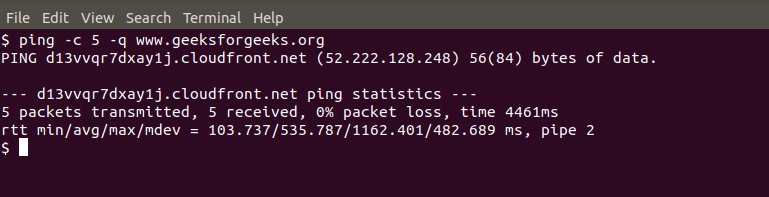
4. -q: Showing Only Summary Output
Displays only the summary of the ping results.
- Hides individual packet responses.
- Useful for getting a quick overview of packet loss and statistics.
**Example: Show summary for 5 packets
**Command:
ping -c 5 -q www.geeksforgeeks.org
**Output:
5. -w DEADLINE: Setting a Ping Timeout
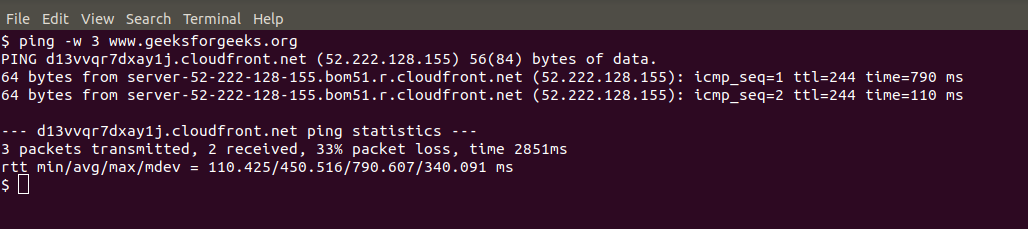
Sets the total time (in seconds) ping should run.
- Ping stops automatically after the specified duration.
- Useful for time-based network testing.
**Example: Run ping for 3 seconds
This command instructs the system to stop pinging the specified website (www.geeksforgeeks.org) after waiting for 3 seconds.
**Command:
ping -w 3 www.geeksforgeeks.org
**Output:
6. -f: Flood Ping
Enables flood ping mode.
- Sends packets as fast as possible.
- Useful for stress testing network performance (requires root privileges).
**Example: Flood ping a host
This command floods the network with PING packets directed at www.geeksforgeeks.org, providing a means to assess and test network performance.
**Command:
ping -f www.geeksforgeeks.org
**Output:

flooding with ping
7. -W TIMEOUT: Setting Maximum Wait Time for a Response
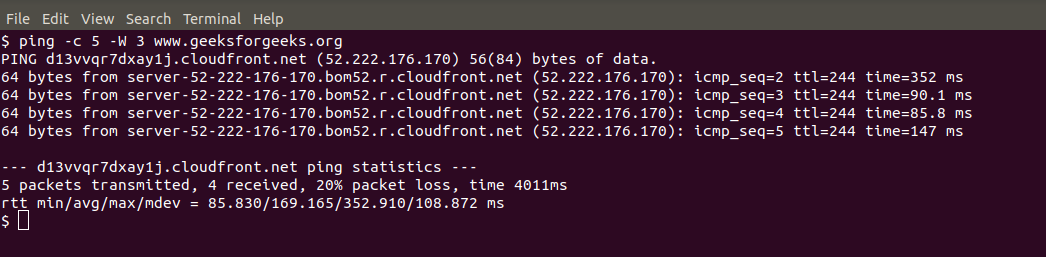
Sets the maximum time to wait for each reply.
- If no response is received within the given time, the packet is considered lost.
- Useful for slow or unstable networks.
**Example: Wait 3 seconds for each reply
This command configures the system to wait for a response for a maximum of 3 seconds while sending 5 PING requests to `www.geeksforgeeks.org\`.
**Command:
ping -c 5 -W 3 www.geeksforgeeks.org
**Output:
8. -p PATTERN: Filling Packets with Custom Data
Fills packets with a specific hexadecimal pattern.
- Useful for debugging and detecting data-dependent issues.
- Helps identify transmission errors.
**Example: Fill packets with ff
This command fills PING packets sent to `www.geeksforgeeks.org\` with the specified data, in this case, ones (represented by `ff`).
**Command:
ping -c 5 -p ff www.geeksforgeeks.org
**Output:

Fill Packet with Data
9. -M OPTION: Enabling Path MTU Discovery
Controls Path MTU Discovery behavior.
- Helps determine the maximum packet size that can travel without fragmentation.
- Useful for diagnosing MTU-related issues.
**Options:
- **do: prohibit fragmentation
- **want: allow fragmentation if needed
- **dont: disable MTU discovery
**Example: Enable PMTU discovery
This command initiates Path MTU Discovery for the specified website (`www.geeksforgeeks.org\`) with the option to either prohibit fragmentation (`do`), perform PMTU discovery with local fragmentation when needed (`want`), or not set the DF flag (`dont`).
**Command:
ping -c 5 -M want www.geeksforgeeks.org
**Output:

Path Mtu Discovery
Other Examples
Here are a few more examples to help you thoroughly understand the ping command and verify network connectivity:
1. Ping an IP Address
- This checks basic network connectivity to Google’s public DNS server using its IP address.
- If this works but ping google.com fails, it usually means DNS (name resolution) is the problem, not the internet.
**Command:
ping 8.8.8.8
2. Ping a Host Only Once
- Sends just one request to check if the host is reachable.
- Useful for quick checks in scripts or automation without flooding the network.
**Command:
ping -c 1 google.com
3. Ping with Audible Alerts
- Plays a beep sound whenever a reply is received (or sometimes on changes).
- Useful when you want to monitor connectivity while doing other work, without staring at the screen.
**Command:
ping -a google.com
**Note : Beep may not be supported on all devices and Distributions