pv command in Linux with Examples (original) (raw)
Last Updated : 5 Sep, 2024
The '**pv' command, short for Pipe Viewer, is a terminal-based tool in Linux used to monitor data flow through pipes. It provides a visual representation of the progress, making it easier to track the status of long-running data transfers. The '**pv' command is particularly useful for monitoring data being sent through pipelines, providing real-time updates on data transfer, elapsed time, throughput rate, and more.
Key Features of the pv Command
'pv' helps the user by giving him a visual display of the following:
- **Time Elapsed: Shows the total time taken since the transfer began.
- **Completed Progress: Displays a percentage progress bar of the transfer.
- **Current Data Transfer Speed: Also known as the throughput rate, it shows how quickly data is being transferred.
- **Data Transferred: Indicates the amount of data transferred so far.
- **ETA (Estimated Time): Provides an estimated remaining time for the transfer based on the current data rate.
Installing the 'pv' command
The 'pv' command is available in most Linux distributions and can be installed using the package manager specific to your system.
**1. For Debian based distributions:
$ apt-get install pv
**2. For RedHat based distributions
$ yum install pv
How to use the 'pv' command?
_pv is used to provide the ability of monitoring progress of a given application which lacks the mentioned functionality. It can be used by placing a pipe operator (|) between two processes.
Syntax of pv command:
pv fileName pv OPTIONS fileName pv fileName > outputFileName pv OPTIONS | command > outputFileName command1 | pv | command2
**Standard Input of the pv command is passed to **Standard Output and then the result is printed to **Standard Error.
Key Options for 'pv' command
1. General Options
- ****'-help':** Displays the usage information.
- ****'--version':** Displays the version information.
2. Display Modifiers
- ****'--progress/-p':** Displays the progress bar.
- ****'--timer/-t':** Displays the elapsed time.
- ****'--eta/-e':** Displays the Estimated Time for the operation. Guess for the time is based on the previous data transfer rate and the size of data to be transferred.
- ****'--rate/-r':** Turns on the rate counter for the operation.
- ****'--bytes/-b':** Displays the total amount of data transferred till now.
- ****'--numeric/-n':** Displays integer percentage instead of the visual representation.
- ****'--quiet/-q':** No output
3. Output Modifiers
- **--wait / -W : To wait for transfer of first byte before displaying progress.
- **--interval SECONDS / -i SECONDS : Specified the time interval between updates.
- **--force / -F : Forces an operation, i.e. forces pv to display visuals even when Standard Error is not a terminal.
- **--size SIZE / -s : Assume the total data to be transferred is SIZE bytes for calculating computing percentage or ETA.
- **--line-mode / -L : Instead of counting size, progress bar will move if new line is found.
- **--name NAME / -n NAME : Prefix output info with name.
- **--cursor / -c : Use cursor positioning escape sequence instead of using carriage returns.
4. Data Transfer Modifier
- **--rate-limit RATE / -L RATE : Limit transfer to max of RATE byte per second.
- **--buffer-size BYTES / -B BYTES : Use transfer buffer size of BYTE bytes.
- **--remote PID / -R PID : If PID is instance of pv, will cause that instance to act, through it has been given instance's command line instead.
_When no option is selected **-p, -t, -e, -r, -b options are selected by default.
pv command Examples in Linux
Let us look at some of the examples of 'pv' command in Linux to better understand the concept.
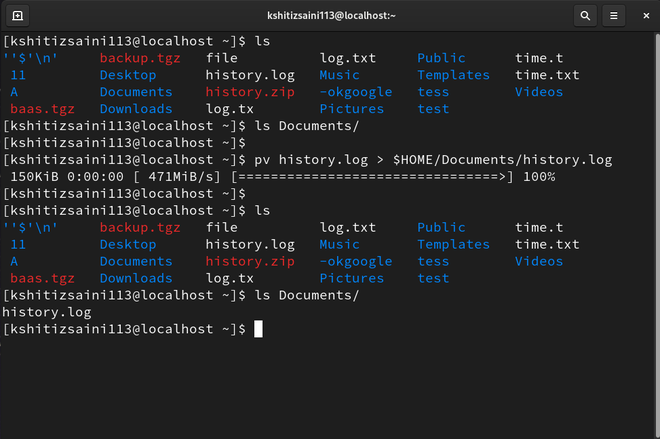
**1. Creating a progress bar with the copy command
****$ pv history.log > $HOME/Documents/history.log**
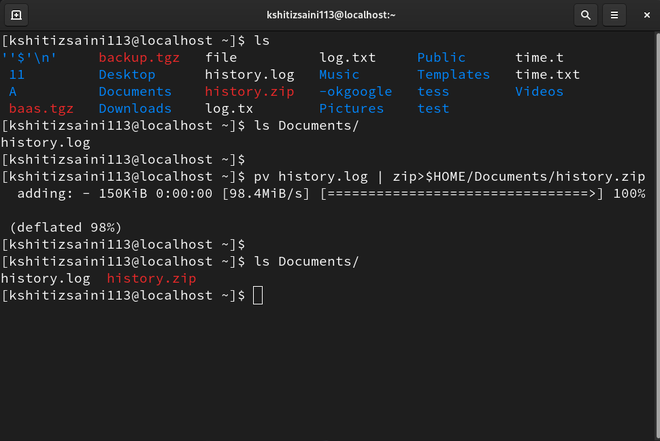
**2. Making zip with the progress bar
****$ pv history.log | zip>$HOME/Documents/history.zip**
**3. Count number of lines, words, bytes
****$ pv -p history.log | wc**

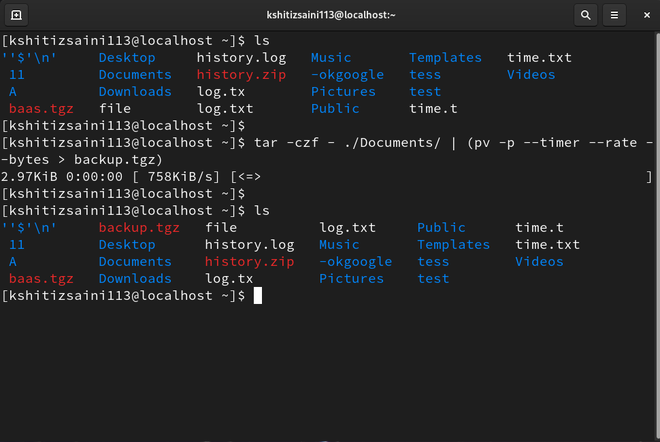
4. Monitor tar progress
****$ tar -czf - ./Documents/ | (pv -p --timer --rate --bytes > backup.tgz)**
Conclusion
The '**pv' command is an invaluable tool for monitoring data transfers in Linux, offering real-time visual feedback on progress, speed, and estimated completion times. It enhances the visibility of data pipelines, especially for processes that do not natively support progress reporting. By learning how to use 'pv' and its different options, you can effectively monitor and manage your data transfers, making it a valuable tool for any Linux user or administrator who works with data processing tasks.