route Command in Linux with Examples (original) (raw)
Last Updated : 4 Nov, 2025
This command helps you view, add, or delete routes for specific destinations, whether to a single host or an entire network. You can define these routes using either numeric IP addresses or symbolic names. The system then uses /etc/hosts or a name server to resolve these names.
Let's consider the example:
To display the IP/kernel routing table.
This command shows how your system is currently routing network traffics
route

route
Syntax of the route command
route [-n] [add|del] [-net|-host] [netmask ] [gw ] [metric ] [dev ]
- **add: Adds a new route to the routing table.
- **del: Deletes an existing route from the routing table.
- **-net: Specifies that the destination is a **network.
- **-host: Specifies that the destination is a **single host.
- ****:** The IP address or hostname of the destination.
- **netmask : Sets the subnet mask for the route.
- **gw : Sets the gateway through which to route the traffic.
- **metric : Sets the cost of the route (lower number = higher priority).
- **dev : Specifies the network interface (e.g.,
eth0,wlan0). - **-n: Displays output in numeric form (skips DNS name resolution).
Installing route Command
Many Linux distributions do not have route commands pre-installed. To install it use the following commands as per your Linux distribution.
**In case of Debian/Ubuntu
sudo apt-get install net-tools
**In case of CentOS/RedHat
sudo dnf install net-tools
**In case of Fedora OS
sudo dnf install net-tools
Working with route command
In this we see how to view, manage, and modify network routing in Linux.
How to Check the Routing Table (Recommended Method)
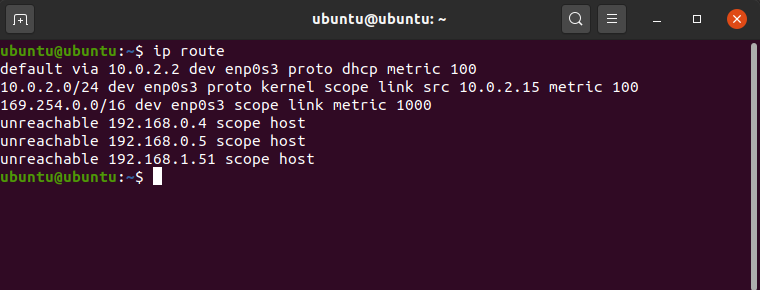
The simplest and most effective way to see the main routing table is with the ip route command.
ip route
To see only IPv4 routes, use ip -4 route. For IPv6, use ip -6 route.
How to Read the Output
The output can look complex, but it's logical. Let's break down the first line:
default via 192.168.1.1 dev enp3s0 ...default: This is the "default gateway" entry. Any traffic that doesn't match another, more specific rule will be sent here.via 10.0.2.2: The traffic is sent _to the router at this IP address (your gateway).dev enp3s0: The traffic is sent _out of this local network interface (your Ethernet card).
To display routing table in full numeric form.
It skips hostname lookups and shows only IP addresses for faster output.
route -n

route -n
It is even useful when you have to determine why the route to nameserver has even vanished.
To add a default gateway.
This sets a default path for sending traffic when no specific route matches.
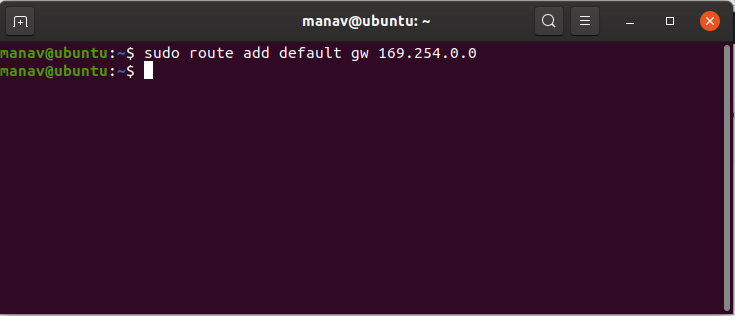
sudo route add default gw 169.254.0.0
add default gateway
This assigns a gateway address to which all the packets that do not belong to the network are forwarded.
**Note: In this case the, we wish to choose 169.254.0.0 as the default gateway. You may choose as per your need.
To list kernel's routing cache information.
This shows the kernel’s memory of recently used routes to improve performance.
route -Cn

route -Cn
To route the packets faster, Kernel maintains this routing cache information. The above command will print the cache information. In this case, the cache information is maintained.
To reject routing to a particular host or network.
This blocks access to a specific IP, making it unreachable.
sudo route add -host 192.168.1.51 reject

reject routing
Now if you ping to the above-mentioned IP it will display "Network is unreachable".
To delete the default gateway.
This removes the default route, which may disrupt your internet connection.
route del default

delete gateway
**Note: This may lead to some malfunctioning of the internet. Keep a note of your default gateway before proceeding with the command. This will remove the default gateway.
To get the details of the local table with destination addresses assigned to the local host.
This displays how your system handles traffic meant just for itself.
ip route show table local

ip route show table local
This filters the routing output to only show IPv4 addresses.
ip -4 route

output related to IPv4
This shows routes specifically related to IPv6 addresses.
ip -6 route

output related to IPv6
Syntax of the route command
This command helps you view, add, or delete routes for specific destinations—whether to a single host or an entire network. You can define these routes using either numeric IP addresses or symbolic names. The system then uses /etc/hosts or a name server to resolve these names.
route [-n] [add|del] [-net|-host] [netmask ] [gw ] [metric ] [dev ]
- **add: Adds a new route to the routing table.
- **del: Deletes an existing route from the routing table.
- **-net: Specifies that the destination is a **network.
- **-host: Specifies that the destination is a **single host.
- ****:** The IP address or hostname of the destination.
- **netmask : Sets the subnet mask for the route.
- **gw : Sets the gateway through which to route the traffic.
- **metric : Sets the cost of the route (lower number = higher priority).
- **dev : Specifies the network interface (e.g.,
eth0,wlan0). - **-n: Displays output in numeric form (skips DNS name resolution).
Command Comparison
| **Task | **Modern ip Command (Recommended) | **Legacy route Command (Deprecated) |
|---|---|---|
| **View Table | ip route | route |
| **View (Numeric) | ip route (default) | route -n |
| **Add Default GW | sudo ip route add default via 192.168.1.1 | sudo route add default gw 192.168.1.1 |
| **Add Static Route | sudo ip route add 10.0.0.0/24 via 192.168.1.1 | sudo route add -net 10.0.0.0 netmask 255.0.0.0 gw 192.168.1.1 |
| **Delete Route | sudo ip route del 10.0.0.0/24 | sudo route del -net 10.0.0.0 netmask 255.0.0.0 |
| **Reject Route | sudo ip route add blackhole 192.168.1.51 | sudo route add -host 192.168.1.51 reject |