Shell Script to Perform Operations on a File (original) (raw)
Last Updated : 23 Jul, 2025
Most of the time, we use shell scripting to interact with the files. Shell scripting offers some operators as well as some commands to check and perform different properties and functionalities associated with the file.
For our convenience, we create a file named 'geeks.txt' and another .sh file (or simply run on the command line) to execute different functions or operations on that file. Operations may be reading the contents of the file or testing the file type. These are being discussed below with proper examples:
File Reading Functionalities
File reading is an interesting task in a programmer's life. Shell scripting offers some functionalities for reading the file, reversing the contents, counting words, lines, etc.
- Reading line by line: First, we take input using the read command then run the while loop which runs line after line.
Script:
#!/bin/bash read -p "Enter file name : " filename while read line do echo $line done < $filename

- Counting characters, words & lines in the file: We take three variables, one for counting characters, words, and lines respectively. We use 'wc' command, which stands for word count and counts the number of characters and words as well. For counting lines, we pass 'grep ' which keeps count of the lines that match a pattern. Then we print out each variable.
Script:
#! /bin/bash
echo Enter the filename
read file
c=cat $file | wc -c
w=cat $file | wc -w
l=grep -c "." $file
echo Number of characters in fileisfile is fileisc
echo Number of words in fileisfile is fileisw
echo Number of lines in fileisfile is fileisl

- Display file contents in reverse: To print the contents of any file in reverse, we use tac or nl, sort, cut commands. Tac is simply the reverse of a cat and simply prints the file in reverse order. Whereas nl commands numbers, the file contents sort the numbered file in the reverse order, and the cut command removes the number and prints the file contents.
Script:
$ nl geeks.txt | sort -nr | cut -f 2-
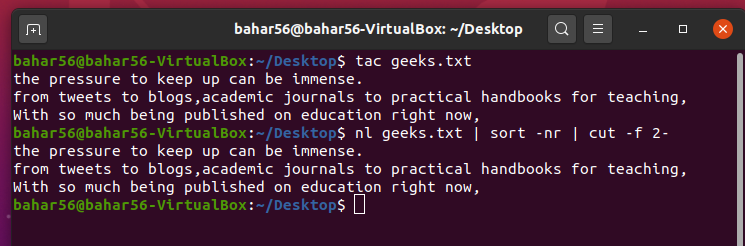
- Frequency of a particular word in the file: To count the frequency of each word in a file, we use certain commands. These are xargs which applies print to every line in the output, the sort which sorts, current buffer piped to it, uniq -c displays the counts of each line in the buffer and, lastly awk, prints the 2nd column and then the 1st column based on the problem requirement.
Script:
cat geeks.txt | xargs printf "%s\n" | sort | uniq -c | sort -nr | awk '{print 2,2,2,1}'

File Test Operators
- -b file: This operator checks if the file is a block special file or not and returns true or false subsequently. It is [-b $file] syntactically.
Script:
#! /bin/bash echo -e "Enter the name of the file : \c" read file_name
if [ -b $file_name ] then echo "$file_name is a block special file" else echo "$file_name is not a block special file" fi
Output:

- -d file: The operator looks over if the file is present as a directory. If Yes, it returns true else false. It is [-d $file] syntactically.
Script:
#! /bin/bash echo -e "Enter the name of the file : \c" read file_name
if [ -d $file_name ] then echo "$file_name is a directory" else echo "$file_name is not a directory" fi
Output:

- -e file: The operator inspects if the file exists or not. Even if a directory is passed, it returns true if the directory exists. It is [-e $file] syntactically.
Script:
#! /bin/bash echo -e "Enter the name of the file : \c" read file_name
if [ -e $file_name ] then echo "$file_name exist" else echo "$file_name not exist" fi
Output:

- -f file: If the file is an ordinary file or special file, then it returns true else false. It is [-f $file] syntactically.
Script:
#! /bin/bash echo -e "Enter the name of the file : \c" read file_name
if [ -f $file_name ] then echo "$file_name is file" else echo "$file_name is not file" fi
Output:

- -r file: This checks if the file is readable. If found yes, then return true else false. It is [-r $file] syntactically.
Script:
#! /bin/bash echo -e "Enter the name of the file : \c" read file_name
if [ -r $file_name ] then echo "$file_name is readable" else echo "$file_name is not readable" fi
Output:

- -s file: This operator checks if the file has a size greater than zero or not, which returns true or false subsequently. It is [-s $file] syntactically.
Script:
#! /bin/bash echo -e "Enter the name of the file : \c" read file_name
if [ -s $file_name ] then echo "$file_name has size>0" else echo "$file_name has size= 0" fi
Output:

- -w file: If wringing is allowed over the file, then the operator returns true, and if not then false. It is [-w $file] syntactically.
Script:
#! /bin/bash echo -e "Enter the name of the file : \c" read file_name
if [ -w $file_name ] then echo "$file_name is writable" else echo "$file_name is not writable" fi
Output:

- -x file: The operator looks over if the file is executable or not, and returns true and false subsequently. It is [-x $file] syntactically.
Script:
#! /bin/bash echo -e "Enter the name of the file : \c" read file_name
if [ -x $file_name ] then echo "$file_name is executable" else echo "$file_name is not executable" fi
Output:

Rename & delete file: To rename the file, we use the 'mv' command which changes the name of the file and 'rm' to delete the file.

As we can see below the command line, breakingBad file (after renaming ) and deleting it with 'rm' command, it is no longer there.
