How to Display Path of an Executable File in Linux | Which Command (original) (raw)
Last Updated : 11 Jul, 2025
In Linux finding the exact path of an excutable file can be crucial for the system adminstration, scripting and as well for troubleshooting. The `which` command helps with providing a simple and effective way to locate the executable files within the directories that are listed in your system.
In this article, we are going to discuss on what is which command in linux, its options to use, examples of which command. How to display path of executable file in linux, discussing the practical examples and the differences of where and which command:
Table of Content
- What is Which Command in Linux?
- Options of Which Command
- Example of Which Command
- How to Display Path of an Executable File in Linux?
- Pratical Examples and Options of the `which` Command in Linux
- Importance of which command
- Functionalities of which Command
- Why use which command?
- Difference between Where and Which Command
What is Which Command in Linux?
The `which` command in Linux is used to locate the executable file associated with a given command. When you enter a command in the terminal, `which` helps identify which executable file will be executed when that command is invoked. It searches through directories listed in the user's `PATH` environment variable and returns the path of the first executable file it finds that matches the specified command. This command is particularly useful for troubleshooting and understanding the execution flow of commands within the Linux operating system.
**which command in Linux is a command that is used to locate the executable file associated with the given command by searching it in the path environment variable. It has 3 return status as follows:
- **0 : If all specified commands are found and executable.
- **1 : If one or more specified commands is nonexistent or not executable.
- **2 : If an invalid option is specified.
**Syntax of `Which` Command in Linux
The basic syntax of the which command in Linux is straightforward. It follows the following format:
which [filename1] [filename2] ...
- Here, we have to replace `[filename1] `, `[filename2]` with the names of excutable files you wanted to locate.
Options of Which Command
The following are the options of which command:
| Option | Description | Example |
|---|---|---|
| -a, --all | Display all matches found, instead of just the first | which -a python |
| --skip-alias | Skip aliases and proceed searching | which --skip-alias ls |
| -h, --help | Display help information | which --help |
| -V, --version | Display version information | which --version |
Example of Which Command
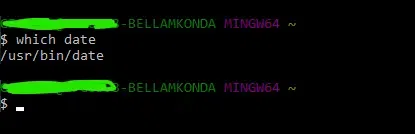
In this following example, we are finding the path of date command (executable file) using which command:
which date
- The following screenshot makes clear understanding that date executable file is located on /usr/bin/date location in my laptop.
How to Display Path of an Executable File in Linux?
It is basically used to find the location of the executable file associated with the command.
**For Example: To find the location of the "cd" command, we use the following command
which cd

- The output will display the full path to the "cd" executable file, such as "/bin/cd"
Pratical Examples and Options of the `which` Command in Linux
The following are the practical examples and options of the which command in linux:
1. Using `-a` to display all the occurrences of the file.
Simple `which` command will display the path of the first occurrence, but if we want ot display all the occurrences of the file we can use `-a` option.
**For Example: If we want to display all the occurrences of the `python` file.
which -a python

2. Checking Command Aliases
- We can use which command with `-a` option to check whether the command is an alias or not.
**For Example: If we want to check whether the command `ll` is an alias or not.
which -a ll

3. Using `-v` to display more verbose output.
- We can use `-v` option with `which` command to display more verbose and additional information.
**For Example: If want o display more verbose and additional information of `echo` command.
which -v echo

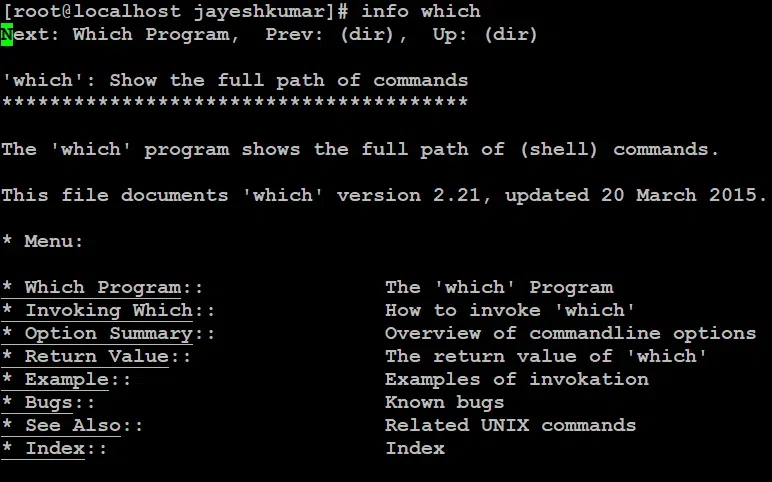
4. Display help information of the `which` command
- Through using the following command of info which we can display the help information:
info which
Importance of which command
The following are the importance of which command:
- **Verify Command Availability: It helps in confirming whether a specific command or executable is installed or accessible in the system.
- **Locate Executables Quickly: It provides the exact path of an executable file. It helps in saving the time on manual searches.
- **Troubleshooting PATH issues: It helps in analyzing and resolving the problems related to the PATH variable and its conflicting command versions.
- **Enhanced Scripting and Automation: It helps in ensuring the scripts with the help of commands, improving the reliability and execution consistency.
Functionalities of which Command
The following are the functionalities of which command:
- **Locate Executable Files: The
whichcommand is used in identifying the location of executable files in the user's path. - **Path Resolution: It searches through directories that are listed in the
PATHenvironment variable to find the executable. - **Command Verification: It helps to verify whether a specific command or executable is installed and accessible in the system.
- **Multiple Results: It can display all the instances of an executable found in different locations within the
PATH.
Why use which command?
The following are the some of the reasons and insights to use which command:
- **Verify Command Availability: It facilitates with ensuring whether a specific command or executable is installed and accessible in the system.
- **Locate Executables: Quickly identifies the path to the executable file for a given command.
- **Troubleshoot PATH Issues: Helps diagnose problems related to missing or conflicting commands in the
PATH. - **Check Correct Version: Confirms which version of a command will be executed, especially when multiple versions are installed.
Difference between Where and Which Command
The following are the difference between where and which command:
| Aspect | where Command | which Command |
|---|---|---|
| Purpose | Used to locate files and directories | Used to locate executable files |
| Operating System | Typically found in Windows systems | Typically found in Unix-like systems |
| Output | Provides a list of all matches | Provides the path of the first match |
| Usage | Example: where java | Example: which python |
Conclusion
In this article we have discussed about `which` command that is mainly used to locate the executable file associated with the given command. We have discussed Options available and there usage. One can easily understand the working of `which` command by going through this article. we come with discussing the frequently asked questions on linux after this conclusion section.