Audio Recognition in Tensorflow (original) (raw)
Last Updated : 23 Jul, 2025
This article discusses audio recognition and also covers an implementation of a simple audio recognizer in Python using the TensorFlow library which recognizes eight different words.
Audio Recognition
Audio recognition comes under the automatic speech recognition (ASR) task which works on understanding and converting raw audio to human-understandable text. It is popularly known as speech-to-text (STT) and this technology is widely used in our day-to-day applications. Some of the popular examples include meeting transcriptions in Zoom meetings, virtual speech assistants like Alexa, and voice searches in Google search.
The main goal behind ASR is to accurately convert speech to text while taking into consideration any background noise, a person's speaking style, accent, and any other factor. Once speech has been accurately transcribed into text, this information can be further processed and used for a wide range of tasks, such as identifying user commands in virtual speech assistants or providing text-based search results in voice search applications.
Implementation
Now, to process the audio signals, we would first convert them to spectrograms, which are basically 2D image representations of change in frequency over time. Later we will use these spectrogram images to train a model to identify the words based on patterns in spectrogram signals. The following subsections contain more details about the dataset, model architecture, training method, and testing of the trained model.
Step 1: Importing Libraries, Dataset, and Preprocessing
In this article, we would be using the following libraries.
Python3 `
import os import tensorflow as tf import numpy as np import seaborn as sns import pathlib from IPython import display from matplotlib import pyplot as plt from sklearn.metrics import classification_report
`
Step 2: Download the dataset
Now, for implementing a simple audio recognizer we would be using mini speech commands dataset by Google which contains audio of eight different words spoken by different people. The words in the dataset include "yes", "no", "up", "down", "left", "right", "on", and "off". To download the dataset use the following code:
Python3 `
Downloading the mini_speech_commands dataset from the external URL
data = tf.keras.utils.get_file( 'mini_speech_commands.zip', origin="http://storage.googleapis.com/download.tensorflow.org/data/mini_speech_commands.zip", extract=True, cache_dir='.', cache_subdir='data')
`
Check the directory
Python3 `
os.listdir('./data/')
`
Output:
['mini_speech_commands.zip', '__MACOSX', 'mini_speech_commands']
Step 3: Preprocessing
Split the data into the Training and validation set
Splitting the data into training and validation sets and getting the labels.
Python3 `
Using audio_dataset_from_directory function to create dataset with audio data
training_set, validation_set = tf.keras.utils.audio_dataset_from_directory( directory='./data/mini_speech_commands', batch_size=16, validation_split=0.2, output_sequence_length=16000, seed=0, subset='both')
Extracting audio labels
label_names = np.array(training_set.class_names) print("label names:", label_names)
`
Output:
Found 8000 files belonging to 8 classes. Using 6400 files for training. Using 1600 files for validation. label names: ['down' 'go' 'left' 'no' 'right' 'stop' 'up' 'yes']
Drop the extra axis in the audio channel data
Now, we will applying tf.squeeze function to drop the extra axis in the audio channel data.
Python3 `
Defining the squeeze function
def squeeze(audio, labels): audio = tf.squeeze(audio, axis=-1) return audio, labels
Applying the function on the dataset obtained from previous step
training_set = training_set.map(squeeze, tf.data.AUTOTUNE) validation_set = validation_set.map(squeeze, tf.data.AUTOTUNE)
`
Waveform
Visualize a sample waveform from the processed dataset.
Python3 `
Visualize the waveform
audio, label = next(iter(training_set)) display.display(display.Audio(audio[0], rate=16000))
`
Output:

Listen it
Spectrogram
Now, we will convert the audio to a spectrogram and visualize it.
Python3 `
Plot the waveform
def plot_wave(waveform, label): plt.figure(figsize=(10, 3)) plt.title(label) plt.plot(waveform) plt.xlim([0, 16000]) plt.ylim([-1, 1]) plt.xlabel('Time') plt.ylabel('Amplitude') plt.grid(True)
Convert waveform to spectrogram
def get_spectrogram(waveform): spectrogram = tf.signal.stft(waveform, frame_length=255, frame_step=128) spectrogram = tf.abs(spectrogram) return spectrogram[..., tf.newaxis]
Plot the spectrogram
def plot_spectrogram(spectrogram, label): spectrogram = np.squeeze(spectrogram, axis=-1) log_spec = np.log(spectrogram.T + np.finfo(float).eps) plt.figure(figsize=(10, 3)) plt.title(label) plt.imshow(log_spec, aspect='auto', origin='lower') plt.colorbar(format='%+2.0f dB') plt.xlabel('Time') plt.ylabel('Frequency')
Plotting the waveform and the spectrogram of a random sample
audio, label = next(iter(training_set))
Plot the wave with its label name
plot_wave(audio[0], label_names[label[0]])
Plot the spectrogram with its label name
plot_spectrogram(get_spectrogram(audio[0]), label_names[label[0]])
`
Output:
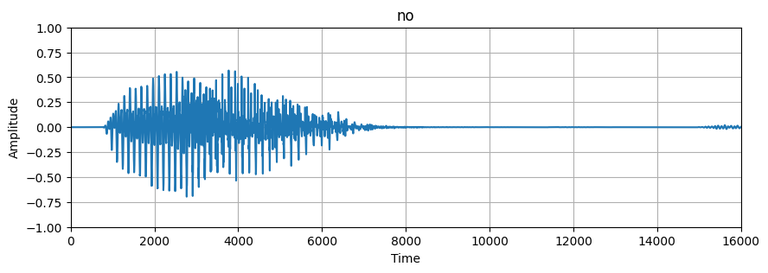
Plot of audio wave
-768.png)
Audio spectrogram
Create input dataset and split Validation set into two parts
Now, creating a spectrogram dataset from the audio dataset and also splitting the validation set into two parts, one for validation during training and another for testing the trained model.
Python3 `
Creating spectrogram dataset from waveform or audio data
def get_spectrogram_dataset(dataset): dataset = dataset.map( lambda x, y: (get_spectrogram(x), y), num_parallel_calls=tf.data.AUTOTUNE) return dataset
Applying the function on the audio dataset
train_set = get_spectrogram_dataset(training_set) validation_set = get_spectrogram_dataset(validation_set)
Dividing validation set into two equal val and test set
val_set = validation_set.take(validation_set.cardinality() // 2) test_set = validation_set.skip(validation_set.cardinality() // 2)
`
Check the dimension of the input dataset
Python3 `
train_set_shape = train_set.element_spec[0].shape val_set_shape = val_set.element_spec[0].shape test_set_shape = test_set.element_spec[0].shape
print("Train set shape:", train_set_shape) print("Validation set shape:", val_set_shape) print("Testing set shape:", test_set_shape)
`
Output:
Train set shape: (None, 124, 129, 1) Validation set shape: (None, 124, 129, 1) Testing set shape: (None, 124, 129, 1)
Step 4: Build the model
Now, since we have converted our audio data to image format, this problem has turned into a classification problem and we can define a simple CNN model to train and classify these audio.
Python3 `
Defining the model
def get_model(input_shape, num_labels): model = tf.keras.Sequential([ tf.keras.layers.Input(shape=input_shape), # Resizing the input to a square image of size 64 x 64 and normalizing it tf.keras.layers.Resizing(64, 64), tf.keras.layers.Normalization(),
    # Convolution layers followed by MaxPooling layer
    tf.keras.layers.Conv2D(64, 3, activation='relu'),
    tf.keras.layers.Conv2D(128, 3, activation='relu'),
    tf.keras.layers.MaxPooling2D(),
    tf.keras.layers.Dropout(0.5),
    tf.keras.layers.Flatten(),

    # Dense layer
    tf.keras.layers.Dense(256, activation='relu'),
    tf.keras.layers.Dropout(0.5),

    # Softmax layer to get the label prediction
    tf.keras.layers.Dense(num_labels, activation='softmax')
])
# Printing model summary
model.summary()
return model
Getting input shape from the sample audio and number of classes
input_shape = next(iter(train_set))[0][0].shape print("Input shape:", input_shape) num_labels = len(label_names)
Creating a model
model = get_model(input_shape, num_labels)
`
Output:
Input shape: (124, 129, 1) Model: "sequential_1" _________________________________________________________________ Layer (type) Output Shape Param #
resizing_1 (Resizing) (None, 64, 64, 1) 0
normalization_1 (Normalizat (None, 64, 64, 1) 3
ion)
conv2d_2 (Conv2D) (None, 62, 62, 64) 640
conv2d_3 (Conv2D) (None, 60, 60, 128) 73856
max_pooling2d_1 (MaxPooling (None, 30, 30, 128) 0
2D)
dropout_2 (Dropout) (None, 30, 30, 128) 0
flatten_1 (Flatten) (None, 115200) 0
dense_2 (Dense) (None, 256) 29491456
dropout_3 (Dropout) (None, 256) 0
dense_3 (Dense) (None, 8) 2056
Total params: 29,568,011 Trainable params: 29,568,008 Non-trainable params: 3
Step 5: Model Training and Validation
Now, we will compile and train the model. Since this is a multiclass classification problem, we will be using categorical cross entropy as loss function to improve the model.
Python3 `
model.compile( optimizer=tf.keras.optimizers.Adam(), loss=tf.keras.losses.SparseCategoricalCrossentropy(), metrics=['accuracy'], )
EPOCHS = 10 history = model.fit( train_set, validation_data=val_set, epochs=EPOCHS, )
`
Output:
Epoch 1/10 400/400 [==============================] - 241s 600ms/step - loss: 1.4206 - accuracy: 0.5186 - val_loss: 0.7907 - val_accuracy: 0.7900 Epoch 2/10 400/400 [==============================] - 284s 711ms/step - loss: 0.7536 - accuracy: 0.7570 - val_loss: 0.6210 - val_accuracy: 0.7950 Epoch 3/10 400/400 [==============================] - 305s 762ms/step - loss: 0.5214 - accuracy: 0.8273 - val_loss: 0.4603 - val_accuracy: 0.8600 Epoch 4/10 400/400 [==============================] - 341s 853ms/step - loss: 0.4128 - accuracy: 0.8594 - val_loss: 0.4495 - val_accuracy: 0.8562 Epoch 5/10 400/400 [==============================] - 340s 849ms/step - loss: 0.3295 - accuracy: 0.8908 - val_loss: 0.4215 - val_accuracy: 0.8600 Epoch 6/10 400/400 [==============================] - 337s 844ms/step - loss: 0.2721 - accuracy: 0.9086 - val_loss: 0.4133 - val_accuracy: 0.8725 Epoch 7/10 400/400 [==============================] - 331s 829ms/step - loss: 0.2499 - accuracy: 0.9192 - val_loss: 0.4623 - val_accuracy: 0.8662 Epoch 8/10 400/400 [==============================] - 338s 845ms/step - loss: 0.2092 - accuracy: 0.9283 - val_loss: 0.4528 - val_accuracy: 0.8737 Epoch 9/10 400/400 [==============================] - 339s 847ms/step - loss: 0.2018 - accuracy: 0.9316 - val_loss: 0.3762 - val_accuracy: 0.8938 Epoch 10/10 400/400 [==============================] - 339s 848ms/step - loss: 0.1811 - accuracy: 0.9397 - val_loss: 0.4379 - val_accuracy: 0.8662
Plotting validation and training loss and accuracy.
Python3 `
Plotting the history
metrics = history.history plt.figure(figsize=(10, 5))
Plotting training and validation loss
plt.subplot(1, 2, 1) plt.plot(history.epoch, metrics['loss'], metrics['val_loss']) plt.legend(['loss', 'val_loss']) plt.xlabel('Epoch') plt.ylabel('Loss')
Plotting training and validation accuracy
plt.subplot(1, 2, 2) plt.plot(history.epoch, metrics['accuracy'], metrics['val_accuracy']) plt.legend(['accuracy', 'val_accuracy']) plt.xlabel('Epoch') plt.ylabel('Accuracy')
`
Output:
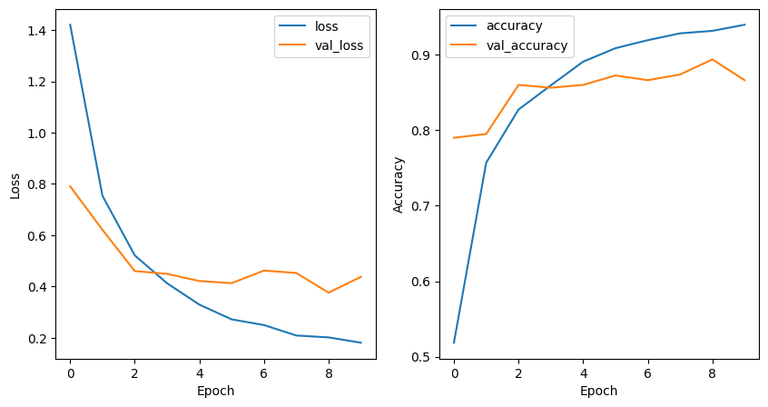
Validation Vs Training loss and accuracy
Step 6: Model Evaluation
For evaluation we will use a confusion matrix to see how well the model performed on the testing set.
Python3 `
Confusion matrix
y_pred = np.argmax(model.predict(test_set), axis=1) y_true = np.concatenate([y for x, y in test_set], axis=0) cm = tf.math.confusion_matrix(y_true, y_pred)
Plotting the confusion matrix
plt.figure(figsize=(10, 8)) sns.heatmap(cm, annot=True, fmt='g') plt.xlabel('Predicted') plt.ylabel('Actual') plt.show()
`
Output:
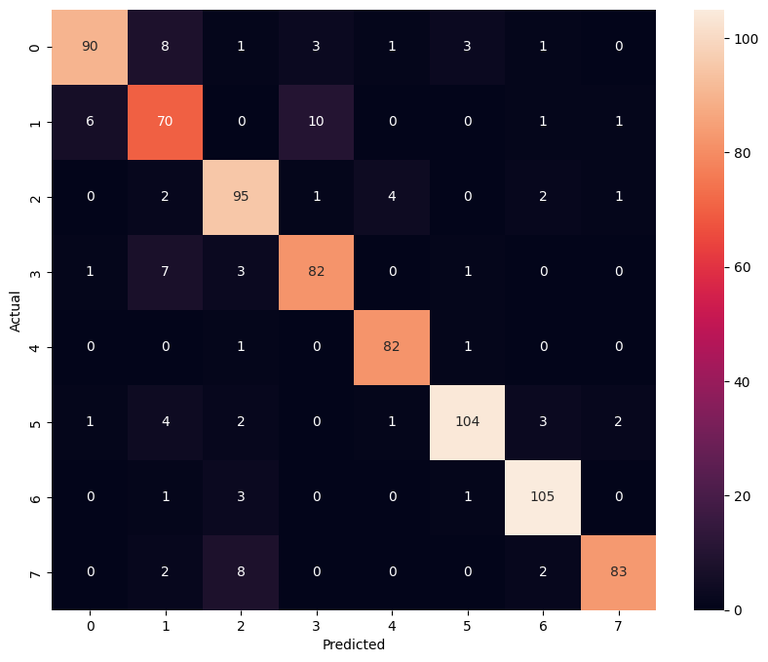
Confusion Matrix
Classification Report
Python3 `
report = classification_report(y_true, y_pred) print(report)
`
Output:
          precision    recall  f1-score   support

       0       0.85      0.85      0.85       107
       1       0.70      0.78      0.74        88
       2       0.90      0.90      0.90       105
       3       0.84      0.85      0.85        94
       4       0.94      0.95      0.95        84
       5       0.96      0.86      0.91       117
       6       0.86      0.91      0.88       110
       7       0.97      0.89      0.93        95

accuracy                           0.88       800
macro avg 0.88 0.88 0.88 800 weighted avg 0.88 0.88 0.88 800
Step :7 Audio Recognization
Python3 `
path = 'data/mini_speech_commands/yes/004ae714_nohash_0.wav' Input = tf.io.read_file(str(path)) x, sample_rate = tf.audio.decode_wav(Input, desired_channels=1, desired_samples=16000,) audio, labels = squeeze(x, 'yes')
waveform = audio display.display(display.Audio(waveform, rate=16000))
x = get_spectrogram(audio) x = tf.expand_dims(x, axis=0)
prediction = model(x) plt.bar(label_names, tf.nn.softmax(prediction[0])) plt.title('Prediction : '+label_names[np.argmax(prediction, axis=1).item()]) plt.show()
`
Output:
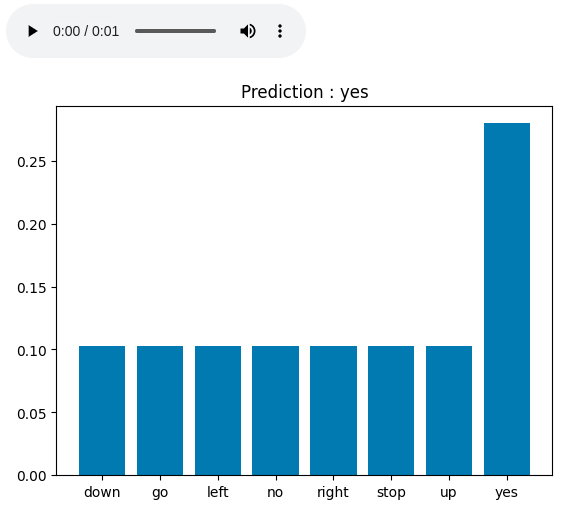
Audio Recognization Result