Automated Testing in Machine Learning Projects (original) (raw)
Last Updated : 23 Jul, 2025
Automated testing is a critical component in the lifecycle of machine learning (ML) projects. It ensures the reliability, robustness, and efficiency of ML models by identifying bugs and defects early in the development process.

Automated Testing in Machine Learning Projects
This article delves into the intricacies of automated testing in ML projects, exploring its importance, methodologies, best practices, and challenges.
Table of Content
- What is Automated Testing?
- Importance of Automated Testing in ML Projects
- Challenges in ML Testing
- Types of Tests in ML Projects
- Tools for Automated Testing in ML Projects
- Automate Testing with ipywidgets : Step-by-Step Example
- Best Practices for Automated Testing in ML Projects
- Challenges and Considerations
What is Automated Testing?
**Automated testing is the process of using software tools to test code automatically and without human assistance. It supports the timely detection of errors, guarantees the quality of the code and upholds the software dependability. Automated testing guarantees that the models function reliably and consistently in the context of machine learning even when fresh data, or code updates are included.
This approach has been around since the early 1990s but has gained significant traction with the rise of Agile development and Continuous Integration (CI) practices. Automated tests are more reliable than manual tests as they are less prone to human errors and can be executed repeatedly with consistent results.
**Importance of Automated Testing in ML Projects
Automated testing in ML projects is crucial for several reasons:
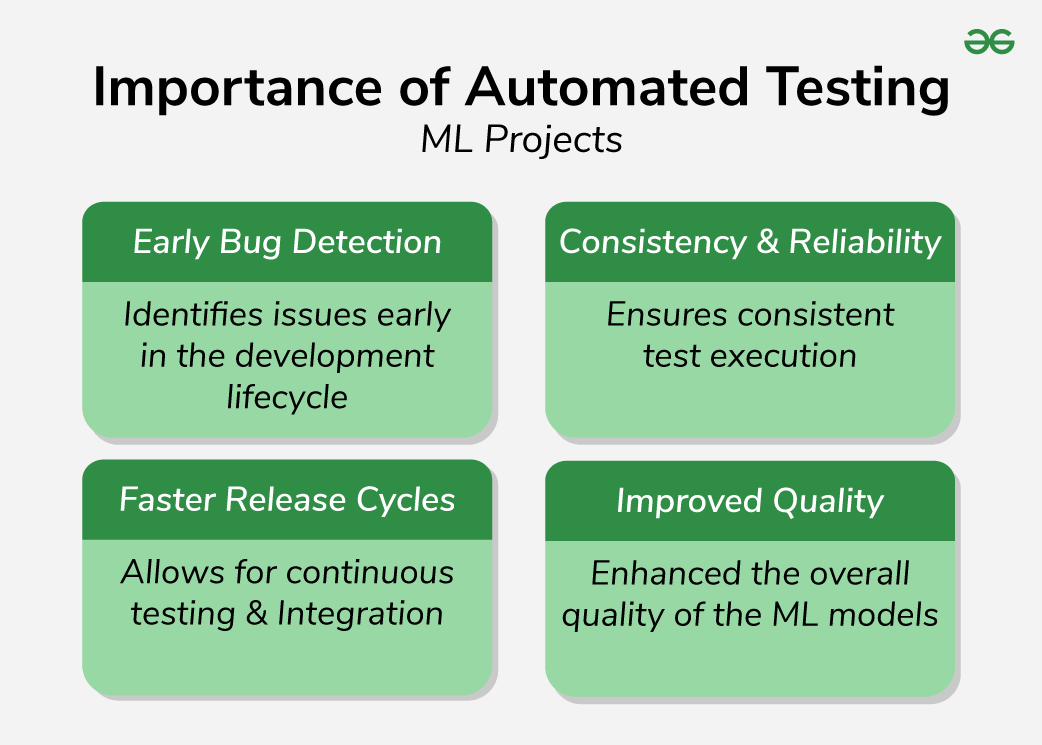
Importance of Automated Testing in ML Projects
- **Early Bug Detection: Identifies issues early in the development lifecycle, reducing the cost and time required for fixes.
- **Consistency and Reliability: Ensures consistent test execution, reducing the likelihood of human error.
- **Faster Release Cycles: Speeds up the development process by allowing continuous testing and integration.
- **Improved Quality: Enhances the overall quality of the ML models by ensuring they meet specified requirements and perform as expected.
**Challenges in ML Testing
Testing ML models presents unique challenges compared to traditional software testing:
- **Data Issues: Problems such as missing values, data distribution shifts, and inefficient data architecture can impact model performance.
- **Model Issues: Low model quality, large models, and compatibility issues with different package versions can pose significant testing challenges.
- **Deployment Issues: Unstable environments, broken code, and training-serving skew can disrupt the deployment of ML models.
**Types of Tests in ML Projects
Automated testing in machine learning involves using software tools to execute pre-scripted tests on machine learning models to ensure they work as expected. Automated testing is crucial in maintaining the reliability and performance of models as they evolve. Here are the main types of automated tests used in machine learning:
| Type of Testing | Description | Example | Purpose |
|---|---|---|---|
| Unit Testing | Testing individual components or functions to ensure they work correctly. | Testing a function that normalizes input data. | To ensure individual components perform as expected. |
| Integration Testing | Testing the interaction between different components of the machine learning pipeline. | Testing the data preprocessing pipeline to ensure correct sequence of transformations. | To verify that different components work together correctly. |
| Regression Testing | Ensuring that new code changes do not negatively impact existing functionality. | Comparing performance metrics of the updated model with the previous version. | To detect and prevent performance degradation after updates. |
| End-to-End Testing | Testing the entire machine learning pipeline from data ingestion to model deployment. | Testing a deployed model API to ensure it processes input data and returns correct predictions. | To validate the complete workflow and ensure end-to-end functionality. |
| Performance Testing | Evaluating the computational efficiency of the model and pipeline. | Benchmarking training time of a model on different datasets. | To ensure the system meets performance requirements and optimizes resource usage. |
| Validation Testing | Ensuring that the model's predictions are accurate and reliable by using a separate validation dataset. | Evaluating the model on a validation set and checking metrics like accuracy and F1-score. | To avoid overfitting and ensure the model generalizes well to new data. |
| A/B Testing | Comparing the performance of two different models or versions of a model to determine which performs better. | Deploying two versions of a model to different user groups and comparing performance metrics. | To select the best-performing model version for production. |
| Security Testing | Ensuring that the machine learning model and system are secure from potential threats and vulnerabilities. | Testing the model's response to adversarial attacks and ensuring data protection. | To safeguard the model and data against security threats and vulnerabilities. |
Several tools can aid in the automated testing of ML models:
- **PyTest****:** A well-liked Python testing framework, that facilitates a range of testing kinds.
- **TensorFlow Test: Provides tools for testing TensorFlow models specifically.
- **Hypothesis: The hypothesis is to detect edge cases by generating test cases according to established rules.
- **MLflow: An open-source framework for controlling the testing, reproducibility and deployment phases of machine learning.\
- **CheckList: CheckList is a tool designed for testing NLP models. It provides a model-agnostic and task-agnostic testing methodology, including Minimum Functionality Tests (MFT), Invariance Tests (INV), and Directional Expectation Tests (DIR).
- **Deepchecks: Deepchecks is a Python package that allows for comprehensive validation of ML models and data. It includes checks for model performance, data integrity, and distribution mismatches, among others.
Step1: Import Libraries
To begin, all necessary libraries must be imported.
- **numpy and pandas: For data manipulation.
- **sklearn: For machine learning algorithms and metrics.
- **matplotlib and seaborn: For data visualization.
- **ipywidgets: For creating interactive widgets. Python `
import numpy as np import pandas as pd from sklearn.model_selection import train_test_split from sklearn.ensemble import RandomForestClassifier from sklearn.metrics import accuracy_score, confusion_matrix, classification_report import matplotlib.pyplot as plt import seaborn as sns import ipywidgets as widgets from IPython.display import display
`
Step 2: Load and Prepare Dataset
We’ll use the Iris dataset for this example.
Python `
from sklearn.datasets import load_iris
Load dataset
iris = load_iris() X = pd.DataFrame(iris.data, columns=iris.feature_names) y = pd.Series(iris.target)
Split dataset into training and testing sets
X_train, X_test, y_train, y_test = train_test_split(X, y, test_size=0.3, random_state=42)
`
Step 3: Train the Model
We’ll use a Random Forest Classifier for this example.
Python `
Initialize the model
model = RandomForestClassifier(random_state=42)
Train the model
model.fit(X_train, y_train)
`
**Output:
RandomForestClassifier
RandomForestClassifier(random_state=42)
Step 4: Make Predictions and Evaluate the Model
We’ll make predictions on the test set and evaluate the model’s performance.
Python `
Make predictions
y_pred = model.predict(X_test)
Evaluate the model
accuracy = accuracy_score(y_test, y_pred) conf_matrix = confusion_matrix(y_test, y_pred) class_report = classification_report(y_test, y_pred)
print(f'Accuracy: {accuracy}') print('Confusion Matrix:') print(conf_matrix) print('Classification Report:') print(class_report)
`
**Output:
Accuracy: 1.0
Confusion Matrix:
[[19 0 0]
[ 0 13 0]
[ 0 0 13]]
Classification Report:
precision recall f1-score support
       0       1.00      1.00      1.00        19
       1       1.00      1.00      1.00        13
       2       1.00      1.00      1.00        13

accuracy                           1.00        45
macro avg 1.00 1.00 1.00 45
weighted avg 1.00 1.00 1.00 45
Step 5: Visualize the Results
We’ll visualize the confusion matrix using Seaborn.
Python `
Visualize the confusion matrix
plt.figure(figsize=(10, 7)) sns.heatmap(conf_matrix, annot=True, fmt='d', cmap='Blues', xticklabels=iris.target_names, yticklabels=iris.target_names) plt.xlabel('Predicted') plt.ylabel('Actual') plt.title('Confusion Matrix') plt.show()
`
**Output:
.png)
Confusion matrix using Seaborn
Step 6: Automate Testing with ipywidgets
We’ll create a simple GUI to automate testing.
- **automate_testing(): Function to automate the testing process.
- **FloatSlider(): Creates a slider widget for selecting the test size.
- **interactive(): Links the function to the widget for real-time interaction. Python `
Define a function to automate testing
def automate_testing(test_size): X_train, X_test, y_train, y_test = train_test_split(X, y, test_size=test_size, random_state=42) model.fit(X_train, y_train) y_pred = model.predict(X_test) accuracy = accuracy_score(y_test, y_pred) conf_matrix = confusion_matrix(y_test, y_pred)
print(f'Accuracy: {accuracy}')
plt.figure(figsize=(10, 7))
sns.heatmap(conf_matrix, annot=True, fmt='d', cmap='Blues', xticklabels=iris.target_names, yticklabels=iris.target_names)
plt.xlabel('Predicted')
plt.ylabel('Actual')
plt.title('Confusion Matrix')
plt.show()
Create a slider widget for test size
test_size_slider = widgets.FloatSlider(value=0.3, min=0.1, max=0.5, step=0.1, description='Test Size:', continuous_update=False)
Display the widget
widgets.interactive(automate_testing, test_size=test_size_slider)
`
**Output:
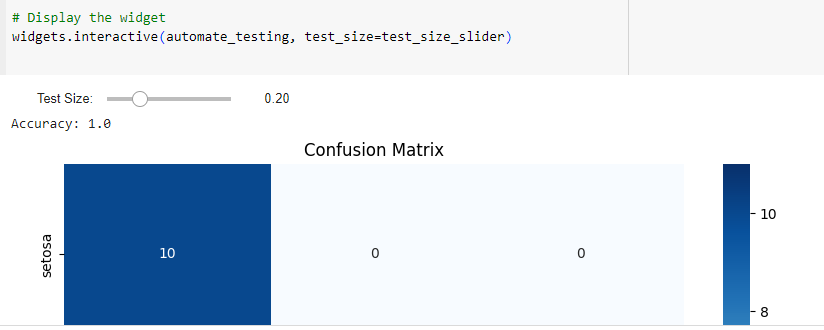
Automating the testing process with interactive widgets
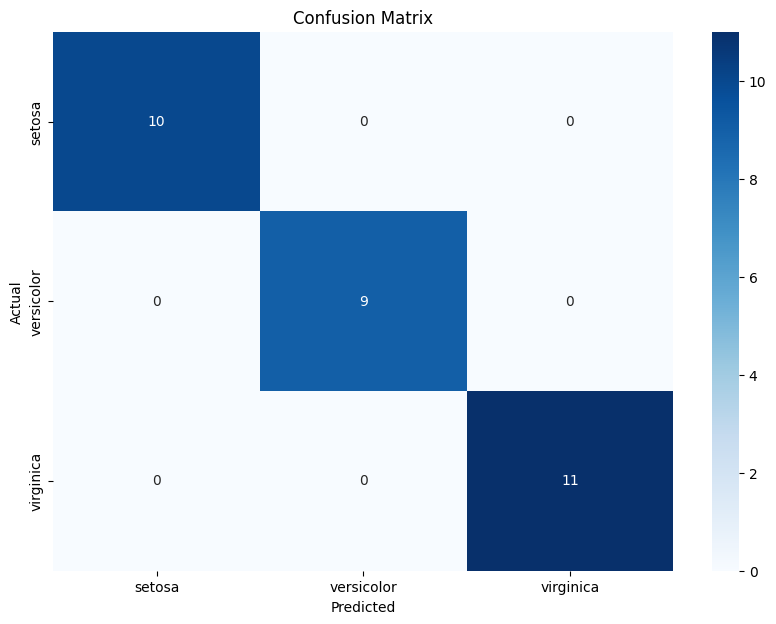
Automating the testing process with interactive widgets
**Best Practices for Automated Testing in ML Projects
Adhering to best practices can significantly enhance the effectiveness of automated testing in ML projects:
- **Use Tests in Small Fractions: Break down the testing process into smaller, manageable parts. This approach allows for more focused and efficient testing, making it easier to identify and resolve issues.
- **Compose Tests for Each Functionality: Develop specific tests for each functionality of the ML model. This ensures comprehensive coverage and helps identify issues in individual components.
- **Conduct Regression Tests Regularly: Regularly perform regression tests to ensure that new changes do not introduce new bugs or negatively impact the existing functionality of the ML model.
- **Ensure Maximum Coverage: Aim for maximum test coverage to identify as many potential issues as possible. This includes testing different data inputs, edge cases, and scenarios.
- **Use Version Control: Implement version control for both code and data to track changes and ensure reproducibility. This practice helps in maintaining consistency and facilitates collaboration among team members.
**Challenges and Considerations
While automated testing offers numerous benefits, it also comes with challenges:
- **Data Availability and Quality: High-quality data is essential for training accurate models. Ensuring data availability and quality can be challenging.
- **Complexity: ML models can be complex, making it difficult to debug and interpret their behavior.
- **Maintenance: ML models require ongoing maintenance and monitoring to ensure they continue to perform well over time.
- **Integration: Integrating ML models into existing test automation frameworks can be challenging and may require significant development effort.
- **Bias and Explainability: ML models can be biased, and ensuring explainability can be difficult.
**Conclusion
Automated testing is a vital aspect of ML projects, ensuring the reliability, robustness, and efficiency of ML models. By adhering to best practices and leveraging appropriate tools, teams can effectively implement automated testing and overcome the unique challenges posed by ML models. Continuous monitoring and maintenance are essential to ensure the long-term success of ML projects.