FastText Working and Implementation (original) (raw)
Last Updated : 12 Jun, 2026
FastText is a word embedding technique developed by Facebook that represents words using character level subwords. It handles unseen words effectively and captures both semantic and morphological information.
- Uses character level subwords.
- Handles out of vocabulary words.
- Captures word meaning and structure.
- Efficient for large text datasets.
FastText Architecture and Working
FastText extends traditional word embedding models by representing words as collections of character n-grams rather than treating them as single units. This approach helps capture word structure and generate embeddings for unseen words.
Character N-Gram Representation
FastText breaks each word into smaller groups of characters called n-grams. Instead of learning only the whole word, it also learns these smaller character patterns, helping it understand word structure and meaning. Consider the word "running":
- **3-grams: <ru, run, unn, nni, nin, ing, ng>
- **4-grams: <run, runn, unni, nnin, ning, ing>
- **5-grams: <runn, runni, unnin, nning, ning>
**Here:
- A 3-gram contains 3 consecutive characters.
- A 4-gram contains 4 consecutive characters.
- These subwords help FastText understand related words such as run, runner and running.
Hierarchical Softmax Optimization
Hierarchical Softmax is an optimization technique used by FastText to speed up training. Instead of comparing a word with every word in the vocabulary, it organizes words in a tree structure and performs fewer calculations.
- Reduces training time.
- Works efficiently with large vocabularies.
- Maintains good prediction performance.
Implementation
Step 1: Installing Required Libraries
Run the following command in your command prompt
pip install gensim
Step 2: Import required libraries
- Imports the FastText model from Gensim.
- Used for training and generating word embeddings. Python `
from gensim.models import FastText
`
Step 3: Creating Training Data
- Creates tokenized sentences for training.
- Each sentence is represented as a list of words.
- This format is required by Gensim FastText. Python `
sentences = [ ["the", "king", "rules", "the", "kingdom"], ["the", "queen", "helps", "the", "king"], ["running", "is", "good", "exercise"], ["the", "runner", "runs", "fast"], ["walking", "is", "healthy", "activity"], ["the", "walker", "walks", "slowly"], ["reading", "books", "is", "fun"], ["the", "reader", "reads", "daily"] ]
print("Training data created successfully")
`
**Output:
Training data created successfully
Step 4: Training a Basic FastText Model
- vector_size=50 sets embedding size.
- window=5 defines context window size.
- min_n=3 and max_n=6 create character n-grams.
- sg=1 enables Skip-Gram training.
- epochs=10 controls training iterations. Python `
model = FastText( sentences, vector_size=50, window=5, min_count=1, min_n=3, max_n=6, sg=1, epochs=10 )
print("Model trained successfully")
`
**Output:
Model trained successfully
Step 5: Getting Word Vectors
- Retrieves the embedding vector for a word.
- Displays the first few vector values.
- Shows the dimensionality of the embedding. Python `
king_vector = model.wv["king"]
print("Vector for 'king':") print(king_vector[:5])
print("Vector Shape:", king_vector.shape)
`
**Output:

Output
Step 6: Handling Unseen Words (OOV)
One of FastText's major advantages is its ability to generate embeddings for unseen words using character n-grams
- Uses character level subword information.
- Overcomes a major limitation of Word2Vec. Python `
kingdom_vector = model.wv["kingdom"]
print("Vector for 'kingdom':") print(kingdom_vector[:5])
`
**Output:

Output
Step 7: Finding Similar Words
- Finds semantically related words.
- Uses cosine similarity between embeddings.
- Returns the most similar words with scores. Python `
print("Words similar to 'king':")
similar_words = model.wv.most_similar( "king", topn=3 )
for word, score in similar_words: print(word, ":", round(score, 4))
`
**Output:
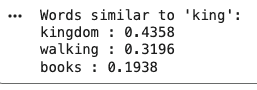
Output
Download full code from here
Applications
- Works effectively with multiple languages, especially when training data is limited.
- Handles specialized and domain specific vocabulary that may not appear in general text datasets.
- Improves text classification by capturing both word meaning and word structure.
- Generates meaningful embeddings for unseen or out-of-vocabulary words.
- Suitable for real time NLP applications due to its fast training and efficient memory usage.
Advantages
- Generates embeddings for unseen words using character level subword information.
- Captures relationships between different forms of a word, such as run, running and runner.
- Provides fast training and efficient inference for large text datasets.
- Performs well on languages with complex word structures and rich morphology.