Feature Encoding Techniques Machine Learning (original) (raw)
Last Updated : 12 Jul, 2025
As we all know that better encoding leads to a better model and most algorithms cannot handle the categorical variables unless they are converted into a numerical value.
Categorical features are generally divided into 3 types:
A. Binary: Either/or
Examples:
- Yes, No
- True, False
B. Ordinal: Specific ordered Groups.
Examples:
- low, medium, high
- cold, hot, lava Hot
C. Nominal: Unordered Groups. Examples
- cat, dog, tiger
- pizza, burger, coke
Dataset: To download the file click on the link encoding dataset
Example:
Python3 `
data preprocessing
import pandas as pd
for linear calculations
import numpy as np
Plotting Graphs
import seaborn as sns df = pd.read_csv("Encoding Data.csv")
displaying top 10 results
df.head(10)
`
Output:
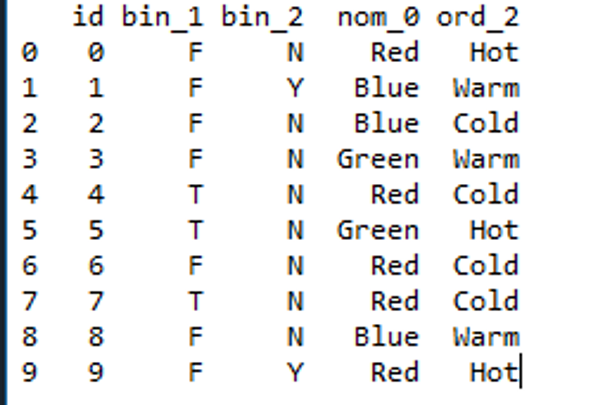
Dataset
Let's examine the columns of the dataset with different types of encoding techniques.
Code: Mapping binary features present in the dataset.
Python3 `
you can always use simple mapping on binary features.
df['bin_1'] = df['bin_1'].apply( lambda x: 1 if x == 'T' else (0 if x == 'F' else None)) df['bin_2'] = df['bin_2'].apply( lambda x: 1 if x == 'Y' else (0 if x == 'N' else None)) sns.countplot(df['bin_1']) sns.countplot(df['bin_2'])
`
Output:
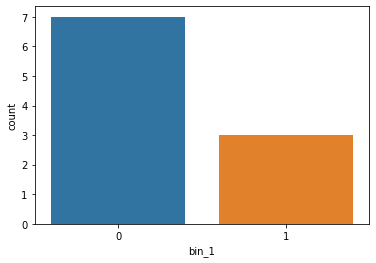
Bin_1 after applying mapping
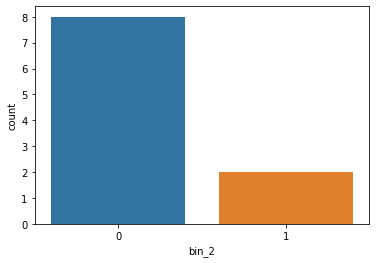
bin_2 after applying mapping
Label Encoding: Label encoding algorithm is quite simple and it considers an order for encoding, Hence can be used for encoding ordinal data.
Code:
Python3 `
labelEncoder present in scikitlearn library
from sklearn.preprocessing import LabelEncoder
le = LabelEncoder()
df['ord_2'] = le.fit_transform(df['ord_2'])
sns.set(style ="darkgrid")
sns.countplot(df['ord_2'])
`
Output:
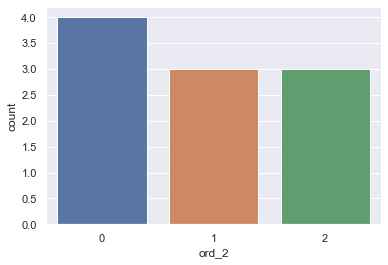
Plot of ord_2 after label encoding
One-Hot Encoding: To overcome the Disadvantage of Label Encoding as it considers some hierarchy in the columns which can be misleading to nominal features present in the data. we can use the One-Hot Encoding strategy.
One-hot encoding is processed in 2 steps:
- Splitting of categories into different columns.
- Put '0 for others and '1' as an indicator for the appropriate column.
Code: One-Hot encoding with Sklearn library
Python3 `
from sklearn.preprocessing import OneHotEncoder enc = OneHotEncoder()
transforming the column after fitting
enc = enc.fit_transform(df[['nom_0']]).toarray()
converting arrays to a dataframe
encoded_colm = pd.DataFrame(enc)
concatenating dataframes
df = pd.concat([df, encoded_colm], axis=1)
removing the encoded column.
df = df.drop(['nom_0'], axis=1) df.head(10)
`
Output:
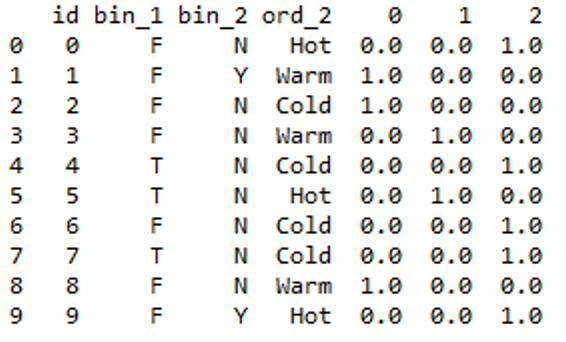
Output
Code: One-Hot encoding with pandas
Python3 `
df = pd.get_dummies(df, prefix=['nom_0'], columns=['nom_0']) df.head(10)
`
Output:
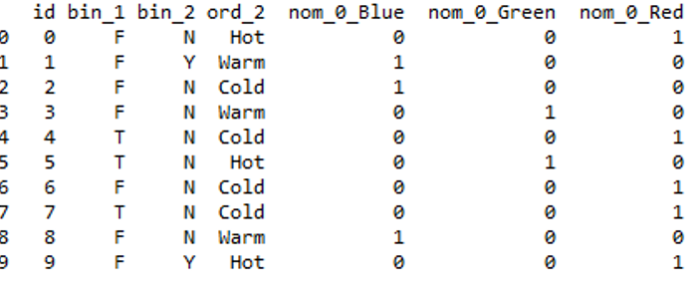
output
This method is preferable since it gives good labels.
Note: One-hot encoding approach eliminates the order but it causes the number of columns to expand vastly. So for columns with more unique values try using other techniques.
Frequency Encoding: We can also encode considering the frequency distribution. This method can be effective at times for nominal features.
Code:
Python3 `
grouping by frequency
fq = df.groupby('nom_0').size()/len(df)
mapping values to dataframe
df.loc[:, "{}_freq_encode".format('nom_0')] = df['nom_0'].map(fq)
drop original column.
df = df.drop(['nom_0'], axis=1) fq.plot.bar(stacked=True) df.head(10)
`
Output:
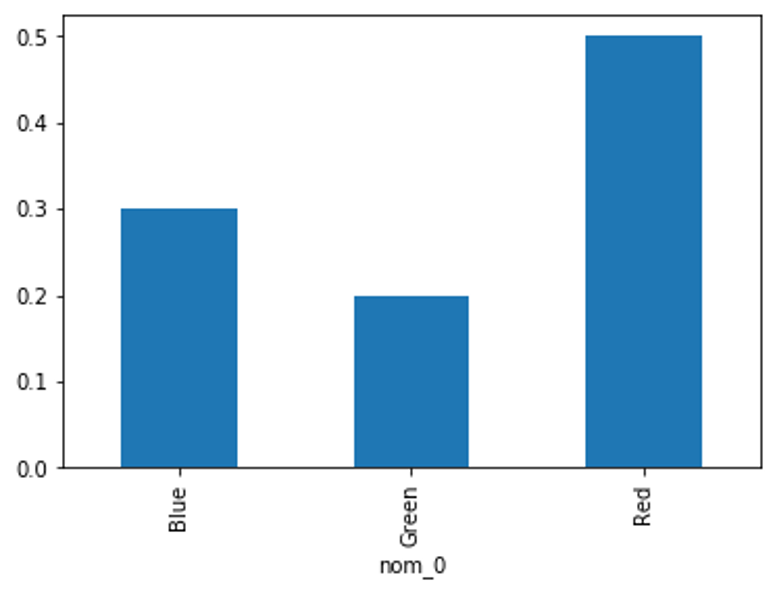
Frequency distribution (fq)
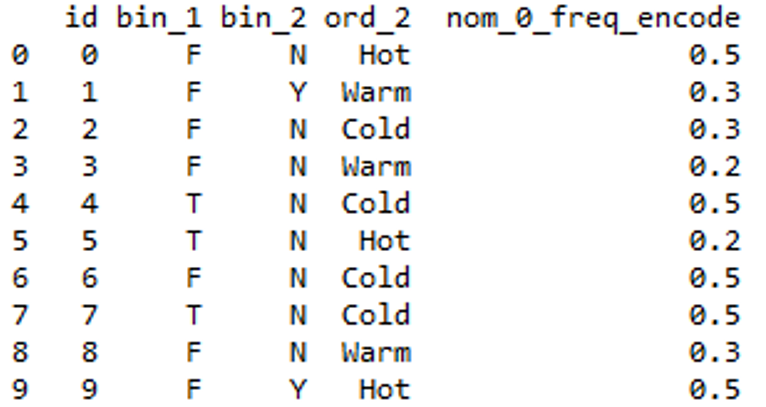
Output
Ordinal Encoding: We can use Ordinal Encoding provided in Scikit learn class to encode Ordinal features. It ensures that ordinal nature of the variables is sustained.
Code: Using Scikit learn.
Python3 `
from sklearn.preprocessing import OrdinalEncoder ord1 = OrdinalEncoder()
fitting encoder
ord1.fit([df['ord_2']])
transforming the column after fitting
df["ord_2"] = ord1.transform(df[["ord_2"]]) df.head(10)
`
Output:
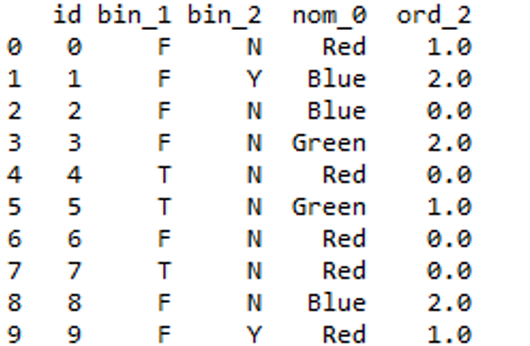
Output
One issue with this representation (Ordinal Encoding) is that the ML algorithm would assume that the two nearby values are closer than the distinct ones.
Example of the above Problem:
Python3 `
from sklearn.preprocessing import OrdinalEncoder x=[["red","green"],["yellow","red"]] ord=OrdinalEncoder() output=ord.fit_transform(x) print(output)
`
Output:
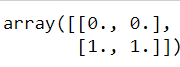
It's looking for the most nearby ones. It assumes that "red" and "green" belong to the same category.
Code: Manually assigning ranking by using a dictionary
Python3 `
creating a dictionary
temp_dict = {'Cold': 1, 'Warm': 2, 'Hot': 3}
mapping values in column from dictionary
df['Ord_2_encod'] = df.ord_2.map(temp_dict) df = df.drop(['ord_2'], axis=1) Output: < /strong >
`
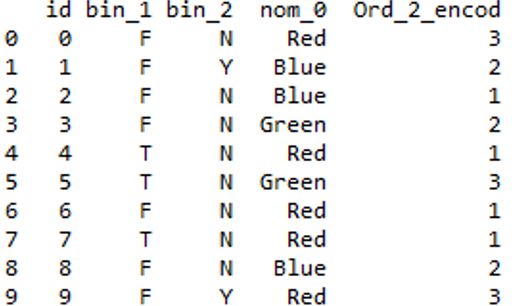
Output
Binary Encoding: Initially, categories are encoded as Integer and then converted into binary code, then the digits from that binary string are placed into separate columns.
for eg: for 7 : 1 1 1
This method is quite preferable when there is more categories. Imagine if you have 100 different categories. One hot encoding will create 100 different columns, But binary encoding only need 7 columns.
Code:
Python3 `
from category_encoders import BinaryEncoder encoder = BinaryEncoder(cols =['ord_2'])
transforming the column after fitting
newdata = encoder.fit_transform(df['ord_2'])
concatenating dataframe
df = pd.concat([df, newdata], axis = 1)
dropping old column
df = df.drop(['ord_2'], axis = 1) df.head(10)
`
Output:
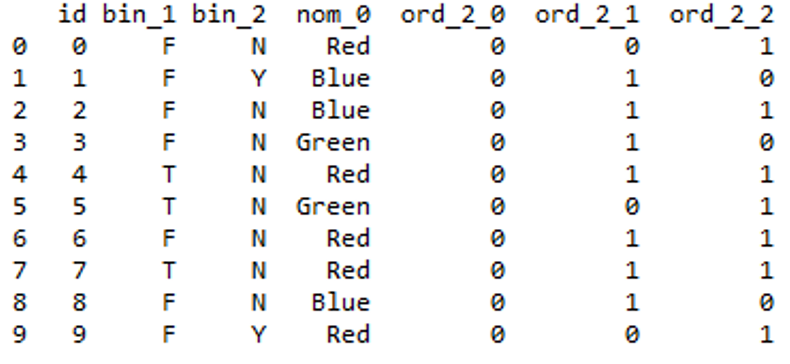
Output
HashEncoding: Hashing is the process of converting of a string of characters into a unique hash value with applying a hash function. This process is quite useful as it can deal with a higher number of categorical data and its low memory usage.
Article regarding hashing
Code:
Python3 `
from sklearn.feature_extraction import FeatureHasher
n_features contains the number of bits you want in your hash value.
h = FeatureHasher(n_features = 3, input_type ='string')
transforming the column after fitting
hashed_Feature = h.fit_transform(df['nom_0']) hashed_Feature = hashed_Feature.toarray() df = pd.concat([df, pd.DataFrame(hashed_Feature)], axis = 1) df.head(10)
`
Output:
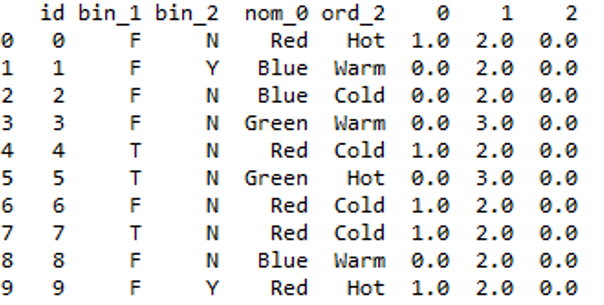
Output
You can further drop the converted feature from your Dataframe.
Mean/Target Encoding: Target encoding is good because it picks up values that can explain the target. It is used by most kagglers in their competitions. The basic idea is to replace a categorical value with the mean of the target variable.
Code:
Python3 `
inserting Target column in the dataset since it needs a target
df.insert(5, "Target", [0, 1, 1, 0, 0, 1, 0, 0, 0, 1], True)
importing TargetEncoder
from category_encoders import TargetEncoder Targetenc = TargetEncoder()
transforming the column after fitting
values = Targetenc.fit_transform(X = df.nom_0, y = df.Target)
concatenating values with dataframe
df = pd.concat([df, values], axis = 1) df.head(10)
`
You can further drop the converted feature from your Dataframe.
Output:
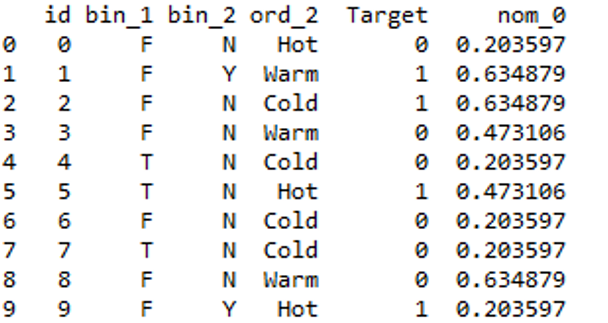
output