How to split a Dataset into Train and Test Sets using Python (original) (raw)
Last Updated : 7 Apr, 2026
To build and evaluate a machine learning model, the dataset must be divided into two parts i.e one for training the model and another for testing its performance. This process helps measure how well a model works on unseen data. This is done to properly assess how well the model will perform in real-world scenarios.
- The training set is used to learn patterns from the data.
- The test set is used to evaluate how well the model performs on new data.
- It prevents overfitting by avoiding training and testing on the same data.
- It provides a realistic estimate of model accuracy.
- It allows fair comparison between different models.
**Method 1: Splitting Dataset Using train_test_split()
The train_test_split() function from scikit-learn is the most common and easiest way to split a dataset.
Here:
- test_size=0.2 keeps 20% data for testing
- Remaining 80% is used for training
- random_state ensures same split every time Python `
from sklearn.model_selection import train_test_split import pandas as pd
data = { 'Age': [22, 25, 47, 52, 46], 'Salary': [25000, 32000, 48000, 52000, 50000], 'Purchased': [0, 1, 1, 0, 1] }
df = pd.DataFrame(data)
X = df[['Age', 'Salary']] y = df['Purchased']
X_train, X_test, y_train, y_test = train_test_split( X, y, test_size=0.2, random_state=42 )
print( X_train,'\n', X_test) print( y_train,'\n', y_test)
`
**Output:
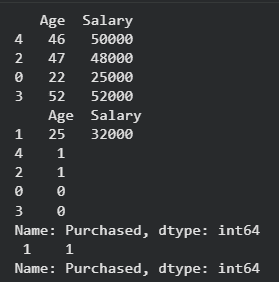
Output
This shows the splitting of our dataset. Now let's see our models accuracy using logistic regression model.
Python `
from sklearn.linear_model import LogisticRegression from sklearn.metrics import accuracy_score
Creating and training the model
model = LogisticRegression() model.fit(X_train, y_train)
Making predictions on test data
y_pred = model.predict(X_test)
Evaluating model performance
acc = accuracy_score(y_test, y_pred) print("Accuracy:", acc)
`
**Output:
Accuracy: 1.0
We can see our model is performing well after train and test split.
**Method 2: Manual Splitting Using Indexing
Manual splitting means dividing a dataset into training and testing parts without using built-in ML functions like train_test_split(). This approach gives full control over how data is shuffled and split.
Here:
- Dataset is shuffled first
- 80% rows are selected for training
- Remaining rows are used for testing Python `
import pandas as pd
data = { 'Age': [22, 25, 47, 52, 46], 'Salary': [25000, 32000, 48000, 52000, 50000], 'Purchased': [0, 1, 1, 0, 1] }
df = pd.DataFrame(data)
df = df.sample(frac=1).reset_index(drop=True)
split = int(0.8 * len(df))
train = df[:split] test = df[split:]
print(train) print(test)
`
**Output:
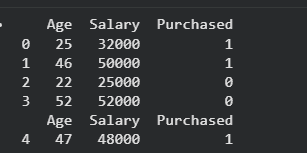
Output
**Method 3: Splitting Using NumPy
NumPy can also be used when working with arrays instead of DataFrames.
- Data is split based on index position
- Suitable for numerical array-based datasets Python `
import numpy as np
arr = np.arange(20)
print("original array: ",arr)
train, test = np.split(arr, [16])
print("train: ",train) print("test: ", test)
`
**Output:

Output
Choosing the Right Split Ratio
| Dataset Size | Recommended Split |
|---|---|
| Small | 70:30 |
| Medium | 80:20 |
| Large | 90:10 |
**Best Method to Use
- Use train_test_split() for most ML tasks
- Use manual splitting for learning or custom logic
- Use NumPy split for array-based workflows
**Common Mistakes to Avoid
- Not shuffling data before splitting
- Using test data during training
- Choosing very small test size
- Forgetting to set random_state