Implementing Apriori algorithm in Python (original) (raw)
Last Updated : 2 May, 2026
Apriori Algorithm is a frequent itemset mining algorithm used for market basket analysis. It helps to find associations or relationships between items in large transactional datasets. A common real-world application is product recommendation where items are suggested to users based on their shopping cart contents.
**Step 1: Importing Required Libraries
Before we begin we need to import the necessary Python libraries like Pandas , Numpy and mlxtend.
Python `
import numpy as np import pandas as pd from mlxtend.frequent_patterns import apriori, association_rules
`
**Step 2: Loading and exploring the data
We start by loading a popular groceries dataset. This dataset contains customer transactions with details like customer ID, transaction date, and the item purchased. you can download the dataset from here.
Python `
import pandas as pd df = pd.read_csv("/content/Groceries_dataset.csv") print(df.head())
`
**Output:

Dataset
- Each row represents one item in a customer's basket on a given date.
- To use the Apriori algorithm we must convert this into full transactions per customer per visit.
**Step 3: Group Items by Transaction
We group items purchased together by the same customer on the same day to form one transaction.
Python `
basket = df.groupby(['Member_number', 'Date'])['itemDescription'].apply(list).reset_index() transactions = basket['itemDescription'].tolist() print(transactions)
`
**Output:

Group items
**Step 4: Convert to One-Hot Format
Apriori needs data in True/False format like Did the item appear in the basket?. We use Transaction Encoder for this:
Python `
from mlxtend.preprocessing import TransactionEncoder te = TransactionEncoder() te_array = te.fit(transactions).transform(transactions) df_encoded = pd.DataFrame(te_array, columns=te.columns_)
`
**Step 5: Run Apriori Algorithm
Now we find frequent itemsets combinations of items that often occur together. Here min_support=0.01 means itemsets that appear in at least 1% of transactions. This gives us common combinations of items.
Python `
from mlxtend.frequent_patterns import apriori frequent_itemsets = apriori(df_encoded, min_support=0.01, use_colnames=True) print("Total Frequent Itemsets:", frequent_itemsets.shape[0])
`
Output:
Total Frequent Itemsets: 69
**Step 6: Generate Association Rules
Now we find rules like If bread and butter are bought, milk is also likely to be bought.
- **Support: How often the rule appears in the dataset.
- **Confidence: Probability of buying item B if item A is bought.
- **Lift: Strength of the rule over random chance. (>1 means it's a good rule) Python `
from mlxtend.frequent_patterns import association_rules rules = association_rules(frequent_itemsets, metric="confidence", min_threshold=0.1) rules = rules[rules['antecedents'].apply(lambda x: len(x) >= 1) & rules['consequents'].apply(lambda x: len(x) >= 1)] print("Association Rules:", rules.shape[0]) print(rules[['antecedents', 'consequents', 'support', 'confidence', 'lift']].head(5))
`
**Output:
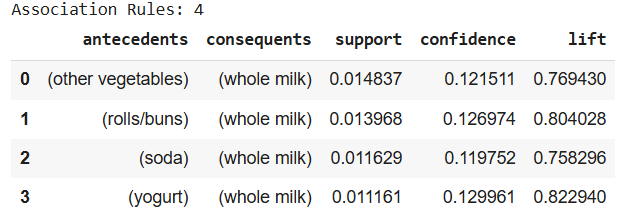
Association rules
**Step 7: Visualize the Most Popular Items
Let’s see which items are most frequently bought:
Python `
import matplotlib.pyplot as plt top_items = df['itemDescription'].value_counts().head(10) top_items.plot(kind='bar', title='Top 10 Most Purchased Items') plt.xlabel("Item") plt.ylabel("Count") plt.show()
`
**Output:

Most Purchased Items
As shown in the above outputWhole milk is the most frequently bought item, followed byother vegetables, rolls/bunand soda.