License Plate Recognition with OpenCV and Tesseract OCR (original) (raw)
Last Updated : 15 Jul, 2025
License Plate Recognition is widely used for automated identification of vehicle registration plates for security purpose and law enforcement. By combining computer vision techniques with Optical Character Recognition (OCR) we can extract license plate numbers from images enabling applications in areas like security, traffic management and toll systems.
One of the most popular tools for OCR is Tesseract an open-source OCR engine developed by Google. Tesseract is capable of recognizing text from various image formats. In this article we'll explore how to implement a basic License Plate Recognition system using OpenCV and Tesseract OCR.
Implementing License Plate Recognition
Here is the step by step implementation of building this model.
1. Installing Tesseract OCR Engine
We need to install Tesseract OCR engine which is essential for text recognition from images. We can do it by below command.
apt-get update: Updates the package index to make sure you're getting the latest versions of packages.apt-get install -y tesseract-ocr: Installs the Tesseract OCR engine which is used for text recognition.
!apt-get update
!apt-get install -y tesseract-ocr
2. Importing Required Libraries
Here we will use OpenCV and pytesseract library.
python `
import cv2 import pytesseract
`
3. Setting Path for Tesseract
This line sets the path to the Tesseract executable.
pytesseract.pytesseract.tesseract_cmd: tells thepytesseractmodule where to find the Tesseract OCR engine on your system. python `
pytesseract.pytesseract.tesseract_cmd = "/usr/bin/tesseract"
`
4. Function to Detect License Plate Number
We will define this function which will show the image and turn image into grayscale to simplify the processing and reduce computation. After that applies Gaussian blur to smooth the image and reduce noise making edge detection more accurate.
cv2.imread(image_path): Reads the image from the specified path.cv2.cvtColor(image, cv2.COLOR_BGR2GRAY): Converts the image from color (BGR) to grayscale. Grayscale simplifies the image, making it easier to process further.cv2.GaussianBlur(gray, (5, 5), 0): Applies Gaussian Blur to the grayscale image. This reduces noise and smooths the image, making it easier for the edge detection step. python `
def detect_plate_number(image_path): image = cv2.imread(image_path) plt.imshow(cv2.cvtColor(image, cv2.COLOR_BGR2RGB)) plt.axis('off') plt.show() gray = cv2.cvtColor(image, cv2.COLOR_BGR2GRAY) blurred = cv2.GaussianBlur(gray, (5, 5), 0)
`
5. Edge Detection using Canny and Contours in the Image
We will use Canny edge detection to highlight the edges in the image, making the plate contours clearer and then finds the contours of the objects in the image helping locate potential license plates.
cv2.Canny(blurred, 100, 200): This is the Canny edge detection algorithm, which helps highlight the edges of the objects in the image. It is particularly useful for detecting the boundaries of the license plate.cv2.findContours: Finds the contours (outlines) of objects in the image. Contours are the boundaries of objects that can be used to locate shapes like rectangles (license plates).cv2.RETR_EXTERNAL: This flag ensures that only external contours are retrieved, excluding inner contours of objects. Python `edges = cv2.Canny(blurred, 100, 200) contours, _ = cv2.findContours(edges.copy(), cv2.RETR_EXTERNAL, cv2.CHAIN_APPROX_SIMPLE)
`
6. Approximate Contours and Check for a Rectangle
We will identify and approximates the contours that resemble the shape of a rectangular license plate.
sorted(contours, key=cv2.contourArea, reverse=True): Sorts the contours by their area, from largest to smallest. The largest contour is likely to be the license plate.cv2.approxPolyDP: Approximates the contour to a polygon with fewer vertices.if len(approx) == 4: If the approximated contour has four vertices, it's likely a rectangle, which is the shape of most license plates. Python `contours = sorted(contours, key=cv2.contourArea, reverse=True) plate_contour = None for contour in contours: epsilon = 0.02 * cv2.arcLength(contour, True) approx = cv2.approxPolyDP(contour, epsilon, True)
if len(approx) == 4: plate_contour = approx break
`
7. Extract License Plate and Apply Thresholding
We will extracts the license plate area and applies thresholding to convert it to a binary image for OCR processing.
cv2.boundingRect: Draws a rectangle around the detected license plate.cv2.threshold: Converts the license plate region into a binary image (black and white), which is easier for OCR to process. python `if plate_contour is not None:
  x, y, w, h = cv2.boundingRect(plate_contour)
  plate_image = gray[y:y + h, x:x + w]

  _, thresh = cv2.threshold(plate_image, 0, 255, cv2.THRESH_BINARY + cv2.THRESH_OTSU)
`
8. OCR to Recognize Plate Number
We will use Tesseract OCR to recognize the text in the license plate image and return the plate number.
pytesseract.image_to_string: This function takes the preprocessed image (thresholded) and applies Tesseract OCR to extract the text (license plate number).--psm 8: Configures Tesseract to treat the image as a single word, improving accuracy for plate number recognition. python `plate_number = pytesseract.image_to_string(thresh, config='--psm 8') # Treat it as a single word return plate_number.strip()
`
9. Calling the Function and Displaying the Output
We will call the function to detect the plate number from the given image path and prints the result.
python `
image_path = "car.jpg"
plate_number = detect_plate_number(image_path) print("Detected Plate Number:", plate_number)
`
**Output:
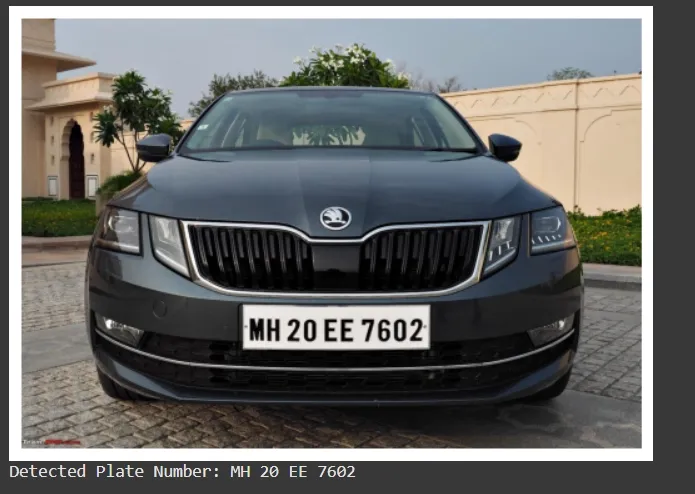
Number Plate Recognition
We can see that our model is working fine, giving us accurate results.
In this article we covered the key steps involved including image loading, preprocessing, edge detection and contour extraction followed by OCR for plate number recognition. By applying these techniques we can significantly enhance the accuracy of the system especially in challenging conditions. While this approach provides a solid foundation further improvements can be made using deep learning models for more complex scenarios. With these skills you can build more advanced applications in vehicle tracking, automated tolling and security systems.
You can download Source code from here.