Next Sentence Prediction using BERT (original) (raw)
Last Updated : 23 Jul, 2025
**Next Sentence Prediction is a pre-training task used in BERT to help the model understand the relationship between different sentences. It is widely used for tasks like question answering, summarization and dialogue systems. The goal is to determine whether a given second sentence logically follows the first one. For example :
- **Sentence A: “She opened the door.”
- **Sentence B: “She saw her friend standing there.”
In this case Sentence B follows Sentence A so the label is 1 (consecutive). If Sentence B was unrelated like “The sky was blue” the label would be 0 meaning non consecutive.
Fine-Tuning BERT for Next Sentence Prediction
BERT is fine-tuned for the NLP task using three primary approaches:
**1. Sentence Pair Classification
In this approach BERT takes a pair of sentences as input and output a single class label. The following datasets are commonly used for this task:
- **MNLI (Multi-Genre Natural Language Inference): A large-scale classification task where the goal is to determine whether the second sentence is an continuation, contradiction or neutral for the first sentence.
- **QQP (Quora Question Pairs): This dataset focuses on identifying whether two questions are semantically equivalent.
- **QNLI (Question Natural Language Inference): Here the model determines whether the second sentence answers the question posed in the first sentence.
- **SWAG (Situations With Adversarial Generations): This dataset contains 113k sentence pairs. The task is to predict whether the second sentence is a plausible continuation of the first.
**2. Single Sentence Classification
In this approach BERT only have a single sentence and output a class label. The following datasets are commonly used:
- **SST-2 (The Stanford Sentiment Treebank): A binary classification task where the goal is to classify the sentiment of movie review sentences as positive or negative.
- **CoLA (Corpus of Linguistic Acceptability): It is a binary classification task where the goal is to decide if an English sentence is correct or makes sense according to grammar rules.
**3. Question Answering
In this approach BERT is provided with a question and a paragraph and it output a sentence from the paragraph that answers the question. This is performed on the **SQuAD (Stanford Question Answering Dataset) versions 1.1 and 2.0.
**BERT Architecture Overview
The architecture of BERT includes special tokens like [CLS] and [SEP]:
- **CLS: Represents the classification token which is the first token in the input sequence.
- **SEP: It acts as a separator between two input sentences.
Inputs are tokenized according to BERT's vocabulary and the outputs are also tokenized.
Step 1: Setting Up the Environment
Start by installing the required libraries and importing them.
Python `
!pip install transformers torch datasets matplotlib scikit-learn
import torch from transformers import BertTokenizer, BertForNextSentencePrediction, Trainer, TrainingArguments from datasets import Dataset, load_dataset import matplotlib.pyplot as plt from sklearn.metrics import accuracy_score
`
Step 2: Data Preparation
We'll create a dataset of sentence pairs labeled as:
1: The second sentence follows the first i.e consecutive.0: The second sentence is unrelated.
Here’s an example dataset:
Python `
sentences = [
("The quick brown fox jumps over the lazy dog.", "The dog was not amused.", 1),
("The quick brown fox jumps over the lazy dog.", "I love eating pizza.", 0),
("She opened the door.", "She saw her friend standing there.", 1),
("She opened the door.", "The sky was blue.", 0),
("He went to the store.", "He bought some groceries.", 1),
("He went to the store.", "It started raining heavily.", 0)
]
dataset = Dataset.from_dict({ "sentence1": [s[0] for s in sentences], "sentence2": [s[1] for s in sentences], "label": [s[2] for s in sentences] })
train_test_split = dataset.train_test_split(test_size=0.2) train_dataset = train_test_split['train'] test_dataset = train_test_split['test']
`
Tokenize the Dataset
Use the BERT tokenizer to tokenize the sentences and prepare inputs for the model.
Python `
tokenizer = BertTokenizer.from_pretrained('bert-base-uncased')
def tokenize_function(examples): return tokenizer(examples['sentence1'], examples['sentence2'], truncation=True, padding='max_length', max_length=128)
train_dataset = train_dataset.map(tokenize_function, batched=True) test_dataset = test_dataset.map(tokenize_function, batched=True)
train_dataset.set_format(type='torch', columns=['input_ids', 'attention_mask', 'label']) test_dataset.set_format(type='torch', columns=['input_ids', 'attention_mask', 'label'])
`
**Output:

Tokenize the dataset
Step 3: Model Training
Load the pre-trained BERT model.
Python `
model = BertForNextSentencePrediction.from_pretrained('bert-base-uncased')
`
Define Training Arguments
Set up the training arguments for fine-tuning.
Python `
training_args = TrainingArguments( output_dir="./results", learning_rate=2e-5, per_device_train_batch_size=8, per_device_eval_batch_size=8, num_train_epochs=3, weight_decay=0.01, logging_dir="./logs", logging_steps=10, save_strategy="epoch", )
`
Define Metrics for Evaluation
Define a function to compute accuracy during evaluation.
Python `
def compute_metrics(pred): labels = pred.label_ids preds = pred.predictions.argmax(-1) acc = accuracy_score(labels, preds) return {"accuracy": acc}
`
Use the Trainer API to train the model and also evaluate the model on the test dataset and visualize the results.
Python `
trainer = Trainer( model=model, args=training_args, train_dataset=train_dataset, eval_dataset=test_dataset, compute_metrics=compute_metrics )
trainer.train()
eval_results = trainer.evaluate() print(f"\nEvaluation Results: {eval_results}")
`
**Output:

Model Training
Step 4: Visualization
Plot the probabilities for a few samples from the test dataset.
Python `
predictions = trainer.predict(test_dataset) probs = torch.softmax(torch.tensor(predictions.predictions), dim=1).numpy()
for i in range(5):
plt.bar(['Next Sentence', 'Not Next Sentence'], probs[i])
plt.title(f"Sample {i+1}: True Label = {test_dataset[i]['label']}")
plt.ylabel("Probability")
plt.show()
`
**Output:
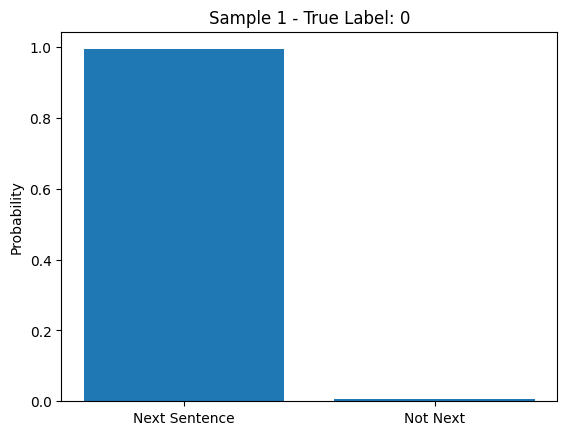
Probabiloty of next sentence and not text
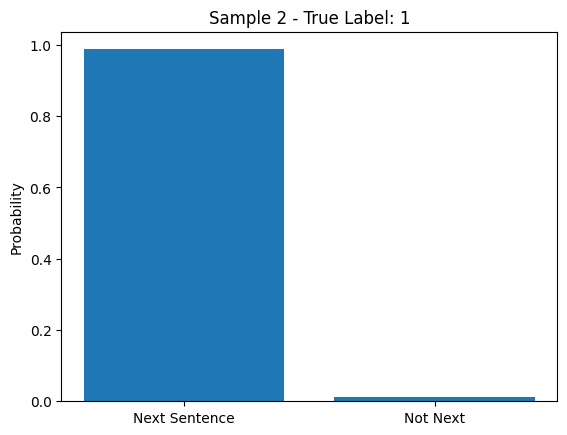
Probability with second sample
The above bar charts show a model predicting if one sentence logically follows another. In both samples the model is very confident the second sentence is the next one, matching the true labels.
You can download source code from here.