Predicting Stock Price Direction using Support Vector Machines (original) (raw)
Last Updated : 23 Jul, 2025
Predicting stock price direction is a key goal for traders and analysts. Support Vector Machines (SVM) is a machine learning algorithm that can help classify whether a stock's price will rise or fall. In this article, we'll demonstrate how to apply SVM to predict stock price movements using historical data, covering data preparation, model training, and evaluation.
Step-by-Step Implementation
Step 1: Import the libraries
Here we will import pandas, scikit learn and matplotlib.
Python `
Machine learning
from sklearn.svm import SVC from sklearn.metrics import accuracy_score
For data manipulation
import pandas as pd import numpy as np
To plot
import matplotlib.pyplot as plt
To ignore warnings
import warnings warnings.filterwarnings("ignore")
`
Step 2: Read Stock data
We will Read the Stock Data Downloaded From Yahoo Finance Website. You can download dataset from **here****.**
Python `
Read the csv file using read_csv
method of pandas
df = pd.read_csv('RELIANCE.csv') df
`
**Output:

dataset
Step 3: Data Preparation
The data needed to be processed before use such that the date column should act as an index to do that and will drop date column.
Python `
Changes The Date column as index columns
df.index = pd.to_datetime(df['Date']) df
drop The original date column
df = df.drop(['Date'], axis='columns') df
`
**Output:
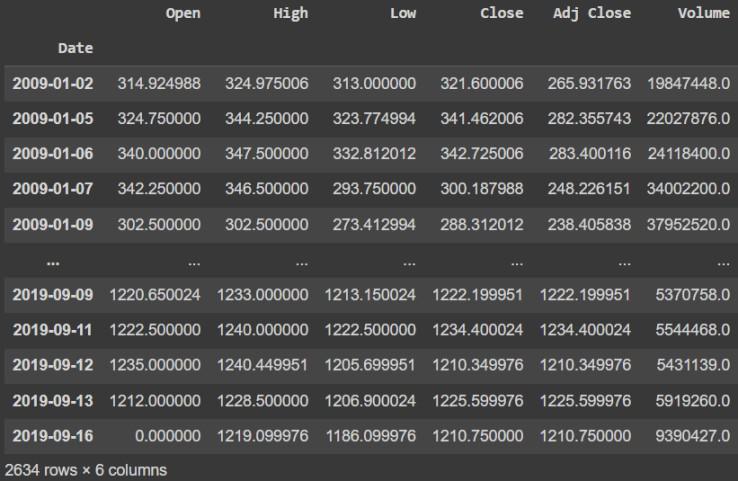
Data Preparation
Step 4: Define the explanatory variables
Explanatory or independent variables are used to predict the value response variable. The X is a dataset that holds the variables which are used for prediction. The X consists of variables such as 'Open - Close' and 'High - Low'. These can be understood as indicators based on which the algorithm will predict tomorrow's trend. Feel free to add more indicators and see the performance.
Python `
Create predictor variables
df['Open-Close'] = df.Open - df.Close df['High-Low'] = df.High - df.Low
Store all predictor variables in a variable X
X = df[['Open-Close', 'High-Low']] X.head()
`
**Output:
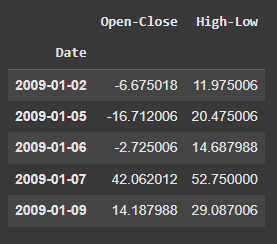
Explanatory variables
Step 5: Define the target variable
The target variable is the outcome which the machine learning model will predict based on the explanatory variables. If tomorrow's price is greater than today's price then we will buy the particular Stock else we will have no position in the. We will store +1 for a buy signal and 0 for a no position in y. We will use where() function from NumPy to do this.
Python `
Target variables
y = np.where(df['Close'].shift(-1) > df['Close'], 1, 0) y
`
**Output:
array([1, 1, 0, ..., 1, 0, 0])
Step 6: Split the data into train and test
We will split data into training and test data sets. This is done so that we can evaluate the effectiveness of the model in the test dataset. We will split 80% data for training and 20% for testing.
Python `
split_percentage = 0.8 split = int(split_percentage*len(df))
Train data set
X_train = X[:split] y_train = y[:split]
Test data set
X_test = X[split:] y_test = y[split:]
`
Step 7: Support Vector Classifier (SVC)
We will use Support Vector Machines by SVC() function from sklearn.svm.SVC library to create our classifier model using the fit() method on the training data set.
Python `
Support vector classifier
cls = SVC().fit(X_train, y_train)
`
Step 8: Classifier accuracy
This code calculates and prints the accuracy of your model on both the training and testing data which were split 80/20 to check for overfitting.
Python `
print("The data was split into training and testing sets using an 80/20 split.")
Calculate training accuracy
train_accuracy = accuracy_score(y_train, cls.predict(X_train))
Calculate testing accuracy
test_accuracy = accuracy_score(y_test, cls.predict(X_test))
print(f"Training Accuracy: {train_accuracy}") print(f"Testing Accuracy: {test_accuracy}")
`
**Output:

Training and testing accuracy
Step 9: Different Kernels
This code trains and tests SVC models with different kernels like linear, polynomial, RBF and sigmoid to see how the kernel affects prediction accuracy on the test data. It then prints the accuracy for each kernel.
Python `
from sklearn.metrics import accuracy_score
Linear kernel
cls_linear = SVC(kernel='linear').fit(X_train, y_train) y_pred_linear = cls_linear.predict(X_test) accuracy_linear = accuracy_score(y_test, y_pred_linear) print(f"Accuracy with Linear Kernel: {accuracy_linear}")
Polynomial kernel
cls_poly = SVC(kernel='poly', degree=3).fit(X_train, y_train) y_pred_poly = cls_poly.predict(X_test) accuracy_poly = accuracy_score(y_test, y_pred_poly) print(f"Accuracy with Polynomial Kernel (degree=3): {accuracy_poly}")
RBF kernel (default)
cls_rbf = SVC(kernel='rbf').fit(X_train, y_train) y_pred_rbf = cls_rbf.predict(X_test) accuracy_rbf = accuracy_score(y_test, y_pred_rbf) print(f"Accuracy with RBF Kernel: {accuracy_rbf}")
Sigmoid kernel
cls_sigmoid = SVC(kernel='sigmoid').fit(X_train, y_train) y_pred_sigmoid = cls_sigmoid.predict(X_test) accuracy_sigmoid = accuracy_score(y_test, y_pred_sigmoid) print(f"Accuracy with Sigmoid Kernel: {accuracy_sigmoid}")
`
**Output:

Accuracy with different Kernels
Step 10: Strategy implementation
We will predict the signal (buy or sell) using the cls.predict() function.
Python `
df['Predicted_Signal'] = cls.predict(X)
`
Calculate Daily returns
Python `
Calculate daily returns
df['Return'] = df.Close.pct_change()
`
Calculate Strategy Returns
Python `
Calculate strategy returns
df['Strategy_Return'] = df.Return *df.Predicted_Signal.shift(1)
`
Calculate Cumulative Returns
Python `
Calculate Cumulutive returns
df['Cum_Ret'] = df['Return'].cumsum() df
`
**Output :
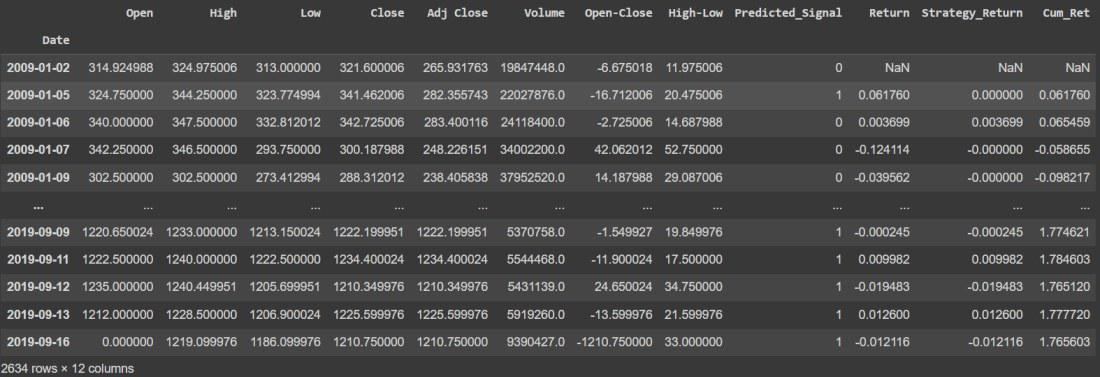
Calculate Cumulative Returns
Calculate Strategy Cumulative Returns
Python `
Plot Strategy Cumulative returns
df['Cum_Strategy'] = df['Strategy_Return'].cumsum() df
`
**Output
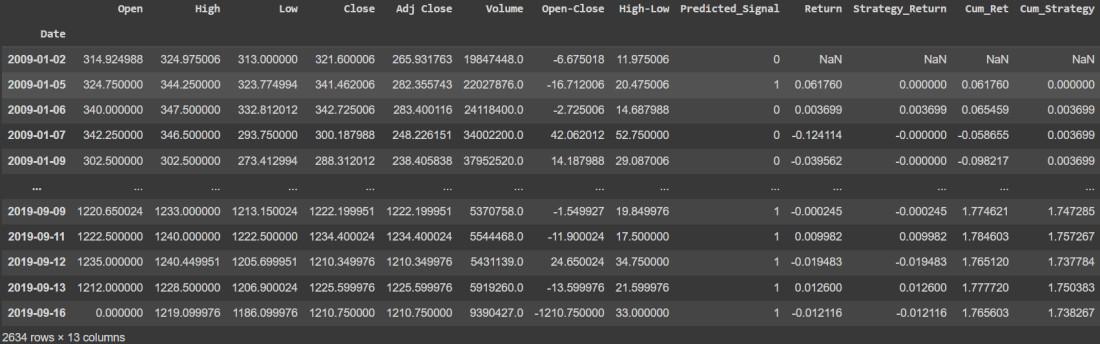
Calculate Strategy Cumulative Returns
Step 11: Visualizing Strategy Returns vs Original Returns
Python `
import matplotlib.pyplot as plt %matplotlib inline
plt.plot(Df['Cum_Ret'],color='red') plt.plot(Df['Cum_Strategy'],color='blue')
`
**Output:

Plot Strategy Returns vs Original Returns
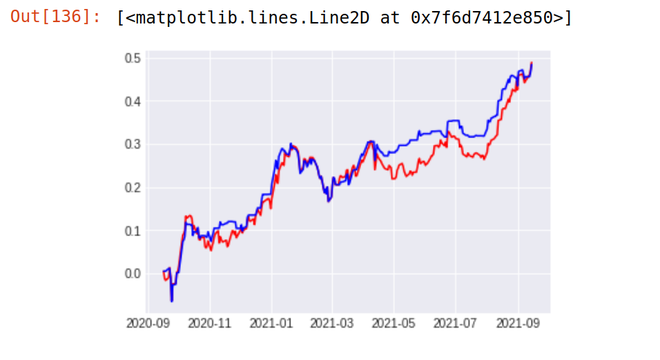
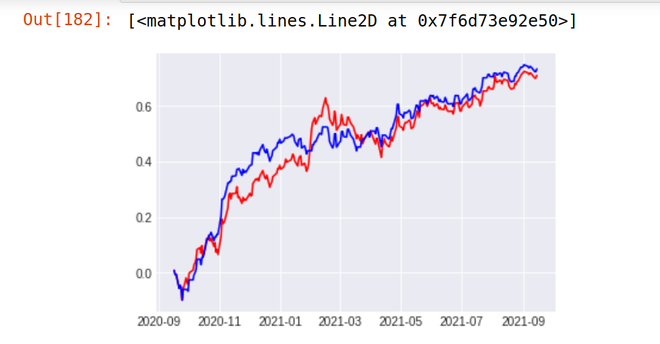
As You Can See Our Strategy Seem to be Totally Outperforming the Performance of The Reliance Stock. Our Strategy (Blue Line) Provided the return of 18.87 % in the last 1 year whereas the stock of Reliance Industries (Red Line) Provides the Return of just 5.97% in the last 1 year. We can further fine tune our model for better accuracy.
Step 12: Let's see our model result on different stocks
**1. TCS
Stock Return Over Last 1 year - 48% Strategy result - 48.9 %
**2. ICICI BANK
Stock Return Over Last 1 year - 48% Strategy result - 48.9 %
**Get the complete notebook link from here:
**Notebook link : **click here.