Implementation of Movie Recommender System Python (original) (raw)
Last Updated : 11 Jul, 2025
Recommender Systems provide personalized suggestions for items that are most relevant to each user by predicting preferences according to user's past choices. They are used in various areas like movies, music, news, search queries, etc. These recommendations are made in two ways:
- **Collaborative filtering: Collaborative filtering makes recommendations based on user's past behavior and similar decisions made by other users to predict items user may be interested in. For example, if User A likes movies X and Y and User B likes Y and Z then system might recommend movie Z to User A.
- **Content-based filtering: Content-based filtering recommends items based on the features of the items and the user's past preferences. For example, if a user likes action movies the system will recommend other action movies based on genres, actors or directors.
In this article we’ll build a basic recommender system using Python that recommends movies based on user past preferences.
Step 1: Import Libraries and Load the Data
In this step we will load pandas ,matplotlib and seaborn library. After that we will load **user ratings for movies file. Each row in this file shows a user’s rating for a specific movie. To download file click here: .tsv file.
Python `
import pandas as pd import matplotlib.pyplot as plt import seaborn as sns
column_names = ['user_id', 'item_id', 'rating', 'timestamp']
path = 'file.tsv'
df = pd.read_csv(path, sep='\t', names=column_names)
df.head()
`
**Output:
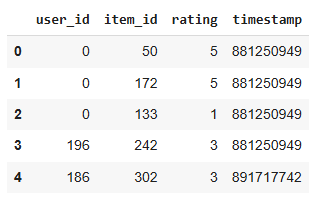
User Rating
Step 2: Loading Movie Titles
Now we load another file that **matches movie IDs to their titles. This helps us show the actual **movie names instead of just numbers. You can download file from here: Movie_Id_Titles.csv.
Python `
movie_titles = pd.read_csv('Movie_Id_Titles.csv') movie_titles.head()
`
**Output:

Movie IDs with their IDs
Step 3: Merging Both Datasets
We now combine the data about user ratings and movie titles and we can see both the **movie names and the **ratings for each movie.
Python `
data = pd.merge(df, movie_titles, on='item_id') data.head()
`
**Output:

Merged Dataset
Step 4: Analyzing Movie Ratings
This gives us the average rating for each movie and use to find top-rated movies.
Python `
data.groupby('title')['rating'].mean().sort_values(ascending=False).head()
`
**Output:

Analyzed Movie Rating
we can also see how many **ratings each movie has. Movies with more ratings are more important when we make recommendations.
Python `
data.groupby('title')['rating'].count().sort_values(ascending=False).head()
`
**Output:

rating of movies
Step 5: Creating a Ratings DataFrame
In this step the DataFrame stores the average rating and number of ratings for each movie. We’ll use this later to filter out movies with few ratings.
Python `
ratings = pd.DataFrame(data.groupby('title')['rating'].mean())
ratings['num of ratings'] = pd.DataFrame(data.groupby('title')['rating'].count())
ratings.head()
`
**Output:

Rating Dataframe
Step 6: Visualizing Ratings
We use **matplotlib and **seaborn to create visual charts that make the data easier to understand.
Python `
sns.set_style('white') %matplotlib inline
`
To Shows how many movies got how many ratings and helps identify popular movies.
Python `
plt.figure(figsize =(10, 4))
ratings['num of ratings'].hist(bins = 70)
`
**Output:

Visualize ratings
We now show the distribution of average ratings across movies
Python `
plt.figure(figsize =(10, 4))
ratings['rating'].hist(bins = 70)
`
**Output:
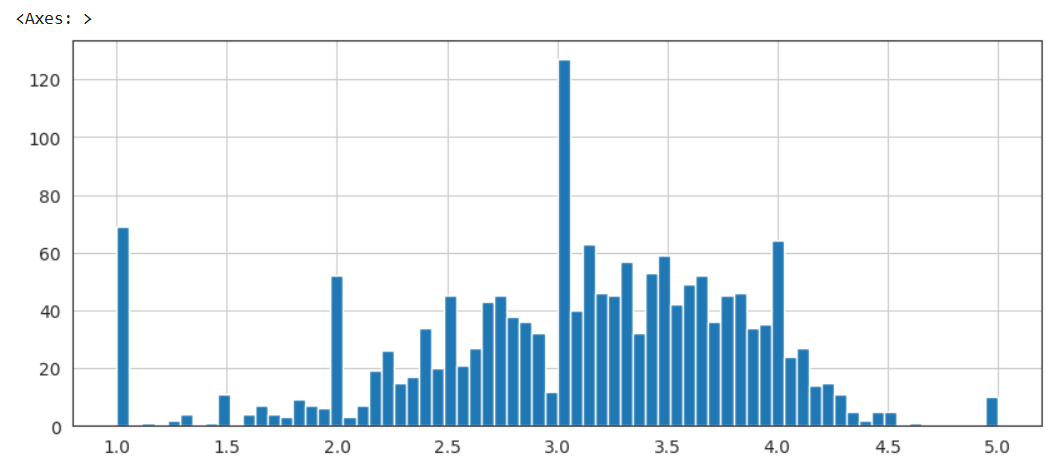
Distribution of average ratings
Step 7: Creating User-Movie Matrix
We now create a **matrix where each row represents a user and each column represents a movie. The values in this matrix are the ratings that users have given to each movie.
Python `
moviemat = data.pivot_table(index ='user_id', columns ='title', values ='rating')
moviemat.head()
ratings.sort_values('num of ratings', ascending = False).head(10)
`
**Output:

User Movie Matrix
Step 8: Finding Similar Movies
We compare how users rated other movies vs. "Star Wars (1977)". corrwith() calculates correlation with all other movies.
Python `
starwars_user_ratings = moviemat['Star Wars (1977)'] liarliar_user_ratings = moviemat['Liar Liar (1997)']
starwars_user_ratings.head()
`
**Output:

Similar Movies
We create a new DataFrame to store these correlations. Drop any NaN values (movies with no overlapping ratings).
Python `
similar_to_starwars = moviemat.corrwith(starwars_user_ratings) similar_to_liarliar = moviemat.corrwith(liarliar_user_ratings)
corr_starwars = pd.DataFrame(similar_to_starwars, columns =['Correlation']) corr_starwars.dropna(inplace = True)
corr_starwars.head()
`
Output:

Correlation between movies
Step 9: Filter Movies with Enough Ratings
Join the correlation data with our ratings dataframe. Filter movies that have more than 100 ratings for more reliable recommendations.
Python `
corr_starwars.sort_values('Correlation', ascending = False).head(10) corr_starwars = corr_starwars.join(ratings['num of ratings'])
corr_starwars.head()
corr_starwars[corr_starwars['num of ratings']>100].sort_values('Correlation', ascending = False).head()
`
**Output:

Filter movies using ratings
Step 10: Trying Another Example
Same process as before now checking for movies similar to “Liar Liar (1997)”.
Python `
corr_liarliar = pd.DataFrame(similar_to_liarliar, columns =['Correlation']) corr_liarliar.dropna(inplace = True)
corr_liarliar = corr_liarliar.join(ratings['num of ratings']) corr_liarliar[corr_liarliar['num of ratings']>100].sort_values('Correlation', ascending = False).head()
`
**Output:

Filter movies with respect to Liar Liar
We can see that our model is working fine giving recommendations based on user preference.
**Get the complete notebook link here:
**Colab Link : **click here.