Python | Linear Regression using sklearn (original) (raw)
Last Updated : 11 Jul, 2025
Linear Regression is a machine learning algorithm based on supervised learning. It performs a regression task. Regression models a target prediction value based on independent variables. It is mostly used for finding out the relationship between variables and forecasting. Different regression models differ based on – the kind of relationship between the dependent and independent variables, they are considering and the number of independent variables being used. This article is going to demonstrate how to use the various Python libraries to implement linear regression on a given dataset. We will demonstrate a binary linear model as this will be easier to visualize. In this demonstration, the model will use Gradient Descent to learn. You can learn about it here.
**Step 1: Importing all the required libraries
Python `
import numpy as np import pandas as pd import seaborn as sns import matplotlib.pyplot as plt from sklearn import preprocessing, svm from sklearn.model_selection import train_test_split from sklearn.linear_model import LinearRegression
`
**Step 2: Reading the dataset:
Python `
df = pd.read_csv('https://www.kaggle.com/datasets/dftow001/bottle-csv') df_binary = df[['Salnty', 'T_degC']]
Taking only the selected two attributes from the dataset
df_binary.columns = ['Sal', 'Temp'] #display the first 5 rows df_binary.head()
`
**Output:
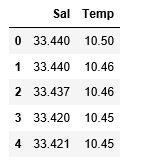
**Step 3: Exploring the data scatter
Python `
#plotting the Scatter plot to check relationship between Sal and Temp sns.lmplot(x ="Sal", y ="Temp", data = df_binary, order = 2, ci = None) plt.show()
`
**Output:
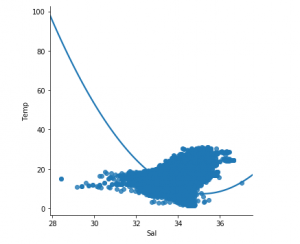
**Step 4: Data cleaning
Python `
Eliminating NaN or missing input numbers
df_binary.fillna(method ='ffill', inplace = True)
`
**Step 5: Training our model
Python `
X = np.array(df_binary['Sal']).reshape(-1, 1) y = np.array(df_binary['Temp']).reshape(-1, 1)
Separating the data into independent and dependent variables
Converting each dataframe into a numpy array
since each dataframe contains only one column
df_binary.dropna(inplace = True)
Dropping any rows with Nan values
X_train, X_test, y_train, y_test = train_test_split(X, y, test_size = 0.25)
Splitting the data into training and testing data
regr = LinearRegression()
regr.fit(X_train, y_train) print(regr.score(X_test, y_test))
`
**Output:

**Step 6: Exploring our results
Python `
y_pred = regr.predict(X_test) plt.scatter(X_test, y_test, color ='b') plt.plot(X_test, y_pred, color ='k')
plt.show()
Data scatter of predicted values
`
**Output:
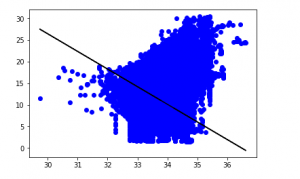
The low accuracy score of our model suggests that our regressive model has not fit very well with the existing data. This suggests that our data is not suitable for linear regression. But sometimes, a dataset may accept a linear regressor if we consider only a part of it. Let us check for that possibility.
**Step 7: Working with a smaller dataset
Python `
df_binary500 = df_binary[:][:500]
Selecting the 1st 500 rows of the data
sns.lmplot(x ="Sal", y ="Temp", data = df_binary500, order = 2, ci = None)
`
**Output:
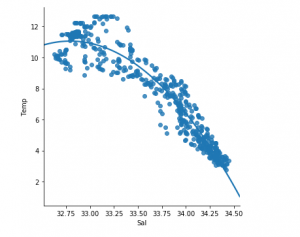
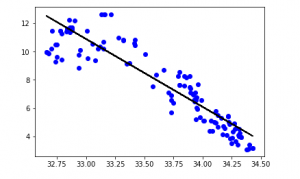
We can already see that the first 500 rows follow a linear model. Continuing with the same steps as before.
Python `
df_binary500.fillna(method ='fill', inplace = True)
X = np.array(df_binary500['Sal']).reshape(-1, 1) y = np.array(df_binary500['Temp']).reshape(-1, 1)
df_binary500.dropna(inplace = True) X_train, X_test, y_train, y_test = train_test_split(X, y, test_size = 0.25)
regr = LinearRegression() regr.fit(X_train, y_train) print(regr.score(X_test, y_test))
`
**Output:

Python `
y_pred = regr.predict(X_test) plt.scatter(X_test, y_test, color ='b') plt.plot(X_test, y_pred, color ='k')
plt.show()
`
**Output:
**Step 8: Evaluation Metrics For Regression
At last, we check the performance of the Linear Regression model with help of evaluation metrics. For Regression algorithms we widely use mean_absolute_error, and mean_squared_error metrics to check the model performance.
Python `
from sklearn.metrics import mean_absolute_error,mean_squared_error
mae = mean_absolute_error(y_true=y_test,y_pred=y_pred) #squared True returns MSE value, False returns RMSE value. mse = mean_squared_error(y_true=y_test,y_pred=y_pred) #default=True rmse = mean_squared_error(y_true=y_test,y_pred=y_pred,squared=False)
print("MAE:",mae) print("MSE:",mse) print("RMSE:",rmse)
`
**Output:
MAE: 0.7927322046360309
MSE: 1.0251137190180517
RMSE: 1.0124789968281078