Support Vector Regression (SVR) using Linear and NonLinear Kernels in Scikit Learn (original) (raw)
Last Updated : 20 Mar, 2026
Support Vector Regression predicts continuous values by fitting a function within a defined error margin. It uses kernel functions to handle both linear relationships and complex non-linear patterns in data.
- Works well with high-dimensional data
- Uses linear and kernel-based transformations
- Controls model flexibility using regularization parameters
- Effective for real-world datasets with limited samples
Linear Kernel SVR
Linear SVR is used when the relationship between input features and the target variable is approximately linear. It fits a straight regression function in the original feature space without transforming the data into higher dimensions.
**Kernel Function:
K(x_i,x_j)=x_i.x_j
**When to use
- Data shows a linear trend
- Large datasets with many features
- Interpretability is important
Linear SVR is computationally efficient, interpretable and suitable for datasets where features have a direct and proportional relationship with the output.
Non-Linear Kernel SVR
Non-linear SVR is applied when the relationship between input and output is complex and cannot be captured by a straight line. It uses kernel functions to implicitly map data into higher-dimensional spaces where a linear relationship can be learned.
This enables SVR to model curved patterns and complex feature interactions commonly found in real-world data.
Common Non-Linear Kernels
- **RBF (Gaussian) Kernel: The RBF kernel is the most widely used non-linear kernel in SVR. It measures similarity based on distance and allows the model to create smooth, flexible regression curves. It is highly effective for capturing localized and non-linear patterns.
- **Polynomial Kernel: The polynomial kernel models polynomial relationships between features and targets. It is useful when interactions between features follow polynomial behaviour but can become computationally expensive for higher degrees.
- **Sigmoid Kernel: The sigmoid kernel resembles neural network activation functions and is less commonly used in regression tasks due to stability issues.
Implementation
Let's see a step-by-step SVR implementation.
Step 1: Import Libraries
We need to import the necessary libraries such a NumPy, Matplotlib, sklearn,
Python `
import numpy as np import matplotlib.pyplot as plt
from sklearn.datasets import load_diabetes from sklearn.model_selection import train_test_split from sklearn.preprocessing import StandardScaler from sklearn.svm import SVR from sklearn.metrics import mean_squared_error, mean_absolute_error
`
Step 2: Load Dataset
Here:
- The diabetes dataset is loaded directly from Scikit-Learn
- X contains medical input features
- y contains disease progression values Python `
data = load_diabetes()
X = data.data y = data.target
`
Step 3: Select One Feature
Here:
- Only the BMI feature is selected from the dataset
- Data is reshaped into a 2D array as required by Scikit-Learn
- Simplifies visualization to a 1D regression curve Python `
X = X[:, 2].reshape(-1, 1)
`
Step 4: Train-Test Split
Dataset is split into training and testing subsets, 80% data is used for training and 20% for testing.
Python `
X_train, X_test, y_train, y_test = train_test_split( X, y, test_size=0.2, random_state=42 )
`
Step 5: Feature Scaling
- Separate scalers are created for input features and target values
- Training data is standardized to zero mean and unit variance
- Test data is transformed using the same scaling parameters
- Target values are also scaled for stable SVR optimization Python `
scaler_X = StandardScaler() scaler_y = StandardScaler()
X_train = scaler_X.fit_transform(X_train) X_test = scaler_X.transform(X_test)
y_train = scaler_y.fit_transform(y_train.reshape(-1, 1)).ravel() y_test = scaler_y.transform(y_test.reshape(-1, 1)).ravel()
`
Step 6: Train Linear Kernel SVR
Here:
- A Linear SVR model is created
- C=100 controls error penalty strength
- epsilon=0.1 defines the tolerance margin
- Model learns a straight regression function
- Predictions are generated on test data Python `
svr_linear = SVR(kernel='linear', C=100, epsilon=0.1) svr_linear.fit(X_train, y_train)
y_pred_linear = svr_linear.predict(X_test)
`
Step 7: Train RBF Kernel SVR
- An RBF (non-linear) SVR model is created
- gamma controls influence range of data points
- Model learns a smooth, non-linear regression curve
- Predictions are generated for comparison Python `
svr_rbf = SVR(kernel='rbf', C=100, gamma=0.5, epsilon=0.1) svr_rbf.fit(X_train, y_train)
y_pred_rbf = svr_rbf.predict(X_test)
`
Step 8: Sort Test Data
- Test input values are sorted in ascending order
- Corresponding actual and predicted values are reordered Python `
sorted_idx = np.argsort(X_test[:, 0])
X_test_sorted = X_test[sorted_idx] y_test_sorted = y_test[sorted_idx]
y_pred_linear_sorted = y_pred_linear[sorted_idx] y_pred_rbf_sorted = y_pred_rbf[sorted_idx]
`
Step 9: Plot Linear SVR
Here we plot the linear SVR:
Python `
plt.figure(figsize=(8, 5)) plt.scatter(X_test_sorted, y_test_sorted, color='green', label='Actual') plt.plot(X_test_sorted, y_pred_linear_sorted, color='black', linewidth=2, label='Linear SVR')
plt.title("Linear Kernel SVR") plt.xlabel("BMI (scaled)") plt.ylabel("Disease Progression (scaled)") plt.legend() plt.show()
`
**Output:
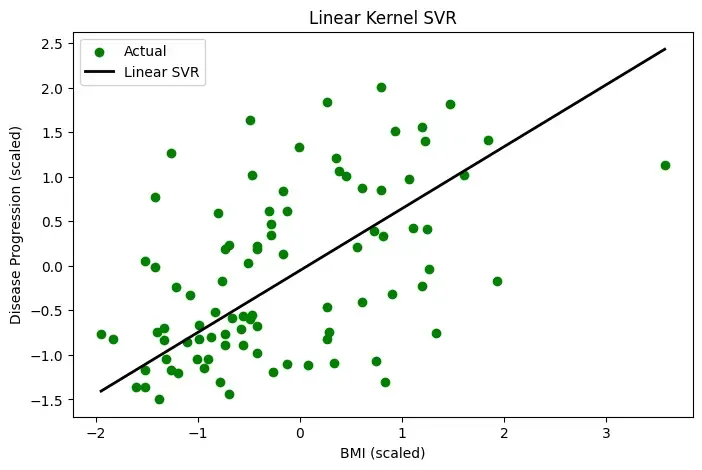
Plot
Step 10: Plot RBF SVR
We plot the RBF SVR:
Python `
plt.figure(figsize=(8, 5)) plt.scatter(X_test_sorted, y_test_sorted, color='green', label='Actual') plt.plot(X_test_sorted, y_pred_rbf_sorted, color='blue', linewidth=2, label='RBF SVR')
plt.title("RBF Kernel SVR – Diabetes Dataset") plt.xlabel("BMI (scaled)") plt.ylabel("Disease Progression (scaled)") plt.legend() plt.show()
`
**Output:
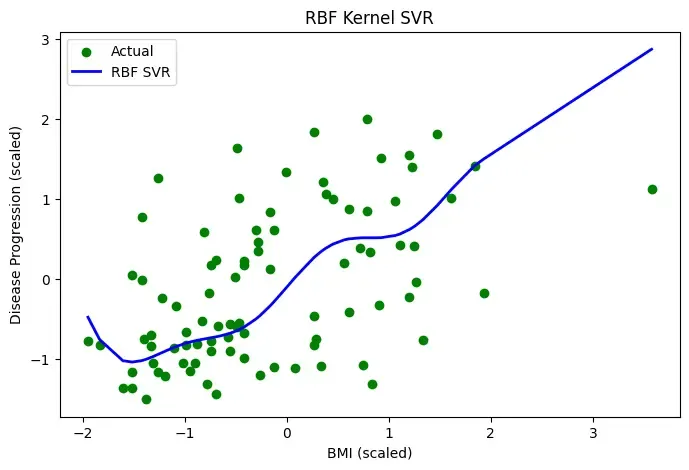
Plot
Step 11: Evaluate Models
**a. Linear SVR
- RMSE measures average prediction error magnitude
- MAE measures absolute deviation from actual values
- Higher values indicate weaker performance Python `
rmse_linear = np.sqrt(mean_squared_error(y_test, y_pred_linear)) mae_linear = mean_absolute_error(y_test, y_pred_linear)
print("Linear SVR RMSE:", rmse_linear) print("Linear SVR MAE:", mae_linear)
`
**Output:
Linear SVR RMSE: 0.8423305650413904
Linear SVR MAE: 0.6735880994376383
**b. RBF SVR
- Same metrics are computed for fair comparison
- Lower RMSE and MAE indicate better model fit
- Confirms numerical superiority of Linear SVR for this dataset Python `
rmse_rbf = np.sqrt(mean_squared_error(y_test, y_pred_rbf)) mae_rbf = mean_absolute_error(y_test, y_pred_rbf)
print("RBF SVR RMSE:", rmse_rbf) print("RBF SVR MAE:", mae_rbf)
`
**Output:
RBF SVR RMSE: 0.8753416035431131
RBF SVR MAE: 0.6797975426553673
Applications
- **Medical Prediction: Used to estimate disease progression and patient health outcomes from clinical data.
- **Financial Forecasting: Applied in predicting stock prices, returns and market trends with non-linear behavior.
- **Energy Demand Estimation: Helps forecast electricity load and energy consumption patterns.
- **Sales Forecasting: Used to predict product demand and future sales in business analytics.
- **Engineering Modelling: Applied in modeling physical systems and scientific regression problems.
Advantages
- **Good Generalization: Margin-based learning helps SVR perform well on unseen data.
- **Handles Non-Linearity: Kernel functions allow SVR to model complex relationships.
- **Robust to Noise: ε-insensitive loss reduces sensitivity to small errors and noise.
- **Effective with Small Data: Performs well even with limited training samples.
- **Kernel Flexibility: Different kernels can be chosen based on problem requirements.
Limitations
- **Hyperparameter Sensitivity: Requires careful tuning of C, ε and kernel parameters.
- **High Computational Cost: Training becomes slow for large datasets.
- **Scaling Requirement: Feature scaling is mandatory for good performance.
- **Low Interpretability: Non-linear SVR models are hard to interpret.
- **Kernel Selection Difficulty: Choosing the right kernel often needs experimentation.