What is Standardization in Machine Learning (original) (raw)
Last Updated : 23 Jul, 2025
In Machine Learning we train our data to predict or classify things in such a manner that isn't hardcoded in the machine. So for the first, we have the Dataset or the input data to be pre-processed and manipulated for our desired outcomes. Any ML Model to be built follows the following procedure:
- Collect Data
- Perform Data Munging/Cleaning (Feature Scaling)
- Pre-Process Data
- Apply Visualizations
Feature Scaling is a method to standardize the features present in the data in a fixed range. It has to perform during the data pre-processing. It has two main ways: Standardization and Normalization.
Standardization
The steps to be followed are :
Data collection
Our data can be in various formats i.e., numbers (integers) & words (strings), for now, we'll consider only the numbers in our Dataset.
Assume our dataset has random numeric values in the range of 1 to 95,000 (in random order). Just for our understanding consider a small Dataset of barely 10 values with numbers in the given range and randomized order.
- 99
- 789
- 1
- 541
- 5
- 6589
- 94142
- 7
- 50826
- 35464
If we just look at these values, their range is so high, that while training the model with 10,000 such values will take lot of time. That's where the problem arises.
Understanding standardization
We have a solution to solve the problem arisen i.e. Standardization. It helps us solve this by :
- Down Scaling the Values to a scale common to all, usually in the range -1 to +1.
- And keeping the Range between the values intact.
So, how do we do that? we'll there's a mathematical formula for the same i.e., Z-Score = (Current_value - Mean) / Standard Deviation.

Standardization Formula
Using this formula we are replacing all the input values by the Z-Score for each and every value. Hence we get values ranging from -1 to +1, keeping the range intact.
Standardization performs the following:
- Converts the Mean (μ) to 0
- Converts to S.D. (σ) to 1
It's pretty obvious for Mean = 0 and S.D = 1 as all the values will have such less difference and each value will nearly be equal 0, hence Mean = 0 and S.D. = 1.
NOTE : (Just for Better Understanding)
For Mean
When we Subtract a value Smaller than the Mean we get (-ve) Output
When we Subtract a value Larger than the Mean we get (+ve) OutputHence, when we get (-ve) & (+ve) Values for Subtraction of Value with Mean, while Summation of all these values,
We get the Final Mean as 0.And when we get the Mean as 0, it means that most or nearly all values are equal to highly close to 0 and have very low variance among them.
Therefore, the S.D also becomes 1 (as good as no difference).
Implementation of Code
Here we are doing the Following:
- Calculating the Z-Score
- Comparing the Original Values and Standardized Values
- Comparing the Range of both using Scatter Plots Python3 `
Importing Libraries
import matplotlib import matplotlib.pyplot as plt
We are just using 10 values
for our Dataset
Here, dataset_0 will be constant
as it's range is just 1 - 10
But, dataset_1 will be scaled down
as it's range is 1 - 95,000
global dataset_0, dataset_1 dataset_0 = [10, 5, 6, 1, 3, 7, 9, 4, 8, 2] dataset_1 = [1, 99, 789, 5, 6859, 541, 94142, 7, 50826, 35464]
n = len(dataset_1) mean_ans = 0 ans = 0 j = 0
`
Now to calculate the summation, run below code :
Python3 `
Calculating summation
for i in dataset_1: j = j + i k = i*i ans = ans + k
print('n : ', n) print("Summation (X) : ", j) print("Summation (X^2) : ", ans)
`
Output :
n : 10 Summation (X) : 188733 Summation (X^2) : 12751664695
Then Calculate the Standard Deviation
Python3 `
Calculating Standard Deviation
part_1 = ans/n part_2 = mean_ans*mean_ans standard_deviation = part_1 - part_2 print("Standard Deviation : ", standard_deviation)
`
Output :
1275166469.5
Then calculate the Mean by using this code
Python3 `
Calculating Mean
mean = j/n mean
`
Output :
18873.3
To Calculate the Z-Score for each Value of dataset_1
Python3 `
Calculating the Z-Score for each
Value of dataset_1
final_z_score = [] print("Calculating Z-Score of Each Value in dataset_1")
for i in dataset_1: z_score = (i-mean)/standard_deviation final_z_score.append("{:.20f}".format(z_score))
`
Comparison between the Values of Original Dataset and Scaled Down Dataset
Python3 `
Comparing the Values of Original Dataset and Saled Down Dataset
print("\nOriginal DataSet | Z-Score ") print() for i in range(len(dataset_1)): print(" ", dataset_1[i], " | ", final_z_score[i])
`
Output :
Original DataSet | Z-Score
 1           |      -0.00001479987158649171
 99          |      -0.00001472301887561513
 789         |      -0.00001418191305413712
 5           |      -0.00001479673474114981
 6859        |      -0.00000942175024780167
 541         |      -0.00001437639746533501
 94142       |      0.00005902656774649453
 7           |      -0.00001479516631847886
 50826       |      0.00002505766953904366
 35464       |      0.00001301061500347112
Now we will compare and see the graph of the Original Values and the Standardized Values.
Python3 `
Here We are checking the Graph
of the Original Values
plt.scatter(dataset_0, dataset_1, label="stars", color="blue", marker="*", s=40) plt.xlabel('x - axis') plt.ylabel('y - axis') plt.legend() plt.show()
Here we are checking the Graph of
the Standardized Values
plt.scatter(dataset_0, final_z_score, label="stars", color="blue", marker="*", s=30) plt.xlabel('x - axis') plt.ylabel('y - axis') plt.legend() plt.show()
`
Output :

Graph of the Original Values
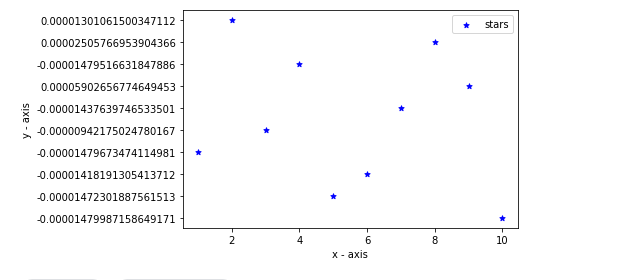
Graph of the Standardized Values
Python3 `
final_z_score = []
for i in dataset_1: z_score = (i-mean)/standard_deviation final_z_score.append("{:.20f}".format(z_score))
`
Comparison between the Values of Original Dataset and Scaled Down Dataset.
Python3 `
print(" Original DataSet | Z-Score ") print() for i in range(len(dataset_1)): print(" ", dataset_1[i], " | ", final_z_score[i])
`
Output :
Original DataSet | Z-Score
      1          |      -0.00001479987158649171
      99         |      -0.00001472301887561513
      789        |      -0.00001418191305413712
      5          |      -0.00001479673474114981
      6859       |      -0.00000942175024780167
      541        |      -0.00001437639746533501
      94142      |      0.00005902656774649453
      7          |      -0.00001479516631847886
      50826      |      0.00002505766953904366
      35464      |      0.00001301061500347112
Comparing the Range of Values using Graphs
- Graph of the Original Values
Python3 `
Now we will compare and see the graph
of the Original Values and the
Standardized Values
import matplotlib import matplotlib.pyplot as plt
Here We are checking the Graph of the
Original Values
plt.scatter(dataset_0, dataset_1, label="stars", color="blue", marker="*", s=40)
plt.xlabel('x - axis') plt.ylabel('y - axis')
plt.title('Original Values') plt.legend()
plt.show()
`
Output :

Graph of the Original Values
- Graph of the Standardized Values
Python3 `
import matplotlib import matplotlib.pyplot as plt
plt.scatter(dataset_0, final_z_score, label= "stars", color= "blue", marker= "*", s=30)
plt.xlabel('x - axis') plt.ylabel('y - axis')
plt.title('Original Values') plt.legend()
plt.show()
`
Output :

Graph of the Standardized Values
Hence we have Reviewed, Understood the Concept, and Implemented as well the Concept of Standardization in Machine Learning