MariaDB UPDATE Statement (original) (raw)
Last Updated : 22 Jan, 2024
**MariaDB uses SQL (**Structured Query Language) and it is an **open-source relational database management system (RDBMS) for **managing and **manipulating data. MariaDB is known for its **high performance, even on large datasets. This makes it a good choice for applications that require fast **data access. MariaDB can be used to handle large amounts of data with easy **Scalability and **Flexibility.
In this article, We will learn about the UPDATE Statement in the article along with the **syntax and **practical examples. After reading this article, you will have a decent understanding of the UPDATE Statement in MariaDB.
UPDATE Statement in MariaDB
The MariaDB update statement is used to **modify the existing record in the table. It allows users to set **new values for specified columns based on specified conditions. With the help of the UPDATE Statement in MariaDB, one can easily change the existing value from the table or database. **Sometimes it happens we may enter incorrect data into the database or table so we can easily correct them using the UPDATE Statement.
**Syntax:
UPDATE table_name SET col 1 = value 1, col 2 = value 2, ... col n = value n [WHERE condition];
**Explanation:
- **table_name: The name of the table you want to update.
- **SET: Specifies the columns and their values.
- **col 1, col 2,..., col n: The columns to be updated.
- **value 1, value 2,..., value n: The new values for the specified columns.
- **WHERE Clause: This is an optional clause that filters the rows based on specific conditions.
Examples of UPDATE Statement
To understand the UPDATE Statement in the MariaDB, We need a table on which we will perform some operations and queries to understand the UPDATE Operator. Here we have **Workers Table which consist of id, worker_name, phone, department, and **salary.
Here the id is considered as a **PRIMARY KEY to make sure the **UNIQUE entry in the Workers table.
After Inserting some data into the **Workers table, The table looks:
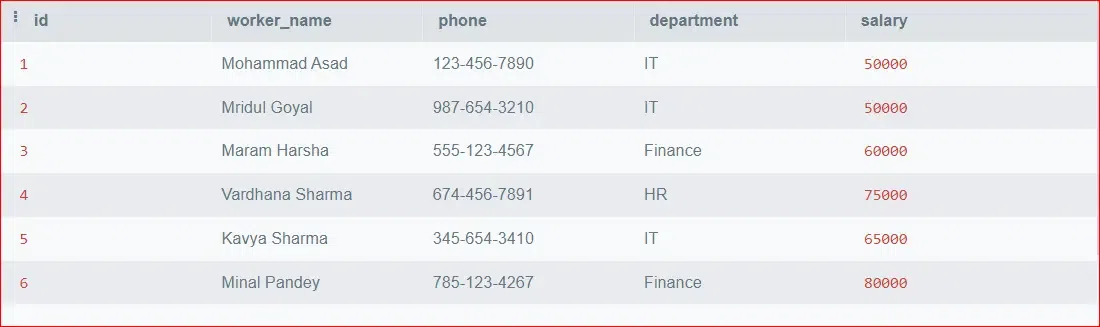
Workers Table
Let's create an another table called Employees which consist of **emp_id, emp_name, and salary as Columns.
After Inserting some data into the **Employees table, The table looks:

Employees Table
Example 1: UPDATE Statement with Single Column
**Query:
Now We will **updating the **salaries of the **IT department employees in the **Workers table.
UPDATE Workers SET salary = 90000 WHERE department = 'IT';
**Output:

Update Single Column
**Explanation: In the above query, We have update the salary all **workers who works in **IT department and getupdated to **90000.
Example 2: UPDATE Statement with Multiple Columns
**Query:
Let's updating the **phone number and department of workers whose name is **Mridul Goyal.
UPDATE Workers SET phone = '999-888-7777', department = 'HR' WHERE worker_name = 'Mridul Goyal';
**Output:
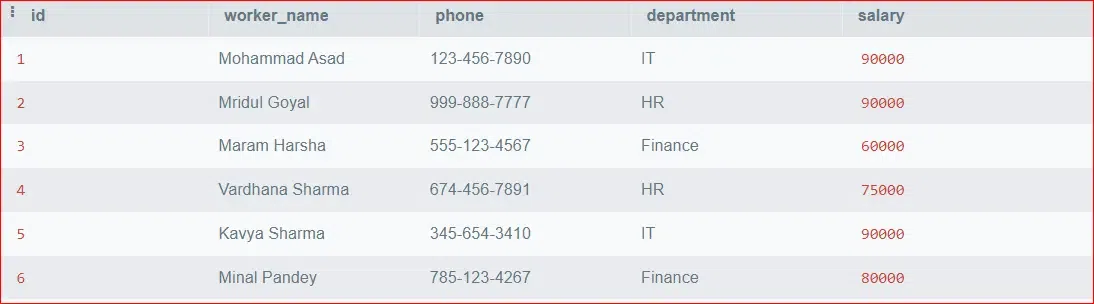
Update Multiple Columns
**Explanation: In the above Query, We have update the **department name and phone number of employees in the **Workers Table whose name is **Mridul Goyal.
Example 3: Update All Rows Using UPDATE Statement
**Query:
Let's update the all different department name to same department name as **IT of **Workers Table.
UPDATE Workers SET department = 'IT';
**Output:

Update All Rows
**Explanation: In the above Query, We have update the all department name of the **Workers Table to **IT department name.
Example 4: Update Single Column Based on Specific Condition.
**Query:
Let's update the salary of all employees who works in the **IT department.
UPDATE Workers SET salary = salary * 1.1 WHERE department = 'IT';
**Output:
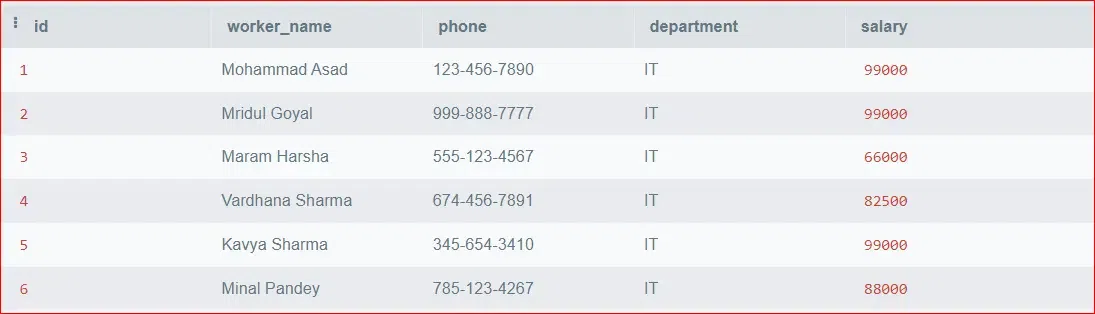
Updating salary
**Explanation: In the above Query, We have update the new salary of all employees who in **IT Department.
Example 5: UPDATE Statement to Modify the Records in Multiple Tables
**Query:
We will perform an update operation on the **worker_name column in the **Workers table with values from the **emp_name column in the **Employees table when, and only when, **id column is equal to **emp_id column and **WHERE salary in the **Workers table is **greater than 50000.
UPDATE Workers, Employees SET Workers.worker_name = Employees.emp_name
WHERE Workers.id = Employees.emp_id AND Workers.salary > 50000;
**Output:

Update Multiple Tables
**Explanation: In the above Query, We update the employees name of Workers Table from the Employees table where salary is 50000.
Example 6: UPDATE Statement With Subquery
**Query:
We will updating the salary of **Vivek Sharma based on the **average salary of all **Employees.
UPDATE Employees SET salary = (SELECT AVG(salary) FROM Employees) WHERE emp_name = 'Vivek Sharma';
**Output:

Update Subquery
**Explanation: In the above Query we have updated salary of employee **Vivek Sharma which will get updated based on the **average salary of all employees in the **Employees table.
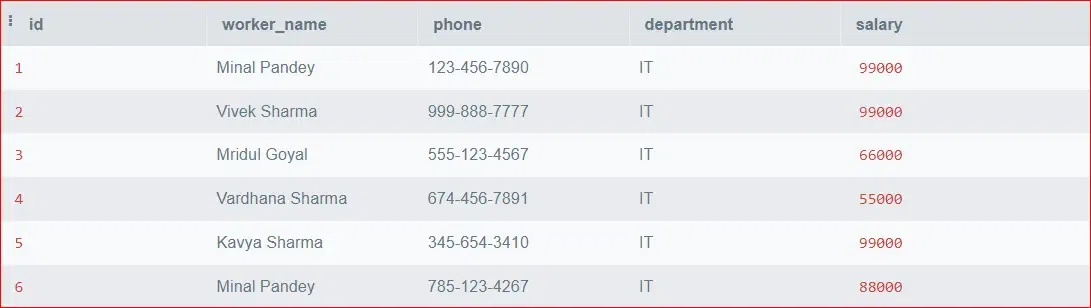
Modify Single Row
Example 7: UPDATE Statement to Modify Multiple Rows
**Query:
We will update all the rows WHERE **department name changed from is **IT to **Accounts department.
UPDATE Workers SET department = 'Accounts' WHERE department = 'IT';
**Output:
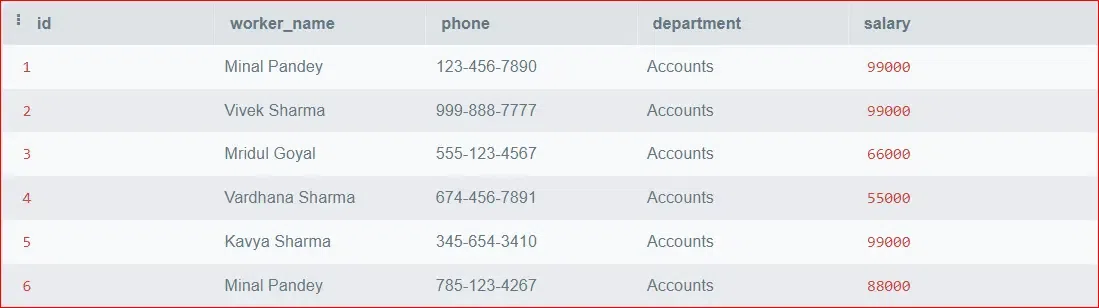
Modify multiple rows
**Explanation:In the above Query, We have updated the **department name from the **IT to **Accounts Departments.
Difference Between ALTER and UPDATE Command
| ALTER Command | UPDATE Command |
|---|---|
| Modifies the structure of table (add, modify, or drop columns) | Modifies the existing data (change values in specific columns) |
| ALTER TABLE table_name action; | UPDATE table_name SET col 1 = value 1, col 2 = value 2, ... col n = value n [WHERE condition]; |
| It does not effect the existing data. | Directly modifies the data in the specified rows based on the WHERE condition. |
| It is not transactional. Changes are committed immediately. | It is transactional. Changes can be rolled back if the statement is part of a transaction. |
| Used to modify the structure of a table, such as adding or removing columns, changing data types, etc. | Used to modify existing data, such as updating values in specific columns based on certain conditions. |
| Some ALTER operations may require significant system resources and may lock the table during execution. | Depending on the complexity of the UPDATE statement and the number of rows affected, it may also have performance implications, especially when updating large datasets. |
| Some ALTER operations may not be atomic and may require multiple steps. | It is generally atomic, and all changes are applied together as a single operation. |
Conclusion
The UPDATE statement in MariaDB allow users to manipulate and maintain data elements within tables. Whether updating a single column or multiple columns with complex conditions, this is a powerful feature in MariaDB that ensure **integrity and **accuracy through updating of columns with various parameters. With the help of UPDATE Statement one can easily update the data of database or tables.