Content Management System (CMS) using React and Express.js (original) (raw)
Last Updated : 23 Jul, 2025
This project is a Content Management System (CMS) Admin Panel developed using React for the frontend and NodeJS and ExpressJS for the backend. The Admin Panel allows administrators to manage content, including viewing and editing posts, approving pending posts, and adding new content. It features real-time updates, allowing administrators to collaboratively manage content seamlessly.
**Output Preview: Let us have a look at how the final output will look like.

Prerequisites:
Approach to Create a Content Management System:
- **Server-side (server.js):
- Set up an ExpressJS server.
- Define routes for handling **GET, POST, and **PUT requests.
- Implement endpoints for fetching content, approving content, editing content, and adding new content.
- Use
body-parsermiddleware to parse request bodies. - Enable **CORS to allow cross-origin requests.
- Use an array to store content data.
- Implement functions to handle different types of requests, such as approving content, editing content, and adding new content.
- **Client-side (App.js):
- Use React functional components and hooks for managing state and side effects.
- Utilize
axiosfor making HTTP requests to the server. - Use
useStatehooks to manage the state of posts, new content, and content being edited. - Use
useEffecthook to fetch content from the server when the component mounts. - Implement functions to handle different user interactions, such as clicking on dashboard or posts, approving posts, editing posts, adding new content, and handling input changes.
- Render UI components dynamically based on the current state, such as displaying posts, forms for adding new content and editing content, and handling different actions based on the status of posts (e.g., pending or approved).
Steps to Create a NodeJS App and Installing module:
**Step 1: Create a new project directory and navigate to your project directory.
mkdir <>
cd <>
**Step 2: Run the following command to initialize a new NodeJS project.
npm init -y
**Step 2: Install the required the packages in your server using the following command.
npm install express body-parser cors
Project Structure(Backend):

Project Structure
The updated dependencies in **package.json file of backend will look like:
"dependencies": {
"express": "^4.18.2",
"cors": "^2.8.5",
"body-parser": "^1.20.2"
}
**Example: Below is an example of creating a server of content management system.
JavaScript ``
// server.js
const express = require('express'); const bodyParser = require('body-parser'); const cors = require('cors');
const app = express(); const port = 5000;
app.use(bodyParser.json()); app.use(cors());
let contentList = [ { id: '1', title: 'Post 1', status: 'pending', allowComment: true, description: 'This is the first post.' }, { id: '2', title: 'Post 2', status: 'pending', allowComment: true, description: 'This is the second post.' }, { id: '3', title: 'Post 3', status: 'pending', allowComment: false, description: 'This is the third post.' }, ];
app.get('/cms', (req, res) => { res.json(contentList); });
app.post('/cms/approve/:id', (req, res) => { const { id } = req.params; const content = contentList.find( (item) => item.id === id);
if (content) {
    content.status = 'approved';
    // Move the approved content to the end of the list
    contentList = contentList.filter(
        (item) => item.id !== id);
    contentList.push(content);

    res.json({
        message: 'Content approved successfully'
    });
} else {
    res.status(404).json({
        error: 'Content not found'
    });
}
});
app.put('/cms/edit/:id', (req, res) => { const { id } = req.params; const updatedContent = req.body; const index = contentList.findIndex( (item) => item.id === id);
if (index !== -1) {
    contentList[index] = {
        ...contentList[index],
        ...updatedContent
    };
    res.json({
        message: 'Content updated successfully'
    });
} else {
    res.status(404).json({
        error: 'Content not found'
    });
}
});
app.post('/cms', (req, res) => { const newContent = req.body; newContent.status = 'pending'; contentList.push(newContent);
res.json({
    message: 'Content added successfully'
});
});
app.listen(port, () => {
console.log(Server is running on port ${port});
});
``
**Start the server using the following command.
node index.js
This will run your server on http://localhost:5000/cms. You should see the message "Server is running on port 5000" in the terminal.
Steps to Create a Frontend using React:
**Step 1: Create a new application using the following command.
npx create-react-app <>
cd <>
**Step 2: Install the required packages in your application using the following command.
npm intall axios
Project Structure(Frontend):
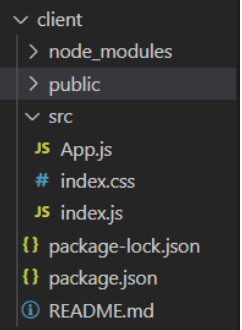
Project structure
The updated dependencies in **package.json file of frontend will look like:
"dependencies": {
"axios": "^1.6.7",
"react": "^18.2.0",
"react-dom": "^18.2.0",
"web-vitals": "^2.1.4"
}
**Example: Below is an example of creating frontend for content management system.
CSS `
/* index.css */
body { font-family: 'Arial', sans-serif; margin: 0; padding: 0; }
nav { background-color: #333; color: white; padding: 10px; text-align: center; }
.hero-section { display: flex; justify-content: space-between; margin: 20px; }
.left-part { width: 30%; }
.right-part { width: 65%; }
table { width: 100%; border-collapse: collapse; margin-top: 20px; }
th, td { border: 1px solid #ddd; padding: 8px; text-align: left; }
th { background-color: #333; color: white; }
form { margin-top: 20px; }
button { background-color: #4CAF50; color: white; padding: 10px 15px; border: none; border-radius: 5px; cursor: pointer; }
button:hover { background-color: #45a049; }
textarea, input[type="text"], select { width: 100%; padding: 10px; margin: 5px 0 10px 0; display: inline-block; border: 1px solid #ccc; box-sizing: border-box; }
/* Add more styles as needed */
` JavaScript ``
// App.js
import React, { useState, useEffect } from 'react'; import axios from 'axios'; import './index.css';
function App() { const [showPosts, setShowPosts] = useState(false); const [posts, setPosts] = useState([]); const [newContent, setNewContent] = useState({ title: '', description: '', allowComment: true }); const [editContent, setEditContent] = useState(null);
useEffect(() => { // Fetch content from the server when the component mounts axios.get('http://localhost:5000/cms') .then(response => setPosts(response.data)) .catch(error => console.error('Error fetching content:', error)); }, []); // Empty dependency array ensures the effect runs only once
const handleDashboardClick = () => { // Reset the state to initial values setShowPosts(false); setPosts([]); };
const handlePostsClick = () => { // Fetch posts from the server when the "Posts" button is clicked axios.get('http://localhost:5000/cms') .then(response => { setPosts(response.data); setShowPosts(true); }) .catch(error => console.error('Error fetching posts:', error)); };
const handleApprove = (id) => {
// Approve post on the server
axios.post(http://localhost:5000/cms/approve/${id})
.then(response => {
console.log(response.data);
// Update the local state to reflect the change
setPosts(prevPosts =>
prevPosts.map(post => post.id === id ?
{ ...post, status: 'approved' } : post));
})
.catch(error =>
console.error('Error approving post:', error));
};
const handleEdit = (post) => { // Set the post to be edited in the state setEditContent(post); };
const handleSaveEdit = () => {
// Save the edited content on the server
axios.put(http://localhost:5000/cms/edit/${editContent.id},
editContent)
.then(response => {
console.log(response.data);
// Update the local state to reflect the change
setPosts(prevPosts =>
prevPosts.map(post => post.id === editContent.id ?
{ ...post, ...editContent } : post));
// Reset the editContent state
setEditContent(null);
})
.catch(error =>
console.error('Error saving edit:', error));
};
const handleCancelEdit = () => { // Reset the editContent state setEditContent(null); };
const handleInputChange = (e) => { // Update the newContent state when input changes setNewContent({ ...newContent, [e.target.name]: e.target.value }); };
const handleAddContent = () => { // Add new content on the server axios.post('http://localhost:5000/cms', newContent) .then(response => { console.log(response.data); // Update the local state to reflect the change setPosts(prevPosts => [...prevPosts, { ...newContent, status: 'pending', id: response.data.id }]); // Reset the newContent state setNewContent({ title: '', description: '', allowComment: true }); }) .catch(error => console.error('Error adding content:', error)); };
const handleInputChangeEdit = (e) => { // Update the editContent state when input changes setEditContent({ ...editContent, [e.target.name]: e.target.type === 'checkbox' ? e.target.checked : e.target.value }); };
return (
  {/* Hero Section */}
  <div className="hero-section">
    {/* Left Part */}
    <div className="left-part">
      <h2>Admin Panel</h2>
      <button onClick={handleDashboardClick}>
        Dashboard
      </button><br /><br />
      <button onClick={handlePostsClick}>
        Posts
      </button>
    </div>

    {/* Right Part */}
    <div className="right-part">
      {showPosts ? (
        <div>
          <h3>Posts</h3>
          <table>
            <thead>
              <tr>
                <th>Title</th>
                <th>Description</th>
                <th>Status</th>
                <th>Allow Comment</th>
                <th>Actions</th>
              </tr>
            </thead>
            <tbody>
              {posts.map(post => (
                <tr key={post.id}>
                  <td>{post.title}</td>
                  <td>{post.description}</td>
                  <td>{post.status}</td>
                  <td>{post.allowComment ? 'Yes' : 'No'}</td>
                  <td>
                    {post.status === 'pending' && (
                      <>
                        <button
                          onClick={() => handleApprove(post.id)}>
                          Approve
                        </button>
                        <button
                          onClick={() => handleEdit(post)}>
                          Edit
                        </button>
                      </>
                    )}
                  </td>
                </tr>
              ))}
            </tbody>
          </table>
        </div>
      ) : (
        <p>Click on "Posts" to view content.</p>
      )}

      {/* Form for Adding New Content */}
      <h3>Add New Content</h3>
      <form>
        <label>
          Title:
          <input type="text" name="title"
            value={newContent.title}
            onChange={handleInputChange} />
        </label>
        <br />
        <label>
          Description:
          <textarea name="description"
            value={newContent.description}
            onChange={handleInputChange} />
        </label>
        <br />
        <label>
          Allow Comment:
          <select name="allowComment"
            value={newContent.allowComment}
            onChange={handleInputChange}>
            <option value={true}>Yes</option>
            <option value={false}>No</option>
          </select>
        </label>
        <br />
        <button type="button"
          onClick={handleAddContent}>
          Add Content
        </button>
      </form>

      {/* Form for Editing Content */}
      {editContent && (
        <>
          <h3>Edit Content</h3>
          <form>
            <label>
              Title:
              <input type="text" name="title"
                value={editContent.title}
                onChange={handleInputChangeEdit} />
            </label>
            <br />
            <label>
              Description:
              <textarea name="description"
                value={editContent.description}
                onChange={handleInputChangeEdit} />
            </label>
            <br />
            <label>
              Allow Comment:
              <select name="allowComment"
                value={editContent.allowComment}
                onChange={handleInputChangeEdit}>
                <option value={true}>Yes</option>
                <option value={false}>No</option>
              </select>
            </label>
            <br />
            <button type="button"
              onClick={handleSaveEdit}>
              Save
            </button>
            <button type="button"
              onClick={handleCancelEdit}>
              Cancel
            </button>
          </form>
        </>
      )}
    </div>
  </div>
</div>
); } export default App;
``
**Step 4: Start the React App
npm start
**Output:

Content Management System