MERN Stack (original) (raw)
Last Updated : 3 Jun, 2026
MERN Stack is a popular full-stack JavaScript framework used to build modern and scalable web applications using a single programming language across both frontend and backend.
- **MongoDB: Non-Relational Database
- **Express: NodeJS web server
- **React: JavaScript Frontend Library
- **Node: JavaScript Web Server
Working of MERN Stack
The MERN Stack works by connecting the frontend, backend, and database to create a complete web application. Each technology plays a specific role in handling user interactions, processing data, and storing information.
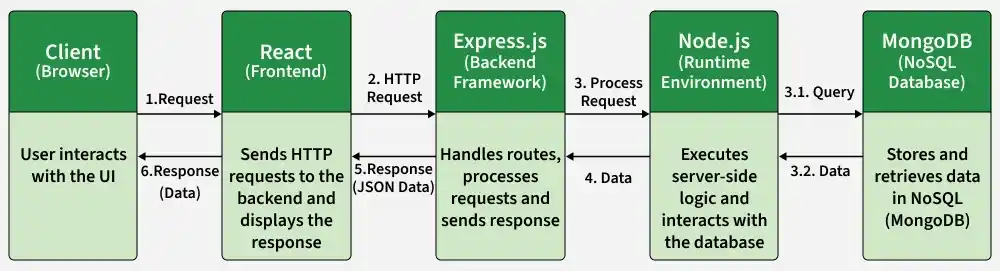
- ReactJS creates the user interface and handles user interactions.
- Users send requests through the React frontend.
- ExpressJS receives and processes these requests.
- NodeJS executes the server-side logic and manages application operations.
- MongoDB, a NoSQL database, stores and retrieves application data.
- Processed data is sent back from the backend to React for display to the user.
Roadmap to become a MERN Stack Developer
**Step 1: Learn basics of HTML, CSS and JavaScript
**Step 2: Learn React which is a frontend library for building User Interfaces
**Step 3: Learn NodeJS which is JavaScript runtime environment
**Step 4: Learn ExpressJS, a framework built upon NodeJS to simplify the process of creating web application and API building
**Step 5: Learn MongoDB, a NoSQL database to store and retrieve data from database.
Getting Started with MERN Stack
There are two requirements to start a MERN stack project:
**Step 1: Install node on your system depending on your Operating System:
**Step 2: Install a Code Editor (Visual Studio Code is recommended).
Setting Up a MERN Stack Project
To setup MERN stack we need to create a folder structure for both frontend and backend. Then we have to define database schema to store and retrieve data from the database.
Follow the below steps to create a basic structure:
**Step 1: Create Project Structure
mkdir frontend
mkdir backend
**Step 2: Navigate to Frontend
cd frontend
**Step 3: Create React Application
npx create-react-app
**Step 4: Navigate to Backend
cd..
cd backend
**Step 5: Initialize Backend Project
npm init -y
**Step 6: Install Dependencies
npm i mongodb express cors dotenv
The basic MERN project structure is now ready.
Understanding MERN Components
The MERN Stack consists of four core technologies that work together to develop full-stack web applications, with each component handling a specific part of the application.
1. NodeJS: JS Runtime Environment
NodeJS is an open-source JavaScript runtime environment that allows developers to run JavaScript code on the server side. It also includes npm (Node Package Manager), which provides access to thousands of reusable packages.
- Open-source, single-threaded, and event-driven runtime environment.
- Fast execution and efficient data streaming using Google's V8 engine.
- Highly scalable with access to a large ecosystem of npm packages.
**Create a NodeJS Project
- Initialize a NodeJS application by typing running the below command in the command window. Accept the standard settings.
npm init
- Create a file named index.js. JavaScript `
let rectangle= { perimeter: (x, y)=> (2*(x+y)), area: (x, y)=> (x*y) };
function Rectangle(l, b) { console.log("A rectangle with l = " + l + " and b = " + b);
if (l <=0 || b <=0) {
    console.log("Error! Rectangle's length & "
    + "breadth should be greater than 0: l = "
    + l + ", and b = " + b);
}

else {
    console.log("Area of the rectangle: "
        + rectangle.area(l, b));
    console.log("Perimeter of the rectangle: "
        + rectangle.perimeter(l, b));
}
}
Rectangle(1, 8); Rectangle(3, 12); Rectangle(-6, 3);
`
- Run the node application by running the below command in the command window.
npm start

2. ExpressJS (Backend Framework)
ExpressJS is a lightweight web framework built on NodeJS that simplifies backend development and API creation. It provides powerful features such as routing and middleware support, making web application development faster and more efficient.
- Asynchronous, single-threaded, and highly scalable framework.
- Provides efficient routing, middleware support, and robust API development.
- Encourages code reusability and is backed by a large NodeJS community.
**Create an Express Project
- Initialize project:
npm init
- Install Express:
npm install express --save

- Create:
index.js
JavaScript ``
const express=require('express'), http=require('http'); const hostname='localhost'; const port=8080; const app=express();
app.use((req, res)=> { console.log(req.headers); res.statusCode=200; res.setHeader('Content-Type', 'text/html'); res.end('
This is a test server
'); }); const sample_server=http.createServer(app);sample_server.listen(port, hostname, ()=> {
console.log(Server running at http: //${hostname}:${port}/);});
``
- Update the "scripts" section in package.json file

- Run:
npm start

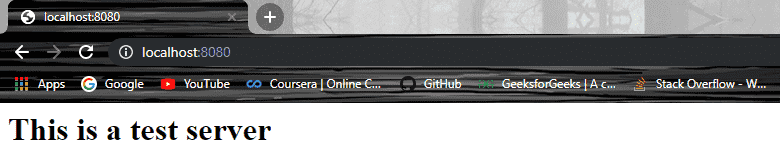
- Now you can open the browser and get the output of the running server.
3. MongoDB (Database)
MongoDB is a NoSQL, document-oriented database that stores data in flexible JSON-like documents. It allows developers to efficiently store, manage, and retrieve large amounts of data without requiring a fixed schema.
- Fast and highly scalable database designed to handle large volumes of data.
- Schema-less structure with data stored in JSON-like documents for greater flexibility.
- Easy to set up, supports JavaScript-based operations, and provides a flexible document model.
**Basic Database Operations in MongoDB
- Create Database:
use database_name;
- Create Collection:
db.createCollection("collection_name");
- Insert Data:
db.collection_name.insert({
"id": 1,
"Name": "Klaus",
"Department": "Technical",
"Organization": "Geeks For Geeks"
});
- Query Data:
db.collection_name.find({Name : "Klaus"}).forEach(printjson);

4. React (Front-End Library)
ReactJS is a JavaScript library used for building interactive and dynamic user interfaces. It is widely used for developing single-page applications (SPAs) and mobile applications due to its efficient handling of changing data.
- Uses Virtual DOM and JSX to improve performance and simplify UI development.
- Supports reusable components, making applications easier to build and maintain.
- Delivers high performance and enables cross-platform mobile app development through React Native.
**Creating and Running a React App
- Install React:
npm install create-react-app --global
OR
yarn global add create-react-app
- Create React App:
create-react-app app_name
- Then navigate into the "app_name" folder and type yarn start or npm start to start your application.

- A typical React application looks like this:

- Update index.js file JavaScript `
ReactDOM.render(
Hello DEVELOPERS!!
, document.getElementById('root') );`

- Run React Application:
npm start
or
yarn start

Benefits of Using the MERN Stack
Here are some benefits of using MERN Stack:
- **Full-Stack JavaScript: With the MERN stack, you only need to know JavaScript to work on both the frontend and backend. This makes development faster and more efficient.
- **High Scalability: MongoDB’s flexible schema allows easy scalability, while NodeJS handles a large number of concurrent connections, making MERN an excellent choice for scalable applications.
- **Performance: NodeJS and Express provide non-blocking, event-driven I/O, ensuring the application performs well even under high loads.
- **Developer-Friendly: React’s component-based architecture helps developers build reusable, modular code, while Express simplifies routing and middleware management.
- **Large Ecosystem: NodeJS has a rich ecosystem with npm and a vast number of packages that can be easily integrated into your MERN application.