Securing the MongoDB Database (original) (raw)
Last Updated : 25 Feb, 2026
Securing MongoDB involves implementing access controls, encryption, and network restrictions to protect data from unauthorized access and breaches.
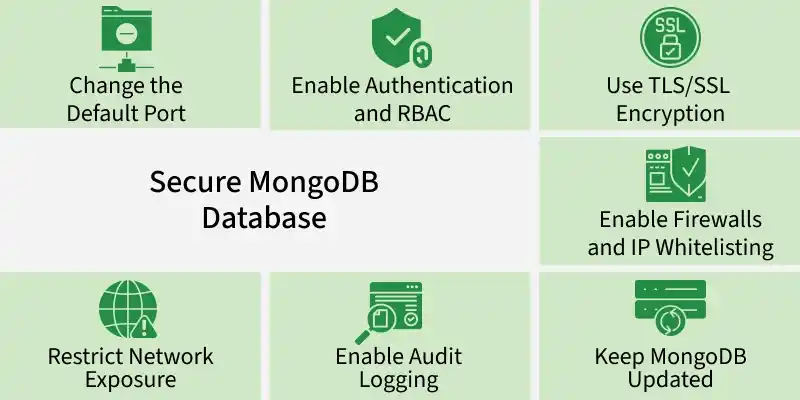
- Enable authentication to ensure only verified users can access the database.
- Apply role-based access control (RBAC) to limit user permissions.
- Enforce strong passwords for database users.
Importance of Securing a MongoDB database
Here are the some importance:
- Blocks unauthorized logins and intrusion attempts.
- Safeguards confidential user and organizational information.
- Lowers exposure to cyber threats such as ransomware attacks.
- Supports adherence to regulatory and security standards (e.g., GDPR, HIPAA).
- Preserves data accuracy by preventing tampering and unauthorized changes.
Approaches for Securing MongoDB
Here are the different approaches for securing MongoDB
1. Change the Default Port
MongoDB uses port 27017 by default, which is commonly targeted by automated attacks. Changing this port makes it harder for attackers to locate your instance.
**Steps to change the port:
- Open the mongod.conf file.
- Locate or create the net section.
- Replace port: 27017 with a new port number.
- Save and restart MongoDB using:
sudo service mongod restart
**Note: Changing the default port adds a small layer of security but should not be the only defense measure.
2. Restrict Network Exposure
By default, MongoDB listens on all interfaces (0.0.0.0), exposing it publicly. Restrict it to localhost to prevent external connections.
**Steps to bind MongoDB to localhost:
- Open the MongoDB configuration file (mongod.conf).
- Find the bindIp setting under the net section.
- Change it to 127.0.0.1 to restrict access.
- Restart the MongoDB service to apply the changes.
mongod --bind_ip localhost
If we want some other IP address to be able to communicate with the MongoDB along with the localhost we can use the below command.
mongod --bind_ip localhost, ip address
3. Enable Authentication and RBAC
MongoDB does not enable authentication by default, allowing anyone with access to modify data. Enable authentication to ensure only verified users can connect.
**Steps to enable authentication:
- Create an admin user using db.createUser().
- In mongod.conf, set:
security:
authorization: enabled
- Restart MongoDB.
**Note: Use Role-Based Access Control (RBAC) to assign roles with minimum required privileges.
4. Use TLS/SSL Encryption
By default, MongoDB does not encrypt data in transit, leaving it vulnerable to interception. Enabling TLS/SSL ensures all client-server communications are secure and protected from unauthorized access.
**Steps:
- Generate SSL/TLS certificates.
- Enable encryption in mongod.conf by adding certificate paths.
- Restart MongoDB.
5. Enable Firewalls and IP Whitelisting
Restrict MongoDB access to trusted IP addresses using firewalls to block unauthorized connections and reduce exposure to external attacks.
**To configure firewall rules:
- Use UFW (Uncomplicated Firewall) to allow access only from trusted IPs.
- Use iptables to create firewall rules restricting access to MongoDB.
- Configure MongoDB IP whitelisting to allow only specific networks.
6. Keep MongoDB Updated
Regularly updating MongoDB is essential for security, as new versions include patches for known vulnerabilities and protect against emerging threats.
**To update MongoDB:
- Check the MongoDB official website for the latest stable release.
- Use package managers such as apt (for Ubuntu) or yum (for CentOS) to update MongoDB.
sudo apt update && sudo apt upgrade mongodb
- Restart the database after updating to apply the changes.
7. Enable Audit Logging
Audit logging helps track database activity, detect unauthorized access, and investigate suspicious actions.
**To enable audit logging:
- Modify the mongod.conf file to specify the log destination and path.
- Enable logAppend to ensure logs are recorded sequentially.
- Regularly review audit logs to detect unusual behavior.
Implementation of Authentication
Authentication in MongoDB restricts database access to authorized users using mechanisms like SCRAM-SHA-256, X.509 certificates, and RBAC.
1. SCRAM-SHA-256 Authentication
SCRAM-SHA-256 is MongoDB’s secure, password-based authentication mechanism that verifies users using a challenge–response process.
- Authenticates users using salted, hashed credentials with server challenges.
- Requires creating users with a username and password.
- Must be enabled in the MongoDB server configuration.
- Credentials are provided in the connection string when connecting to the database.
2. X.509 Certificate Authentication
X.509 certificate authentication secures MongoDB connections by verifying client and server identities using SSL/TLS digital certificates.
- Uses SSL/TLS certificates to authenticate both clients and servers.
- Verifies identities through trusted digital certificates.
- Requires enabling SSL/TLS in mongod.conf with server certificate and private key paths.
- Clients must present valid X.509 certificates when connecting.
3. Use X.509 Server Authentication
X.509 server authentication allows clients to verify the identity of the MongoDB server using SSL/TLS certificates before establishing a connection.
- The MongoDB server proves its identity to clients using an SSL/TLS certificate validated by a trusted CA.
- Clients connect only after verifying the server is a legitimate MongoDB instance.
- This prevents man-in-the-middle attacks and connections to malicious servers.
4. Use X.509 Client Authentication
X.509 client authentication ensures that only trusted clients can connect to MongoDB by validating client SSL/TLS certificates.
- Clients present a valid SSL/TLS certificate during connection.
- MongoDB verifies the client certificate before granting access.
- Restricts database access to authorized and trusted clients only.
5. Use X.509 Member Authentication
X.509 member authentication secures communication within a MongoDB sharded cluster by verifying the identity of each cluster component using certificates.
- Each shard, config server, and router authenticates to others using X.509 certificates.
- Establishes mutual trust between cluster members.
- Allows communication only between trusted and verified cluster components.
6. Restrict Member Source IPs
Restricting member source IPs secures a MongoDB cluster by allowing connections only from trusted network locations.
- Configure IP whitelisting in mongod.conf for each cluster member.
- Enforce firewall rules or network ACLs to allow only approved IP ranges.
- Limit inter-node communication to trusted network sources.
- Block unauthorized servers or devices from connecting to cluster nodes.
7. Use of Role-Based Access Control
Role-Based Access Control (RBAC) enforces least-privilege access in MongoDB by granting users only the permissions required for their roles.
- Define custom roles with precise permissions (e.g., read-only, read-write, admin).
- Assign roles to users based on job responsibilities.
- Limit access to specific databases, collections, and operations.
- Reduces security risks by preventing excessive privileges.