MongoDB findOneAndDelete() Method (original) (raw)
Last Updated : 5 May, 2026
findOneAndDelete() removes a single document that matches a filter and returns the deleted document, making it useful when you need the removed data for logging or auditing.
- Deletes one matching document; the selection order is undefined unless sort is specified.
- Returns the deleted document or null if no match is found.
- Supports options like projection, sort, and write concern.
- Useful for audit logs and follow-up processing after deletion.
Syntax
db.Collection_name.findOneAndDelete(
Selection_criteria,
{
projection: ,
sort: ,
maxTimeMS: ,
collation:
})
- **selection_criteria: Filters documents to match; deletes the first matching document.
- **projection: Specifies which fields to return from the deleted document.
- **sort: Determines which document to delete when multiple documents match.
- **maxTimeMS: Sets a time limit for the operation.
- **collation: Applies locale-specific string comparison rules (case, accents).
Return Value of findOneAndDelete()
- If a document matches the given filter query then this method returns the deleted document.
- If no document matches the given filter query then this method returns null.
Examples of MongoDB findOneAndDelete()
In the following examples, we are working with:
- **Database: gfg
- **Collection: student
- **Document: Four documents contain name and age of the students
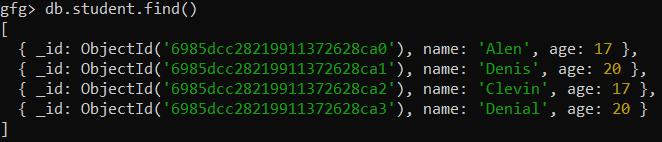
Example 1: Delete A Document by Name
Delete the first document where the name is "Denis" from the student collection.
**Query:
db.student.findOneAndDelete({name:"Denis"})
**Output:

Example 2: Find and Delete the document according to the selection criteria
Delete the first document where age is 17, but sort the matching documents by age in descending order.
**Query:
db.student.findOneAndDelete({age:17},{sort:{age:-1}})
**Output:
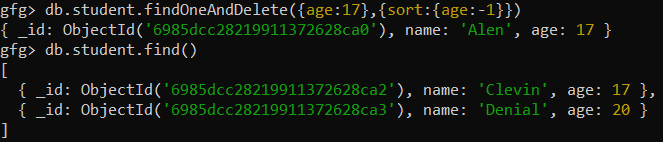
Example 3: When no document matches the filter query.
Delete a document where the name is "Jenny", but no such document exists in the collection.
**Query:
db.student.findOneAndDelete({name: "Jenny"})
**Output:

Example 4: Delete A Document Using Write Concern
Delete a document based on its _id, specifying a write concern for acknowledgment from the majority of the replica set.
**Query:
db.student.findOneAndDelete(
{ "_id": ObjectId("6985dcc28219911372628ca2") },
{ writeConcern: { w: "majority", wtimeout: 5000 } }
)
**Output:

**Note: deleteOne() is a related delete method. Use it when you only need acknowledgment and not the deleted document. Use findOneAndDelete() when you need the deleted document back.
Example 5: Sort And Delete A Document
Sort the documents by name and delete the first document found.
**Query:
db.student.findOneAndDelete({}, { sort: { name: 1 } })
**Output:

Best Practices for Using MongoDB findOneAndDelete()
Here are some best practices to be followed for better results:
- **Projections: Return only needed fields to reduce data load.
- **Sorting: Define order when multiple documents match.
- **Null Handling: Handle cases where no document is deleted.
- **Indexing: Index frequently queried fields for faster deletes.
- **Write Concern: Use write concerns for critical operations.