MongoDB insertOne() Method (original) (raw)
Last Updated : 5 May, 2026
insertOne() adds a single document to a collection.
- Inserts one document at a time.
- Supports text, numbers, arrays, etc.
- Returns the inserted document’s unique _id.
**Syntax:
db.collection_name.insertOne(,{ writeConcern: })
- **collection_name: It refers to the name of the collection where the document will be inserted (the collection is created automatically if it does not exist).
- ****:** The document we want to insert. A document is a set of key-value pairs similar to a JSON object.
- **writeConcern: If we need to specify a custom write concern (e.g., to ensure the data is written to multiple nodes), you can include this option.
Return Value of insertOne()
The insertOne() method returns the following:
- **Acknowledgement: It returns acknowledged: true if the write concern was enabled.
- **InsertedId: This field contains the _id value of the inserted document
Examples of MongoDB insertOne()
Here are few examples to understand how insertOne() works in MongoDB. In the following examples, we are working with:
- **Database: gfg
- **Collection: student
- **Document: No document but, we want to insert in the form of the student name and student marks.
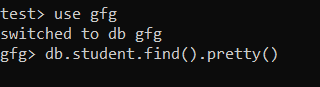
Example 1: Insert a Document without Specifying an _id Field
We are inserting the document whose name is Akshay and marks is 500 in the student collection. MongoDB will automatically assign a unique _id field to this document.
**Query:
db.student.insertOne({Name: "Tim", Marks: 500})
**Output:
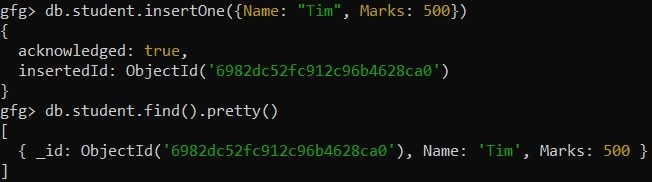
MongoDB has inserted the document with a new ObjectId automatically generated for the _id field.
Example 2: Insert a Document Specifying an _id Field
We are inserting a document whose unique id is Stu102, name is Vishal, and marks is 230 in the student collection
**Query:
db.student.insertOne({_id: "Stu102", Name: "Ron", Marks: 220})
**Output:
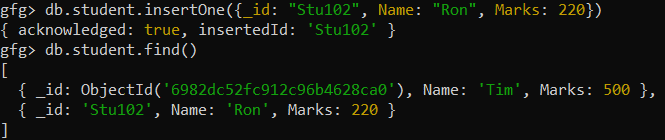
We specified the _id as "Stu102", and MongoDB inserts the document successfully.
Example 3: Handling Write Concern with insertOne()
A custom write concern can be specified to ensure data is written to multiple nodes before being considered committed.
**Query:
db.student.insertOne(
{ Name: "Maria", Marks: 420 },
{ writeConcern: { w: 1, j: true, wtimeout: 5000 } }
)
- **w: Number of nodes that must confirm the write.
- **j: Ensures data is written to disk (journaled).
- **wtimeout: Maximum time to wait for confirmation.
**Output:

Common Errors with insertOne()
While the insertOne() method is quite efficient, you might encounter some errors when:
- **Duplicate _id: Existing _id values cause a DuplicateKeyError.
- **Write concern errors: Unsatisfied write concerns result in a WriteConcernError.