MongoDB Replication and Sharding (original) (raw)
Last Updated : 5 May, 2026
Replication and sharding in MongoDB work together to ensure high availability, fault tolerance, and scalability by replicating data for reliability and distributing data for performance at scale.
- **Replication: Duplicates data across multiple servers to provide reliability and fault tolerance.
- **Sharding: Distributes data across servers to handle large datasets and high workloads.
- **High Availability: Replication keeps the database accessible during node failures.
- **Scalability & Performance: Sharding improves performance by spreading load across nodes.
Replication in MongoDB
Replication in MongoDB maintains multiple copies of data across servers for high availability and fault tolerance. A replica set is a group of nodes that store the same dataset.
- **Primary Node: Handles all write operations and replicates data to secondary nodes.
- **Secondary Nodes: Maintain copies of the data and can serve read operations to improve performance.

Replication in MongoDB
Features of Replication
Here are the features:
- **Replica Sets: A group of nodes (usually odd-numbered) that store identical data.
- **Write and Read Operations: The primary handles writes and secondaries can serve reads.
- **Automatic Failover: A secondary is promoted to primary if the primary fails.
- **Oplog: A capped collection that records changes for secondaries to sync.
Set Up Replication in MongoDB
Setting up replication in MongoDB involves configuring a replica set, where multiple servers maintain the same copy of data to ensure high availability and fault tolerance.
**1. Start MongoDB with Replica Set Configuration
The first step is to start your MongoDB instance with the --replSet option. This option is used to specify the name of the replica set and ensure MongoDB operates in replication mode.
Run the following command in the terminal:
mongod --port --dbpath --replSet
- ******: The port on which your MongoDB instance will run.
- ****<YOUR_DB_PATH>**: The directory where your MongoDB data will be stored.
- ****<REPLICA_SET_NAME>**: The name of your replica set (e.g., rs0).
**2. Initiate the Replica Set
Once the MongoDB instance is running with the replication option, the next step is to initiate the replica set. This step configures MongoDB to treat this instance as part of a replica set.
Open the MongoDB shell and run the following command:
rs.initiate()
This will initiate the replica set and assign the current node as the primary node.
**3. Add Secondary Members to the Replica Set
After initiating the replica set, you need to add secondary nodes (replica members) to replicate the data. These secondary members will asynchronously replicate the data from the primary node.
To add a secondary member, use the following command in the Mongo shell:
rs.add("")
**4. Automate Setup with a Script (Optional)
You can automate the creation of the replica set using a shell script. For example, create a create_replicaset.sh script that contains the commands to start MongoDB and configure the replica set.
**Example script (create_replicaset.sh):

Then run the following script :
./create_replicaset.sh
- Directories will be created and then run the mongo.
- In the Mongo terminal, use the command rs.initiate() to initiate a new replica set.

**Note: By using replication, MongoDB protects against data loss, ensures continuous availability even if a server fails, and allows read scaling by distributing queries across secondary nodes.
Sharding in MongoDB
Sharding in MongoDB splits data across multiple servers to handle large datasets and high traffic.
- **Shards: Store subsets of the data.
- **Config Servers: Maintain metadata about the cluster and data distribution.
- **Query Routers (Mongos): Direct client requests to the appropriate shard(s).
Set Up Sharding in MongoDB
To implement sharding, the following components must be configured:
- **Shard Servers: Start MongoDB instances as shards by running them as replica sets.
- **Config Servers: Set up config servers to store metadata and routing information for the sharded cluster.
- **Query Routers (mongos): Configure the query routers to handle client requests and direct them to the appropriate shard.
MongoDB uses a shard key to distribute data across shards; choosing a high-cardinality field (e.g., userId or timestamp) ensures even distribution.
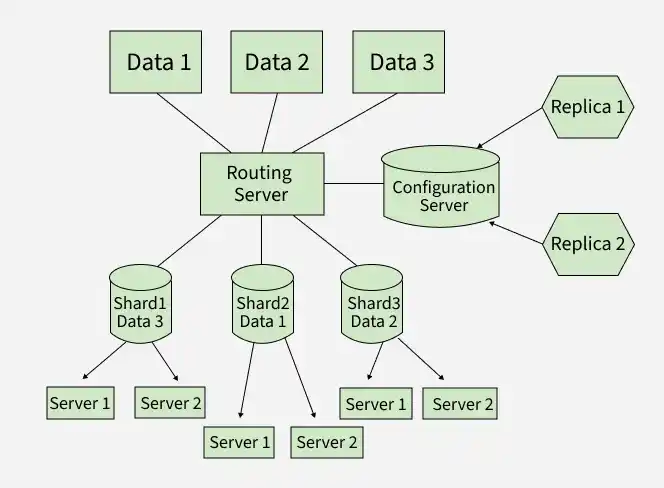
Replication Vs Sharding
Here is a detailed comparison between Replication and Sharding in MongoDB:
| Replication | Sharding |
|---|---|
| Data redundancy and high availability | Horizontal scaling for large datasets |
| Copies data across multiple servers | Splits data across multiple servers (shards) |
| Primary and secondary nodes | Shards, config servers, query routers (mongos) |
| Primary handles writes, secondaries can handle reads | Each shard handles part of the data; queries routed to appropriate shards |
| Fault tolerance, data backup, read scaling | Performance, scalability, storage capacity |
| Reliability and availability | Managing large datasets efficiently |