Replica Set Members in MongoDB (original) (raw)
Last Updated : 24 Feb, 2026
A replica set in MongoDB is a group of MongoDB instances that store the same data. Replica sets provide redundancy, ensuring data is always available, even during server failures. Each member of the replica set plays a different role in maintaining data consistency and high availability.
- **Redundancy: Multiple copies of data are stored, enhancing reliability.
- **Automatic Failover: If the primary node fails, one of the secondary nodes is automatically promoted to primary.
- **Scalability: By adding more secondary members, the system can scale horizontally to handle read traffic.
Types of Replica Set Members in MongoDB
MongoDB supports several types of members in a replica set, each with distinct responsibilities.
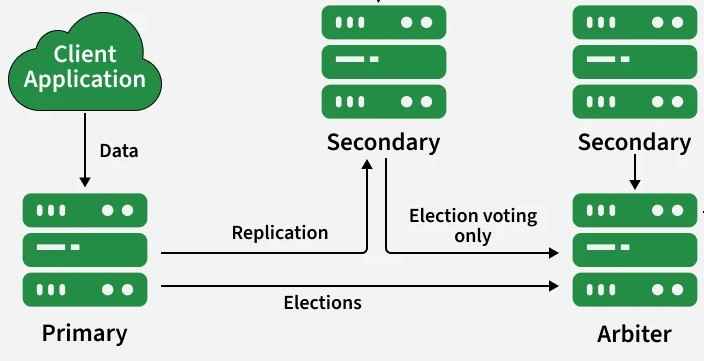
- **Client Application: Sends requests (writes/reads) to MongoDB.
- **Primary Member: Receives all write operations from the client and processes them.
- **Replication: The primary records changes in the oplog and replicates them to secondaries.
- **Secondary Members: Apply oplog changes to keep data in sync, can serve reads if configured.
- **Arbiter: Does not store data and only participates in elections to help choose a new primary during failures.
- **Failover: If the primary goes down, secondaries and the arbiter vote to elect a new primary, and clients reconnect to it.
1. Primary Member
In a MongoDB replica set, one node is elected as the primary to handle all writes; if it becomes unreachable, a new primary is automatically elected. The primary logs all changes in the oplog for secondaries to replicate.
- Elections occur when the replica set starts or the primary fails.
- The primary handles all write operations (insert, update, delete).
- The oplog records changes and syncs data to secondaries.
- Reads go to the primary by default, read preferences can route to secondaries.
- Only one primary exists at any time to ensure consistency.
2. Secondary Member
Secondary members in a MongoDB replica set replicate data from the primary’s oplog to maintain identical copies and support high availability, failover, and read scaling.
- Replicate data by applying operations from the primary’s oplog.
- Can be elected as primary if the current primary becomes unavailable.
- Improve read scalability by serving read queries (via read preferences).
- Replication is continuous and automatic, keeping data consistent across nodes
3. Arbiter
An arbiter in a MongoDB replica set does not store data; it only participates in elections to help maintain quorum and select a primary.
- Participates in elections to choose a primary during failures.
- Stores no data, so it requires minimal resources.
- Helps maintain quorum (odd number of voting members).
- Cost-effective option when extra data storage is not needed.
Adding Replica Set Member
Setting up and managing MongoDB replica set members is essential for ensuring high availability and redundancy. Here’s how to add members to your MongoDB replica set. To add members to a replica set, follow these steps:
- **Connect to the Primary: Connect to the primary member of the replica set using the MongoDB shell.
- **Initiate Replica Set Configuration: If not already initiated, initiate the replica set using the rs.initiate() command.
Add a New Member
To add a new member to an existing replica set, connect to the primary member of the replica set and use the rs.add() command.
rs.add("hostname:port")
- Connect to the primary member of the replica set.
- Run rs.add("hostname:port") to add the new member.
- Replace hostname:port with the actual address of the node.
Add an Arbiter (if needed)
Arbiters help in maintaining an odd number of voting members in a replica set. To add an arbiter:
rs.addArb("arbiterHost:port")
- Connect to the primary member of the replica set.
- Run rs.addArb("arbiterHost:port") with the arbiter’s hostname and port.
Adding a Hidden Member
Hidden members are replica set members that do not participate in elections or serve read requests. They are useful for backup purposes. To add a hidden member
var cfg = rs.conf();
cfg.members.push({
_id: ,
host: "hiddenHost:port",
priority: 0,
hidden: true
});
rs.reconfig(cfg);
- Fetch the replica set config using rs.conf()
- Append the hidden node to cfg.members
- Reconfigure the replica set with rs.reconfig(cfg)
Add a Delayed Member
A delayed member is used for replication with a delay. This can be useful for disaster recovery. To add a delayed member:
var cfg = rs.conf();
cfg.members.push({
_id: ,
host: "delayedHost:port",
priority: 0,
hidden: true,
slaveDelay:
});
rs.reconfig(cfg);
- Load the replica set configuration with rs.conf()
- Add the delayed node to cfg.members
- Update the replica set using rs.reconfig(cfg)
Add a Non-Voting Member
Non-voting members do not participate in elections and have no vote in primary selection. To add a non-voting member:
var cfg = rs.conf();
cfg.members.push({
_id: ,
host: "nonVotingHost:port",
votes: 0
});
rs.reconfig(cfg);
- Fetch the replica set configuration with rs.conf()
- Append the non-voting node to cfg.members
- Reconfigure the set using rs.reconfig(cfg)
Configuration and Troubleshooting Issues
When configuring a MongoDB replica set, you may encounter certain issues. Here are some common ones:
- **Primary Member Not Electing: Ensure that the replica set has enough members and that at least one can communicate with the primary.
- **Replication Lag: Monitor the oplog size and network performance, as high lag can affect data consistency.
- **Arbiter Role Confusion: Ensure arbiters are not used for read operations as they don’t hold any data.