AVG() Function in MySQL (original) (raw)
Last Updated : 28 Mar, 2026
The AVG() function in MySQL is used to calculate the average (mean) value of a specified numeric expression or column. It helps summarize data by returning a single average value from multiple rows.
- It belongs to MySQL numeric (aggregate) functions and works on a single expression.
- It accepts only one parameter (expression or column name).
- It automatically ignores NULL values while calculating the average.
**Syntax :
AVG(expression)
- **expression: A numeric column or a calculated expression.
- **Returns: It returns the average value of the specified expression.
Working with the MySQL AVG() Function
The following examples show how the AVG() function works with different columns and conditions. First, we will create a demo table on which the AVG() function will be applied:
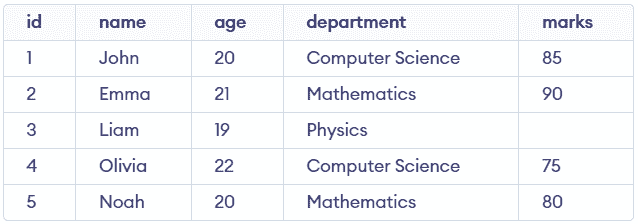
students Table
Example 1: Basic AVG() Usage
This example calculates the average marks of all students. It provides a quick summary of overall performance.
**Query:
SELECT AVG(marks) AS average_marks FROM students;
**Output:

- Calculates the average of all values in the
markscolumn. - Ignores
NULLvalues automatically during computation.
Example 2: AVG() with Multiple Columns
This example calculates the average of more than one numeric column. It helps compare different metrics in a single query.
**Query:
SELECT AVG(marks) AS avg_marks, AVG(age) AS avg_age FROM students;
**Output:

- Computes averages for multiple numeric columns in a single query.
- Returns separate results for each column using aliases.
Example 3: AVG() with Subquery
This example filters students based on the average marks. It shows how AVG() can be used inside a subquery for comparison.
**Query:
SELECT * FROM students WHERE marks > (SELECT AVG(marks) FROM students);
**Output:

- The subquery calculates the average marks first.
- The main query filters records where marks exceed that average.
Example 4: AVG() with GROUP BY
This example calculates the average marks for each department. It helps analyze performance across different groups.
**Query:
SELECT department, AVG(marks) AS avg_marks FROM students GROUP BY department;
**Output:

- Groups the data based on the department column.
- Calculates the average marks separately for each department.
- Returns NULL if all values in a group are NULL.