MySQL ANY and ALL Operators (original) (raw)
Last Updated : 26 Mar, 2026
The ANY and ALL operators in MySQL are used with subqueries to compare a value against a set of values returned by another query. They help in writing flexible and powerful conditions when working with multiple rows.
- ANY returns TRUE if the condition matches at least one value in the subquery.
- ALL returns TRUE only if the condition matches all values in the subquery.
First, we create a demo table on which the ANY and ALL operators will be used:
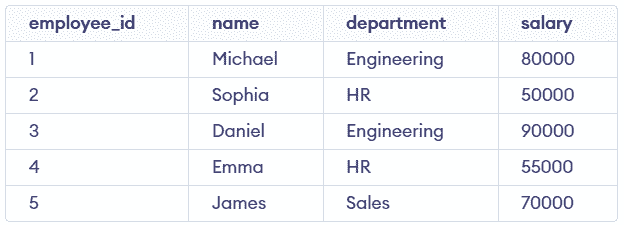
employees Table
ANY Operator
The ANY operator checks whether a comparison is true for any one of the values returned by a subquery.
- Works with comparison operators (=, >, <, >=, <=, <>).
- Returns TRUE if at least one condition is satisfied.
- Often used when comparing against multiple possible values.
**Note: The ANY operator is also known as SOME in MySQL, and both can be used interchangeably.
**Syntax:
SELECT column_name FROM table_name WHERE column_name operator ANY (subquery);
**Example: In below example we will find employees whose salary is greater than the salary of any employee in the 'HR' department.
SELECT name, salary FROM employees WHERE salary > ANY (SELECT salary FROM employees WHERE department = 'HR');
**Output:
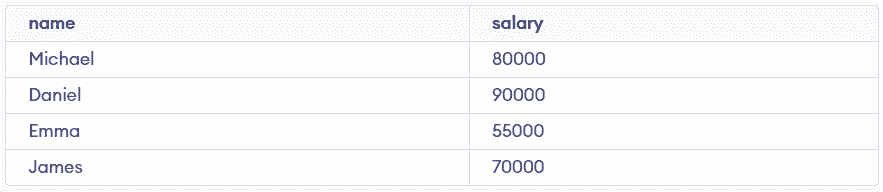
- The subquery returns the salaries of employees in the HR department: (50000, 55000).
- The main query checks if an employee's salary is greater than at least one of these values.
ALL Operator
The ALL operator in MySQL is used to check whether a condition is true for all values returned by a subquery. It ensures that the comparison holds true for every value in the result set.
- Returns TRUE only if every value in the subquery satisfies the condition.
- More restrictive compared to the ANY operator.
- Commonly used to find extreme values, such as the highest or lowest values in a dataset.
**Syntax:
SELECT column_name FROM table_name WHERE column_name comparison_operator ALL (subquery);
**Example: In below example we will find employees whose salary is greater than the salary of all employees in the 'HR' department.
SELECT name, salary FROM employees WHERE salary > ALL (SELECT salary FROM employees WHERE department = 'HR');
**Output:

- The subquery returns the set of salaries: 50000, 55000.
- The main query checks if an employee's salary is greater than all of these salaries.
Combining ANY and ALL with Other MySQL Clauses
The ANY and ALL operators can be combined with other MySQL clauses to create more advanced and meaningful queries. They are often used with clauses like JOIN, GROUP BY, and ORDER BY to refine data retrieval and analysis.
Example 1: Using ANY with JOIN
Find employees who earn more than any employee in a different department, and list their department details. Consider the departments table as shown below:
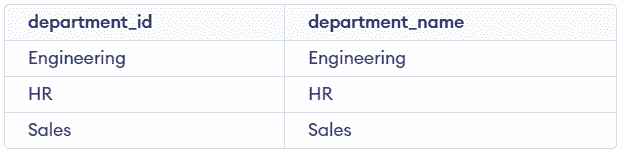
departments Table
**Query:
SELECT e.employee_id, e.name, d.department_name
FROM employees e
JOIN departments d
ON e.department = d.department_name
WHERE e.salary > ANY (
SELECT salary
FROM employees
WHERE department = 'Sales'
);
**Output:

- The subquery returns salaries from the Sales department (70000).
- The ANY condition checks if salary is greater than at least one of these values.
- The JOIN is used to fetch department names from the departments table.
Example 2: Using ALL with GROUP BY
Find departments where all employees have salary greater than 50000.
**Query:
SELECT department
FROM employees
GROUP BY department
HAVING MIN(salary) > ALL (
SELECT salary
FROM employees
WHERE salary <= 50000
);
**Output:

- The subquery returns all salaries less than or equal to 50000.
- ALL ensures the condition is true for every value.
- GROUP BY is used to evaluate data department-wise.
Example 3: Using ANY with ORDER BY
Find employees who earn more than any employee in HR, and display them in descending salary order.
**Query:
SELECT name, salary
FROM employees
WHERE salary > ANY (
SELECT salary
FROM employees
WHERE department = 'HR'
)
ORDER BY salary DESC;
**Output:
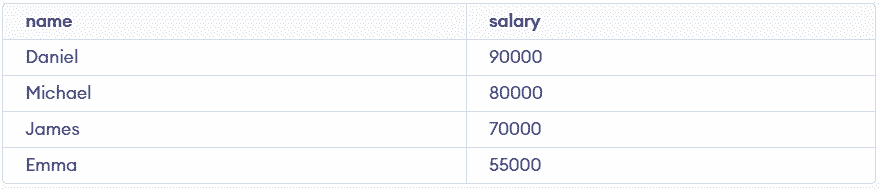
- The subquery returns HR salaries: (50000, 55000).
- ANY filters employees earning more than at least one of the HR employees salaries.
- ORDER BY sorts results from highest to lowest salary.