MySQL DELETE Statement (original) (raw)
Last Updated : 25 Mar, 2026
The MySQL DELETE statement is used to remove one or more existing records from a table. It helps in managing and cleaning data by deleting unwanted rows.
- It is a Data Manipulation Language (DML) statement and is commonly used with WHERE or JOIN clauses.
- Changes made using DELETE are usually permanent, and it can remove all rows or only specific records.
**Syntax
DELETE FROM table_name WHERE condition;
**Note: Be careful when using the DELETE statement in MySQL. Always use a DELETE statement with a WHERE clause.
Working with MySQL DELETE Statement
Let’s look at some examples of the MySQL DELETE statement to understand its working and also cover different use cases of DELETE statement. First, we will create a demo table on which the DELETE statement will be applied:
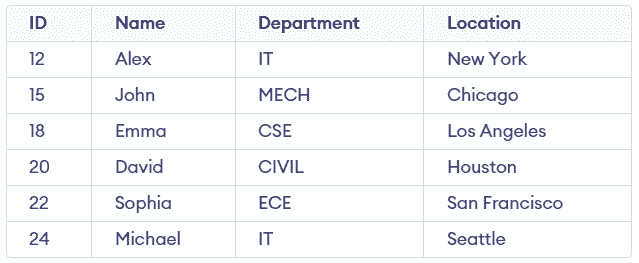
Student Table
Example 1: DELETE Statement with WHERE Clause
This example deletes specific rows based on given conditions using the WHERE clause. It ensures only matching records are removed from the table.
**Query:
DELETE FROM Students WHERE Department = 'IT';
SELECT * FROM Students;
**Output:
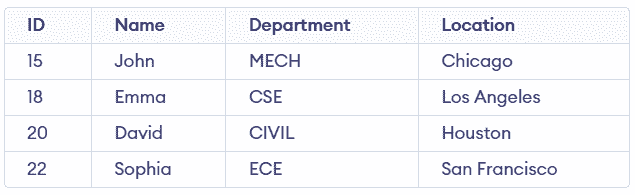
- The WHERE clause filters rows where Department equals 'IT'.
- Only matching records are deleted, while remaining rows stay unchanged.
Example 2: Delete the Entire Data From the Table
This example deletes all rows from the table by not using the WHERE clause. It is useful for clearing complete table data.
**Query:
DELETE FROM Students;
**Output:

- Without the WHERE clause, the DELETE statement removes all records from the table.
- The table structure remains intact, but all data is permanently deleted.
Example 3: DELETE with LIMIT Clause
The DELETE statement with LIMIT allows you to restrict the number of rows deleted from a table. It is useful when you want to remove only a specific number of records.
- Without WHERE, it deletes the first N rows specified by LIMIT.
- With WHERE and ORDER BY, it filters and sorts rows before deleting limited records.
Consider the Marks table below for the example:
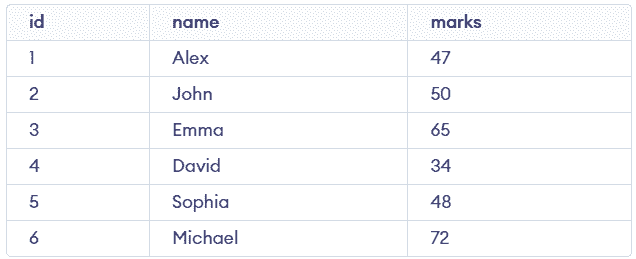
**Query:
DELETE FROM Marks WHERE marks <= 50 ORDER BY marks ASC LIMIT 2;
SELECT * FROM Marks;
**Output:
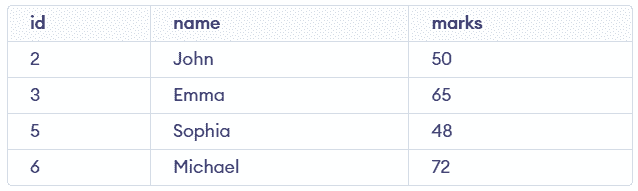
- The WHERE clause filters rows with marks less than or equal to 50, and ORDER BY sorts them in ascending order.
- LIMIT 2 ensures only the first two lowest-mark rows are deleted.
Example 4: DELETE with JOIN Clause
The DELETE statement with JOIN allows deleting rows from one or more tables based on matching conditions between them. It is useful when related data exists across multiple tables.
- It joins tables first, then applies conditions, and deletes matching rows.
- You can delete from one or multiple tables depending on how DELETE is written.
Consider the Customers and Orders table below for the example:
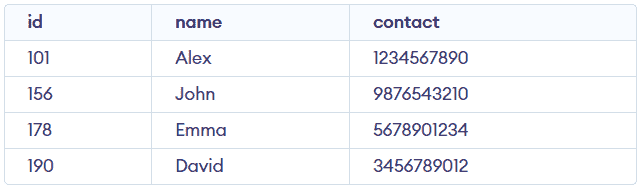
Customers Table
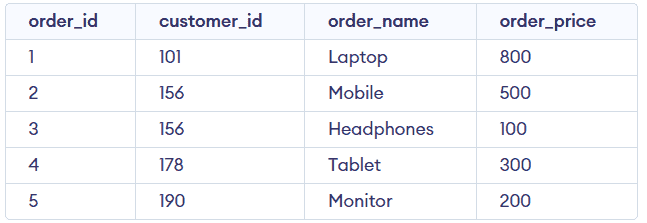
Orders Table
**Query:
DELETE Customers, Orders FROM Customers INNER JOIN Orders ON Customers.id=Orders.customer_id WHERE Customers.id=156;
SELECT * FROM Customers;
SELECT * FROM Orders;
**Output:
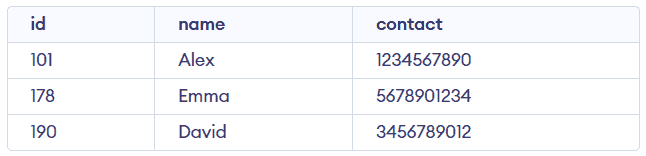
Customers Table
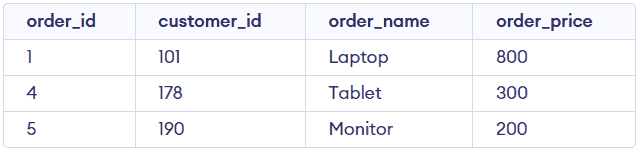
Orders Table
- The JOIN combines both tables based on the matching customer ID.
- The DELETE statement removes matching records from both tables based on the WHERE condition.
**Note:
- If foreign key constraints exist, ensure child rows are deleted first or use ON DELETE CASCADE to avoid errors.
- If only one table is specified after DELETE, rows are removed only from that table.
- Be cautious when using DELETE with JOIN, as it can affect multiple tables at once.