MySQL DISTINCT Clause (original) (raw)
Last Updated : 23 Mar, 2026
The SELECT DISTINCT statement is used to retrieve unique values from one or more columns in a table. It removes duplicate records and returns only distinct results.
- It helps in eliminating duplicate data.
- It can be used with one or multiple columns.
- It is useful for data analysis and filtering unique entries.
**Syntax:
SELECT DISTINCT column1, column2, ...FROM table_nameWHERE condition;
- **column1, column2, ... : Columns from which distinct values are selected.
- **table_name: Name of the table from which data is retrieved.
- **condition: Optional filter to select specific rows.
Examples of DISTINCT Clause
These examples show how to use DISTINCT to get unique values from a table.
Example 1: Selecting Distinct Values from a Single Column
Consider a table named employees with the following data:
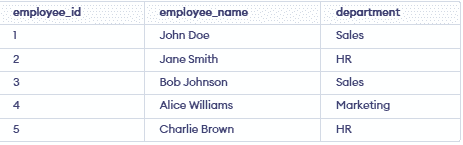
To retrieve a list of unique departments, you can use the DISTINCT clause:
SELECT DISTINCT department FROM employees;
**Output:

- This query returns a list of unique departments from the employees table, eliminating any duplicates.
Example 2: Selecting Distinct Values From Multiple Columns
Suppose you want to retrieve unique combinations of department and employee_name. You can modify the query to include multiple columns:
SELECT DISTINCT department, employee_name FROM employees;
**Output:

- In this case, the query returns distinct combinations of department and employee_name.
Example 3: Using DISTINCT with WHERE Clause
DISTINCT clause can be combined with the WHERE clause to filter results. For example, to get unique departments that start with 'S':
SELECT DISTINCT department FROM employees WHERE department LIKE 'S%';
**Output:

- This query filters the departments to only those starting with 'S' and then returns unique values.
**Things to Remember When Using DISTINCT
The following points highlight important aspects to consider when using the DISTINCT clause in MySQL.
- **Performance Impact: DISTINCT can slow down queries on large datasets as MySQL must compare rows to remove duplicates.
- **Order of Columns: Uniqueness depends on the order of columns in the SELECT statement.
- **NULL Values: Multiple NULL values are treated as duplicates.