MySQL IN Operator (original) (raw)
Last Updated : 25 Mar, 2026
The IN operator is used to filter data by matching a column’s value against a specified set of values. It is commonly used in SQL queries to simplify multiple conditions.
- Replaces multiple OR conditions by checking multiple values in a single statement.
- Can be used with different data types like numbers, strings, and dates.
**Syntax:
SELECT column1, column2, ... FROM table_name WHERE column_name IN (value1, value2, ...);
- **column1, column2, ...: The columns to retrieve data from.
- **table_name: The name of the table from which to retrieve data.
- **column_name: The column to compare against the list of values.
- **value1, value2, ...: The list of values to check against.
Working with the MySQL IN Operator
The MySQL IN operator is used in practical examples to show how multiple values can be matched in a query. It helps in filtering data efficiently by checking a column against a list of values. First, we will create a demo table on which the IN operator will be applied:
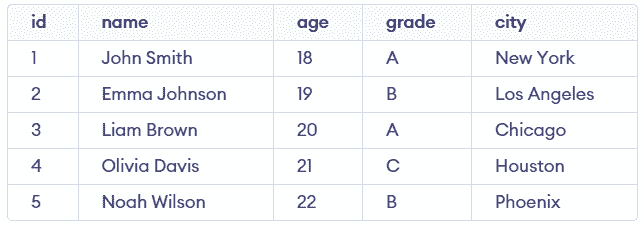
studentsInfo Table
Example 1: Select students who are in grades 'A' or 'B'
This example retrieves students whose grades match either 'A' or 'B' using the IN operator.
**Query:
SELECT id, name, grade, city FROM studentsInfo WHERE grade IN ('A', 'B');
**Output:
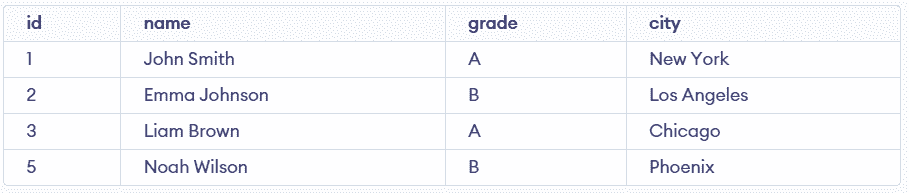
- This query retrieves students whose grades are either 'A' or 'B'.
- The IN operator checks if the grade column value matches 'A' or 'B'.
Example 2: Select students whose city is not Los Angeles or Phoenix
This example finds students whose cities do not match the specified values using the NOT IN operator.
**Query:
SELECT id, name, city FROM studentsInfo WHERE city NOT IN ('Los Angeles', 'Phoenix');
**Output:

- This query retrieves students whose cities are neither 'Los Angeles' nor 'Phoenix'.
- The NOT IN operator excludes rows where the city matches the given values.
Example 3: Select students aged 18, 20, or 22
This example filters students whose ages match any value in the given list.
**Query:
SELECT id, name, age, city FROM studentsInfo WHERE age IN (18, 20, 22);
**Output:

- This query retrieves students whose ages are 18, 20, or 22.
- The IN operator checks if the age column value matches any specified value.