MySQL IS NULL Operator (original) (raw)
Last Updated : 26 Mar, 2026
The IS NULL operator in MySQL identifies records with missing values, helping ensure accurate queries and maintain data consistency.
- Supports precise querying by allowing conditions based on missing values.
- Helps maintain clean and reliable data by identifying incomplete records.
- Enables handling of complex query scenarios involving NULL conditions.
**Syntax:
SELECT column1, column2, ... FROM table_name WHERE column_name IS NULL;
Working with the IS NULL Operator
It demonstrates how the IS NULL operator can be applied in different MySQL operations. First, we create a demo table on which the IS NULL operator will be applied:
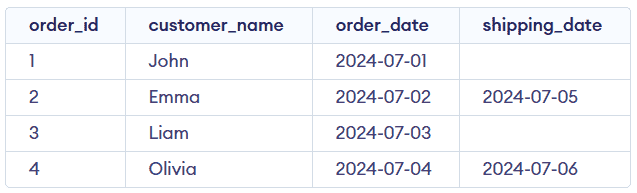
Orders Table
Example 1: IS NULL with SELECT Statement
This example shows how to retrieve records where a column contains NULL values. It helps identify rows with missing data.
**Query:
SELECT order_id, customer_name, order_date FROM Orders WHERE shipping_date IS NULL;
**Output:

- Filters records where shipping_date has no value.
- Returns orders that have not been shipped yet.
Example 2: IS NULL with COUNT() Function
This example demonstrates how to count rows with NULL values. It is useful for analyzing incomplete data.
**Query:
SELECT COUNT(*) FROM Orders WHERE shipping_date IS NULL;
**Output:

- Counts total records where shipping_date is NULL .
- Helps measure how many orders are pending shipment.
Example 3: IS NULL with UPDATE Statement
This example shows how to update records with NULL values. It is useful for replacing missing data with valid values.
**Query:
UPDATE Orders SET shipping_date = '2024-07-10' WHERE shipping_date IS NULL
SELECT * FROM Orders;
**Output:
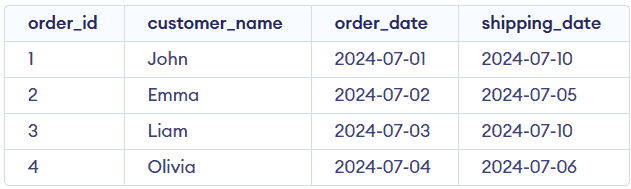
- Updates NULL values with a specified date.
- Ensures missing shipping dates are properly filled.
Example 4: IS NULL with DELETE Statement
This example demonstrates how to remove records with NULL values. It helps clean up incomplete or unwanted data.
**Query:
DELETE FROM Orders WHERE shipping_date IS NULL;
SELECT * FROM Orders;
**Output:

- Deletes rows where shipping_date is NULL.
- Helps maintain a clean and accurate dataset.