MySQL LIMIT Clause (original) (raw)
Last Updated : 26 Mar, 2026
MySQL provides the LIMIT clause to restrict the number of rows returned by a query. It is useful for controlling large result sets and improving query performance.
- It limits the number of rows returned in the result set.
- It is commonly used with the
SELECTstatement. - It helps in handling large datasets efficiently.
- It improves performance by reducing unnecessary data retrieval.
**Syntax:
SELECT column_name(s) FROM table_name **LIMIT [offset,] row_count;
- **offset (optional): The starting point from which rows are returned. If omitted, it defaults to 0.
- **row_count: The maximum number of rows to return.
MySQL LIMIT Clause Example
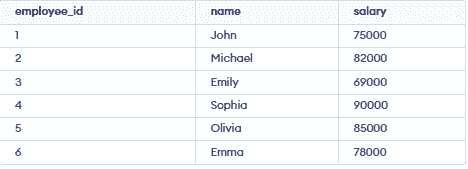
Let’s understand the MySQL LIMIT clause using examples. First, we create a sample table:
Example 1: Retrieve the First 3 Records
In this example, we are using the LIMIT clause to fetch the first 3 records from the employees table. This query returns the earliest entries based on their order in the table.
SELECT * FROM employees LIMIT 3;
**Output:

Example 2: Retrieve 3 Records Starting from the 2nd Record
In this example, we are using the LIMIT clause with an offset to skip the first record and return the next 3 records from the employees table. This allows us to paginate through the results by specifying a starting point.
SELECT * FROM employees LIMIT 1, 3;
**Output:

Example 3: Retrieve the Last 2 Records
In this example, we are using the LIMIT clause in combination with ORDER BY to fetch the last 2 records from the employees table. Sorting the results in descending order and limiting the output lets us obtain the most recent entries.
SELECT * FROM employees ORDER BY employee_id DESC LIMIT 2;
**Output:
