MySQL Temporary Table (original) (raw)
Last Updated : 17 Mar, 2026
A temporary table in MySQL stores intermediate query results for use within the same session. It is automatically removed after the session ends, making it useful for handling complex operations without permanent storage.
- Accessible only within the current session and not visible to other users.
- Automatically dropped when the session terminates, requiring no manual cleanup.
- Enhances performance by storing results of complex or expensive queries for reuse.
**Syntax:
CREATE TEMPORARY TABLE ( , , , ...................., , table_constraints like PRIMARY KEY, FOREIGN KEY );
Working with MySQL Temporary Table
Demonstrates how to create, populate, and query a temporary table for handling intermediate data.
1. Create Temporary Table
Defines the structure of a temporary table to store session-specific data.
**Query:
CREATE TEMPORARY TABLE temp_sales ( sale_id INT, product_id INT, sale_amount DECIMAL(10, 2) );
2. Insert Data into Temporary Table
Insert sample values into the temp_sales table.
**Query:
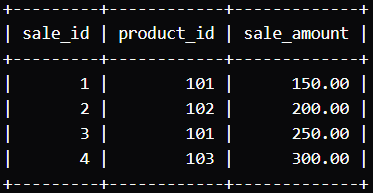
INSERT INTO temp_sales (sale_id, product_id, sale_amount) VALUES (1, 101, 150.00), (2, 102, 200.00), (3, 101, 250.00), (4, 103, 300.00);
**Output:
3. Querying a Temporary Table
Querying a temporary table works the same as querying a regular table.
**Query:
SELECT SUM(sale_amount) AS total_sales FROM temp_sales;
**Output:
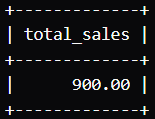
- Calculates the total by summing all sale_amount values in the temporary table.
- Returns the result as 900.00, representing the total sales.
Temporary Table Using Existing Table Structure
Creates a temporary table by copying the structure of an existing table.
1. Create Base Tables
Defines original tables that will be used as a reference for creating the temporary table.
**Query:
CREATE TABLE customers ( customer_id INT PRIMARY KEY, customer_name VARCHAR(100), email VARCHAR(100), phone VARCHAR(20) );
INSERT INTO customers (customer_id, customer_name, email, phone) VALUES (1, 'John Doe', 'john.doe@example.com', '123-456-7890'), (2, 'Jane Smith', 'jane.smith@example.com', '987-654-3210');
**Query:
CREATE TABLE orders ( order_id INT PRIMARY KEY, customer_id INT, order_date DATE, amount DECIMAL(10, 2), FOREIGN KEY (customer_id) REFERENCES customers(customer_id) );
INSERT INTO orders (order_id, customer_id, order_date, amount) VALUES (1, 1, '2024-06-30', 150.00), (2, 2, '2024-06-30', 200.00), (3, 1, '2024-07-01', 250.00);
2. Create Temporary Table Using Existing Structure
Create a temporary table named 'temp_orders' based on the structure of the orders table.
**Query:
CREATE TEMPORARY TABLE temp_orders LIKE orders;
This command creates the 'temp_orders' table with the same structure as the orders table, but without any data.
3. Insert Data into the Temporary Table
Insert some data into the 'temp_orders' table.
**Query:
INSERT INTO temp_orders (order_id, customer_id, order_date, amount) VALUES (4, 1, '2024-07-02', 300.00), (5, 2, '2024-07-02', 400.00);
4. Query the Temporary Table
Run a query to fetch data from the 'temp_orders' table.
**Query:
SELECT * FROM temp_orders;
**Output:
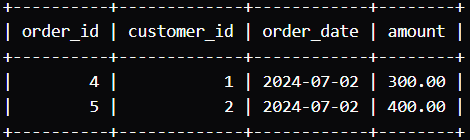
- Displays two rows from the temp_orders temporary table.
- Maintains the same structure as the original orders table.
- Includes order_id, customer_id, order_date, and amount for orders 4 and 5.
Dropping a Temporary Table
Dropping a temporary table in MySQL is a simple process used to remove session-specific tables when no longer needed. Although temporary tables are automatically deleted at session end, they can also be dropped manually before that.
**Syntax:
DROP TEMPORARY TABLE IF EXISTS temp_table_name;
- **TEMPORARY: This keyword specifies that the table to be dropped is a temporary table.
- **IF EXISTS: This clause is optional but recommended. It ensures that the statement does not produce an error if the temporary table does not exist.
- **temp_table_name: This is the name of the temporary table you want to drop.
Assume you have a temporary table named 'temp_orders' that you created earlier. To drop this table, you would use the following SQL statement:
**Query:
DROP TEMPORARY TABLE IF EXISTS temp_orders;
This command will remove the 'temp_orders' temporary table from the current session.