How to Catch All Routes in Next.js ? (original) (raw)
Last Updated : 26 Jul, 2024
To catch all routes in Next.js, you create a dynamic route file using the catch-all segments syntax. This allows you to handle various routes dynamically, enhancing routing flexibility and application structure.
**Catch all routes
To catch all routes in next js, We will
- Create a file named [...gfg].js in the pages directory.
- Use the useRouter hook from next/router to access the caught routes.
- Access and handle the route segments through the slug parameter in the query object.
We can catch all paths in NextJs using catch-all routes. For this, we have to add three dots inside the square brackets in the name of the file as shown below:
./pages/[...file_name].js
**Create NextJS Application
You can create a new NextJs project using the below command:
npx create-next-app gfg
After creating your project folder(i.e. gfg), move to it by using the following command.
cd gfg
**Project Structure:
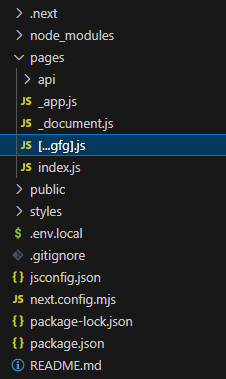
project structure
**Example: Now let's create a new dynamic route to catch all the paths. For this, we are going to create a new javascript file inside our pages directory with the name [...gfg].js. After that add the below content in that file.
JavaScript `
// Filename: /pages/[...gfg].js
// Importing useRouter() method import { useRouter } from 'next/router'
function Gfg(){
// Initializing useRouter() method
const router = useRouter()

return <h1>Path :- {router.asPath} </h1>
}
export default Gfg;
`
**Explanation: In the above code, we are using the useRouter hook to access the router object. Router object contains the data about the current route such as pathname, query, asPath, etc. So first, we are importing useRouter in our file and after that, we are creating a new variable to store the value of the router object. Then we are displaying the value of the asPath property of the router object.
**Step to Run Application: Run the application using the following command from the root directory of the project.
npm run dev
**Output: