Get Current Route In Next.js (original) (raw)
Last Updated : 12 Mar, 2026
To get the current route in Next.js, you can use the router utilities provided by the framework. These allow you to access the current URL path inside your components.
- Use useRouter() from Next.js (next/router) in the Pages Router to access router.pathname or router.asPath.
- In the App Router, use usePathname() from next/navigation to directly get the current route.
- These hooks help with tasks like highlighting active links, conditional rendering, or tracking navigation.
**Steps to Get Current Route in Next.js
**Step 1: You can create a new NextJs project using the below command:
npx create-next-app gfg
**Project Structure
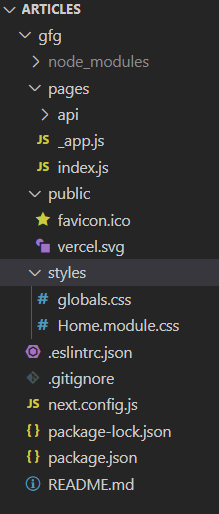
**Method 1: Using useRouter() Method
In NextJs we can easily get the value of the current route using the useRouter() function. To use this we are going to create a new page inside our pages directory with the name '**get-route.js'.
JavaScript `
//get-route.js
import React from 'react' import {useRouter} from 'next/router';
export default function getRoute() { // Calling useRouter() hook const router = useRouter() return (
GeeksforGeeks
pathname:- {router.pathname}
query:- {router.query}
asPath:- {router.asPath}
`
**Step to run the application: Start the development server by typing the below command in the terminal.
npm run dev
Output

Here, first we are calling our useRouter() hook and after that, we are displaying the objects of our router in the console.
- **pathname: Current route. That is the path of the page in '/pages'.
- **query: The query string parsed to an object.
- **asPath: The path (including the query) shown in the browser.
Knowing how to access the current route is essential for navigation and conditional rendering.
**Method 2: Using withRouter() Method
- You can easily get the current router value in react class component using the withRouter().
- To use this you just have to export your class component inside withRouter().
In the below code first, we are importing our withRouter function from the next/router after that we are creating a new class component with the name of getRoute and inside that, In our render function, we are displaying the pathname, asPath, and query from the props received in our class. After that, we are exporting our class u=inside withRouter() function.
JavaScript `
import React from 'react' import {withRouter} from 'next/router';
export class getRoute extends React.Component {
render() {
    console.log(this.props.router.pathname)
    console.log(this.props.router.query)
    console.log(this.props.router.asPath)
    return (
        <div>
            <h1>GeeksforGeeks</h1>
            <h2>Using withRouter</h2>
        </div>
    )
}
}
export default withRouter(getRoute)
`
**Step to run the application: Start the development server by typing the below command in the terminal.
npm run dev
Output

**Method 3: Using getInitialProps() Method
- You can also access the value of the route the context prop inside getInitialProps().
- Context prop contains information of your routes like asPath, query, and Pathname.
In the below code first, we are importing our withRouter function from the next/router after that we are creating a new class component with the name of getRoute and inside that, we are creating a async getIntitalProps function which contains context as a prop.
JavaScript `
import React from 'react' import {withRouter} from 'next/router';
export class getRoute extends React.Component {
static async getInitialProps(context) {
    // Using context prop to get asPath, query, context
    const {asPath, query, pathname} = context
    return{asPath, query, pathname}
}

render() {
    // Consoling the values
    console.log(this.props.pathname)
    console.log(this.props.query)
    console.log(this.props.asPath)
    return (
        <div>
            <h1>GeeksforGeeks</h1>
            <h2>Using Context prop in getInitialProps</h2>
        </div>
    )
}
}
export default getRoute
`
**Step to run the application: Start the development server by typing the below command in the terminal.
npm run dev
Output
