Amazon Product Review Sentiment Analysis using RNN (original) (raw)
Last Updated : 23 Jul, 2025
In this article, we will learn how to use Recurrent Neural Networks for Sentiment Analysis. We will use the Product Reviews dataset which has around 25000 customer reviews. Our end goal will be to give a rating according to the review given.
Sentiment Analysis using RNN
Sentiment Analysis is the process of extracting information from the texts. It involves various steps of Natural Language Processing like, text cleaning, text vectorization, stemming, lemmatization, and many more. We will use the above mentioned steps to finally generate a model that can give rating predictions to the reviews.
Recurrent Neural Networks are a type of neural network which uses previous information to give output. We will use RNN with different setups to get maximum accuracy. Further, we will also use LSTM (Long Short Term Memory) which is an extension to RNN, to further increase the accuracy.
Dataset
We've used the dataset i.e. Consumer Reviews of Products. The dataset contains information like reviews and ratings.
Step 1: Importing necessary Libraries
Python `
import pandas as pd import numpy as np import matplotlib.pyplot as plt import re import seaborn as sns import nltk from nltk.corpus import stopwords from nltk.tokenize import word_tokenize import tensorflow as tf from tensorflow.keras.layers import SimpleRNN, LSTM, Dense, Dropout, Embedding, BatchNormalization from tensorflow.keras.models import Sequential from tensorflow.keras.preprocessing.text import Tokenizer from tensorflow.keras.utils import pad_sequences
import warnings warnings.filterwarnings('ignore')
`
**Step 2: Loading the dataset
The Amazon dataset contains 25000 customer reviews on Amazon products. Here is how we can load the dataset and get information on it.
**Link for Dataset : Link
Python `
data = pd.read_csv('AmazonReview.csv')
Printing shape of the dataset
print(data.shape)
printing columns and rows information
print(data.info())
`
**Output:
(25000, 2)
<class 'pandas.core.frame.DataFrame'>
RangeIndex: 25000 entries, 0 to 24999
Data columns (total 2 columns):
Column Non-Null Count Dtype
0 Review 24999 non-null object
1 Sentiment 25000 non-null int64
dtypes: int64(1), object(1)
memory usage: 390.8+ KB
None
From the above output, we can see that the dataset is of the shape (25000, 2), which shows that it has 25000 rows and 2 columns.
**Step 3: Exploratory Data Analysis
1. As we've to just get a sentiment analysis of reviews, so let's extract useful information from the dataset. Also, let's look at how many null values are present in this dataset.
Python `
looking for NULL values
print("Null Values:\n", data.isna().sum())
dropping null values
data = data.dropna()
again checking for NULL values
print("Null Values after dropping:\n", data.isna().sum())
`
**Output:
Null Values:
Review 1
Sentiment 0
dtype: int64
Null Values after dropping:
Review 0
Sentiment 0
dtype: int644
Let's take a look at the number of values of each unique item in the Sentiment column.
Python `
count of unique values in Sentiment column
data['Sentiment'].value_counts()
`
1 5000
2 5000
3 5000
4 5000
5 4999
Name: Sentiment, dtype: int64
2. **Text Cleaning: In this step, we will clean the 'reviews.text' column. We will remove the unwanted HTML tags, brackets, or special characters that may be present in the texts. We will use Regex to clean the text.
Python `
downloading stopwords from nltk library
nltk.download('stopwords') stop_words = set(stopwords.words('english'))
downloading punkt sentence tokenizer models
nltk.download('punkt')
Review text Cleaning
def clean_reviews(text):
# removing html brackets and other square brackets from the string using regex
regex = re.compile('<.*?>') # r'<.*?>'
text = re.sub(regex, '', text)

# removing special characters like @, #, $, etc
pattern = re.compile('[^a-zA-z0-9\s]')
text = re.sub(pattern,'',text)

# removing numbers
pattern = re.compile('\d+')
text = re.sub(pattern,'',text)

# converting text to lower case
text = text.lower()

# Tokenization of words
text = word_tokenize(text)

# Stop words removal
text = [word for word in text if not word in stop_words]

return text
using the clean_reviews function on the dataset
data['Review'] = data['Review'].apply(clean_reviews)
This code is modified by Susobhan Akhuli
`
4. **Tokenization & Text Encoding: In this step, we will use tokenization to first generate the tokens. For this, we will use Tokenizer from the Tensorflow library. And we will encode the text using the same.
We have around 5 unique values in the 'reviews.rating' column. So let's use one-hot encoding to represent each value in the rating as separate columns.
Also, in this step, we have initialized X(input) and y(output) to the model.
Python `
tokenizer = Tokenizer()
converting all the reviews to list to pass it as a parameter to fit_on_texts
reviews_to_list = data['Review'].tolist() tokenizer.fit_on_texts(reviews_to_list)
Generating text sequences
text_sequences = tokenizer.texts_to_sequences(reviews_to_list)
setting maximum words we want in an example
max_words = 500
Padding sequences
- Before converting to a NumPy array, pad the sequences to ensure they all have the same length.
padded_sequences = pad_sequences(text_sequences, maxlen=max_words) # Use the same max_words value
text_sequences = np.array(padded_sequences)
one hot encoding
data = pd.get_dummies(data, columns = ['Sentiment'])
Generatin our X (input) to the model
using pad_sequences and y (output)
X = pad_sequences(text_sequences, maxlen = max_words) y = data[['Sentiment_1', 'Sentiment_2', 'Sentiment_3', 'Sentiment_4', 'Sentiment_5']] print(X.shape, y.shape)
This code is modified by Susobhan Akhuli
`
**Output:
(24999, 500) (24999, 5)
- Train-Test Split: In this step, we will split our dataset into training and testing datasets. We will split the dataset into 80-20%, i.e. 80% for the training and 20% for testing.
Python `
Train Test split
from sklearn.model_selection import train_test_split X_train, X_test, y_train, y_test = train_test_split(X, y, test_size=0.20, random_state=42)
print(X_train.shape, X_test.shape, y_train.shape, y_test.shape)
`
**Output:
(19999, 500) (5000, 500) (19999, 5) (5000, 5)
**Step 4: Model Building, Compiling andLet's Training
1. **Build the Model: In this step, let's build our model using RNN.
Python `
Creating a RNN model
rnn = Sequential(name="Simple_RNN") rnn.add(Embedding(len(tokenizer.word_index)+1, max_words, input_length=max_words))
rnn.add(SimpleRNN(128,activation='relu',return_sequences=True))
rnn.add(SimpleRNN(64,activation='relu',return_sequences=False))
rnn.add(Dense(5, activation='softmax'))
printing model summary
print(rnn.summary())
`
**Output:
Model: "Simple_RNN"
_________________________________________________________________
Layer (type) Output Shape Param #
embedding_1 (Embedding) (None, 500, 500) 19819500
simple_rnn_2 (SimpleRNN) (None, 500, 128) 80512
simple_rnn_3 (SimpleRNN) (None, 64) 12352
dense_1 (Dense) (None, 5) 325
Total params: 19,912,689
Trainable params: 19,912,689
Non-trainable params: 0
None
2. **Compiling the model and Model Evaluation: Let's compile and train the model we defined in the above step. Then we will see the accuracy of the model on the test dataset.
Python `
Compiling model
rnn.compile( loss="categorical_crossentropy", optimizer='adam', metrics=['accuracy'] )
Training the model
history = rnn.fit(X_train, y_train, batch_size=64, epochs=2, verbose=1, validation_data = (X_test, y_test))
Printing model score on test data
print("Simple_RNN Score---> ", rnn.evaluate(X_test, y_test, verbose=1))
`
**Output:
Epoch 1/2
313/313 [==============================] - 411s 1s/step - loss: 1.4465 - accuracy: 0.3333
- val_loss: 1.2963 - val_accuracy: 0.4178
Epoch 2/2
313/313 [==============================] - 370s 1s/step - loss: 0.9909 - accuracy: 0.5994 - val_loss: 1.4120 - val_accuracy: 0.4074
157/157 [==============================] - 13s 83ms/step - loss: 1.4120 - accuracy: 0.4074
Simple_RNN Score---> [1.4119665622711182, 0.4074000120162964]
Thus we've got an accuracy of 40% while using RNN.
LSTM ( Long Short Term Memory)
Let's use LSTM and see how the model performance is changing. We will simply start with defining the model, compiling and then training. To understand the theoretical aspects of LSTM please visit this article Long Short Term Memory Networks Explanation.
Python `
model = Sequential(name="LSTM_Model") model.add(Embedding(len(tokenizer.word_index)+1, max_words, input_length=max_words))
adding a LSTM layer
model.add(LSTM(150, return_sequences=False)) BatchNormalization() model.add(Dropout(0.5))
#adding a dense layer with activation function of relu model.add(Dense(50, activation='relu')) BatchNormalization() model.add(Dropout(0.5))
adding the final output activation with activation function of softmax
model.add(Dense(5, activation='softmax'))
printing model summary
print(model.summary())
`
**Output:
Model: "LSTM_Model"
_________________________________________________________________
Layer (type) Output Shape Param #
embedding_2 (Embedding) (None, 500, 500) 19819500
lstm (LSTM) (None, 100) 240400
dropout (Dropout) (None, 100) 0
dense_2 (Dense) (None, 5) 505
Total params: 20,060,405
Trainable params: 20,060,405
Non-trainable params: 0
Python `
Compiling the model
model.compile( loss="categorical_crossentropy", optimizer='adam', metrics=['accuracy'] )
Training the GRU model
history = model.fit(X_train, y_train, batch_size=64, epochs=3, verbose=1, validation_data=(X_test, y_test))
Printing model score on test data
print("LSTM model Score---> ", model.evaluate(X_test, y_test, verbose=1))
`
**Output:
Epoch 1/3
313/313 [==============================] - 59s 176ms/step - loss: 1.3207 - accuracy: 0.4177
- val_loss: 1.2239 - val_accuracy: 0.4636
Epoch 2/3
313/313 [==============================] - 33s 107ms/step - loss: 1.0189 - accuracy: 0.5793 - val_loss: 1.2542 - val_accuracy: 0.4542
Epoch 3/3
313/313 [==============================] - 26s 83ms/step - loss: 0.7772 - accuracy: 0.6949 - val_loss: 1.4089 - val_accuracy: 0.4542
157/157 [==============================] - 2s 10ms/step - loss: 1.4089 - accuracy: 0.4542
LSTM model Score---> [1.408874273300171, 0.45419999957084656]
Thus we got the final accuracy of **45% using LSTM. Let's take a look at the classification report of this LSTM model.
Classification Report
Python `
Plotting the history
metrics = history.history plt.figure(figsize=(10, 5))
Plotting training and validation loss
plt.subplot(1, 2, 1) plt.plot(history.epoch, metrics['loss'], metrics['val_loss']) plt.legend(['loss', 'val_loss']) plt.xlabel('Epoch') plt.ylabel('Loss')
Plotting training and validation accuracy
plt.subplot(1, 2, 2) plt.plot(history.epoch, metrics['accuracy'], metrics['val_accuracy']) plt.legend(['accuracy', 'val_accuracy']) plt.xlabel('Epoch') plt.ylabel('Accuracy')
`
**Output:
[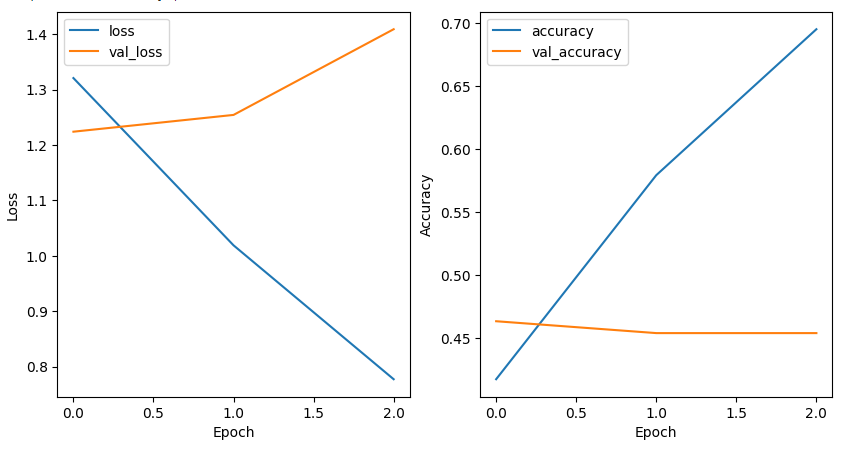 ](Loss and Accuracy.png)
Loss and Accuracy Graph
Python `
converting y_test tht was one hot encoded to one column fo rconfusion matrix
y_true = np.argmax(y_test.values, axis=1) y_true.shape
Confusion matrix
y_pred = np.argmax(model.predict(X_test), axis=1) cm = tf.math.confusion_matrix(y_true, y_pred)
Plotting the confusion matrix
plt.figure(figsize=(10, 8)) sns.heatmap(cm, annot=True, fmt='g') plt.xlabel('Predicted') plt.ylabel('Actual') plt.show()
`
**Output:
[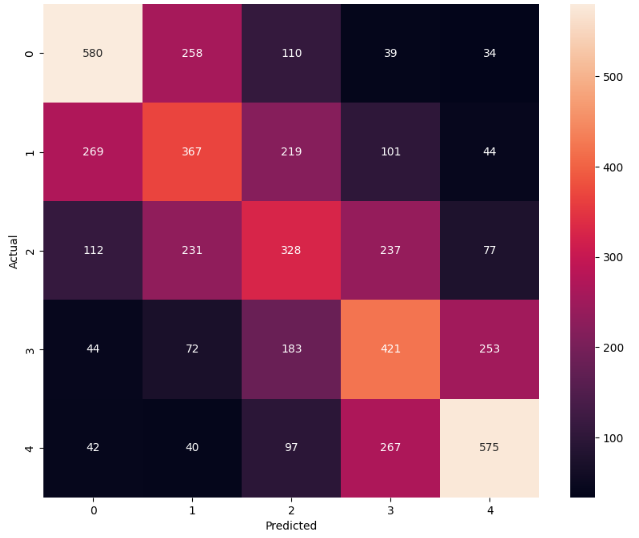 ](Confusion Matrix.png)
Confusion Matrix
Python `
from sklearn.metrics import classification_report report = classification_report(y_true, y_pred) print(report)
`
**Output:
          precision    recall  f1-score   support
       0       0.55      0.57      0.56      1021
       1       0.38      0.37      0.37      1000
       2       0.35      0.33      0.34       985
       3       0.40      0.43      0.41       973
       4       0.58      0.56      0.57      1021
accuracy                           0.45      5000
macro avg 0.45 0.45 0.45 5000
weighted avg 0.45 0.45 0.45 5000
Testing the trained model
Let's take a look at how the model is performing on the text we give in. For this make a custom function in which we will pass out text and it will generate the rating using the model.
Python `
def predict_review_rating(text): text_sequences_test = np.array(tokenizer.texts_to_sequences([text])) testing = pad_sequences(text_sequences_test, maxlen = max_words) y_pred_test = np.argmax(model.predict(testing), axis=1) return y_pred_test[0]+1
Testing
rating1 = predict_review_rating('Worst product') print("The rating according to the review is: ", rating1)
rating2 = predict_review_rating('Awesome product, I will recommend this to other users.') print("The rating according to the review is: ", rating2)
`
**Output:
The rating according to the review is: 1
The rating according to the review is: 5
Get the Complete notebook:
**Notebook: **click here.
**For Dataset: **click here.