Automatic Speech Recognition using Whisper (original) (raw)
Last Updated : 16 Mar, 2026
Automatic Speech Recognition (ASR) is a technology that converts spoken audio into written text. In simple terms, it enables machines to understand human speech and transform it into readable format just like automatically converting a voice message into text. Some of its applications are:
- **Voice assistants: Enabling hands free interaction
- **Meeting transcription: Converting discussions into documented notes
- **Video subtitling: Generating captions automatically
- **Call center analytics: Extracting insights from customer conversations
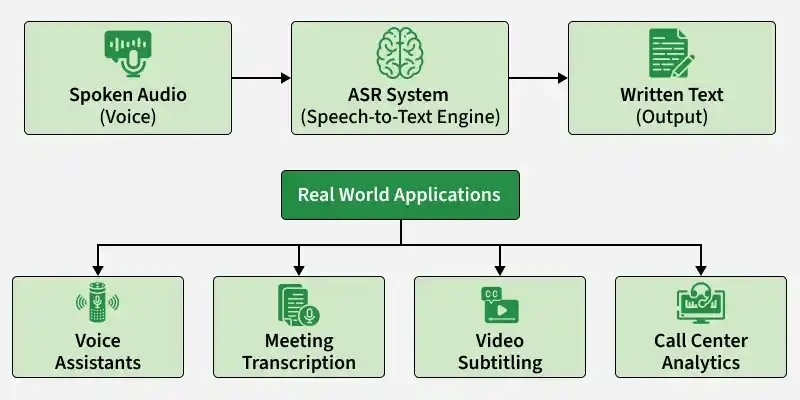
Automatic speech recognition
Why use Whisper
Whisper is a speech recognition model developed by OpenAI and is widely accessible through Hugging Face. It stands out due to its performance, flexibility and ease of integration. It has advantages like:
- **Trained on large scale multilingual audio: Built using massive and diverse datasets, enabling strong generalization.
- **Robust to background noise: Performs reliably even in real world, noisy environments.
- **Speech translation capability: Can transcribe and translate speech across languages.
- **Simple deployment workflow: Easily usable through Hugging Face pipelines with minimal setup.
Implementing Automatic Speech Recognition
Step 1: Set Up the Environment
First, install the required libraries. Run the following command one by one in your command prompt.
pip install transformers --upgrade
pip install torch torchaudio
Step 2: Import Required Modules
This step sets up the foundational components required to build the speech to text pipeline.
- **WhisperProcessor: Prepares audio input for the Whisper model (feature extraction + decoding).
- **WhisperForConditionalGeneration: Loads the Whisper speech to text model developed by OpenAI.
- **torch: Core deep learning framework used to run the model and handle tensors.
- **torchaudio: Used to load and preprocess audio files before feeding them into the model. Python `
from transformers import WhisperProcessor, WhisperForConditionalGeneration import torch import torchaudio
`
Step 3: Load Model and Processor
We load the pre trained Whisper Small model developed by OpenAI from Hugging Face.
- **Processor : Converts audio into model ready features and handles tokenization.
- **Model : Generates text tokens from processed audio. Python `
model_name = "openai/whisper-small"
processor = WhisperProcessor.from_pretrained(model_name) model = WhisperForConditionalGeneration.from_pretrained(model_name)
`
**Output:

Loading pretrained model
Step 4: Download and Load Audio
It downloads a sample audio file from Hugging Face and saves it locally. Then, torchaudio.load() reads the file and returns the audio waveform and its sampling rate. This prepares the speech input for the Whisper model.
You an also download the audio file from here
Python `
import requests
url = "https://huggingface.co/datasets/Narsil/asr_dummy/resolve/main/1.flac"
r = requests.get(url)
with open("sample.flac", "wb") as f: f.write(r.content)
audio, sampling_rate = torchaudio.load("Your audio file path")
`
Step 5: Resampling Audio to 16kHz
Whisper requires audio sampled at 16kHz. If the loaded audio has a different sampling rate, we resample it.
Python `
if sampling_rate != 16000: resampler = torchaudio.transforms.Resample(sampling_rate, 16000) audio = resampler(audio)
`
Step 6: Preprocess Audio
The processor converts the raw audio waveform into numerical features that the Whisper model can understand.
- **audio.squeeze().numpy(): removes extra dimensions and converts the tensor to NumPy format
- **sampling_rate=16000: ensures correct audio frequency
- **return_tensors="pt": returns PyTorch tensors Python `
inputs = processor( audio.squeeze().numpy(), sampling_rate=16000, return_tensors="pt" )
`
Step 7: Generate Transcription
- **torch.no_grad(): Disables gradient computation (faster inference, less memory usage).
- **model.generate(): Uses the Whisper model to generate text token IDs from the audio features.
- The output **predicted_ids contains the predicted text tokens, which will be decoded into readable text in the next step. Python `
with torch.no_grad(): predicted_ids = model.generate(inputs["input_features"])
`
Step 8: Decode Output
- **batch_decode(): converts the predicted token IDs into readable text.
- **skip_special_tokens=True: removes unnecessary special tokens.
- **[0]: extracts the final transcription from the batch. Python `
transcription = processor.batch_decode( predicted_ids, skip_special_tokens=True )[0]
print("Transcription:", transcription)
`
**Output:
Transcription: He hoped there would be stew for dinner, turnips and carrots and bruised potatoes and fat mutton pieces to be ladled out in thick, peppered, flour-fattened sauce.
You can download the full code from here