Introduction to ChromaDB (original) (raw)
Last Updated : 15 Apr, 2026
ChromaDB is an open-source vector database designed for efficiently storing, searching and managing vector embeddings which are numeric representations used in AI and machine learning for tasks like semantic search and recommendation systems. It enables fast similarity search and offers a simple API for developers.
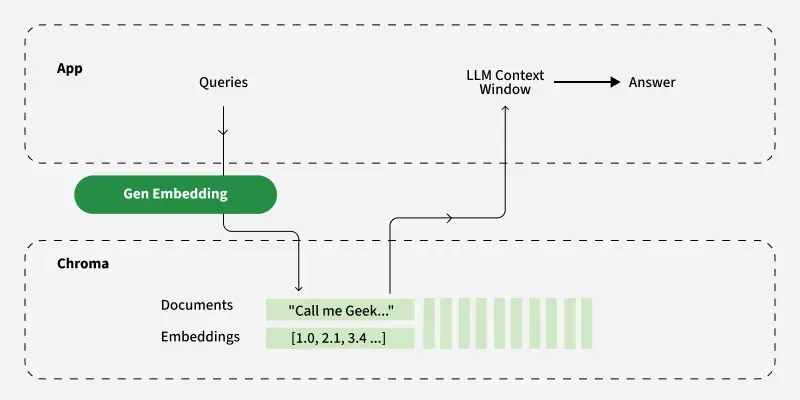
Architecture of ChromaDB
Key Features
- **Vector Storage and Querying: The system quickly searches for similar data points using advanced techniques like Hierarchical Navigable Small World (HNSW) graphs since it is designed to handle high-dimensional data efficiently.
- **Ease of Use: It offers a simple Python-based API that makes it easy for both beginners and experts to work with vector data without having to worry about the complexities of vector indexing.
- **Flexible Storage: The system offers both temporary storage for testing and prototyping, as well as permanent storage for production hence keeping our data safe and reliable.
- **Machine Learning Integration: It integrates easily with popular embedding models from platforms like Hugging Face and OpenAI or even custom models which allows for seamless embedding generation and storage.
Working
- **Embedding Generation: Data like text or images is converted into vector embeddings using a pre-trained or custom model. For example, a sentence like "The cat is on the mat" can be transformed into a numerical vector using a model like BERT or SentenceTransformers.
- **Storing Embeddings: The embeddings are stored in a ChromaDB collection, along with optional metadata like document ID, category or timestamp and unique identifiers.
- **Querying: Users can query the database by providing a vector or raw data which is converted to a vector. ChromaDB performs a similarity search to return the most relevant embeddings based on metrics like cosine similarity or euclidean distance.
- **Filtering with Metadata: Queries can include metadata filters to narrow down results. For example, a search might only return embeddings from a specific category or time range.
- **Retrieval: The database finds the top-k most similar embeddings and gives back their details and identifiers which can be used for search or recommendations.
ChromaDB Hierarchy
In ChromaDB, data is typically stored locally using storage backends like SQLite for persistence in single-node setups, though storage configuration may vary depending on deployment. Below is a breakdown of this hierarchy:
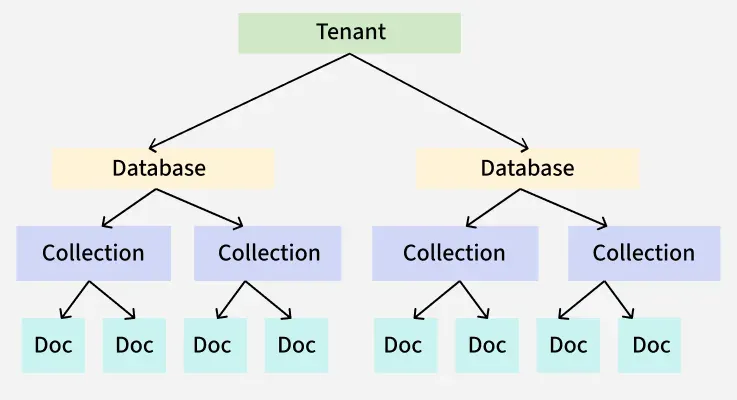
Hierarchy in ChromaDB
- **Tenants: A tenant represents an organization or individual using ChromaDB. Each tenant logically groups together a set of databases, making it easy to model different organizations or users within the system. A single tenant can manage multiple databases.
- **Databases: A database is a logical container for collections. It typically corresponds to a single application or project. Each tenant can have multiple databases and each database can house multiple collections.
- **Collections: A collection is a group of documents (data entries) that share similar characteristics. Collections organize our embeddings, documents and metadata. Importantly, collections do not require a predefined schema, we can start storing data immediately which makes ChromaDB flexible for various use cases.
- **Documents: Documents are the raw chunks of text we store in ChromaDB. Each document is associated with an embedding (a numerical representation of its content). We can query these documents directly making retrieval efficient and intuitive.
Implementation
Lets see step by step implementation of ChromaDB
Step 1: Install ChromaDB Library
We need to install the ChromaDB library to interact with the vector database.
Python `
!pip install chromadb
`
Step 2: Import ChromaDB Library
Import the ChromaDB library to begin using it in the script.
Python `
import chromadb
`
Step 3: Initialize the ChromaDB Client and create a Collection
Create a client instance to interact with the ChromaDB database and create a collection within ChromaDB which will store documents along with their metadata. In this case, the collection is named personal_collection.
Python `
chroma_client = chromadb.Client() collection = chroma_client.create_collection(name="personal_collection")
`
Step 4: Add Documents to the Collection
Add documents to the collection with their respective metadata and unique IDs. Each document is tagged with source information in the metadata.
Python `
collection.add( documents=[ "This is a document about machine learning", "This is another document about data science", "A third document about artificial intelligence" ], metadatas=[ {"source": "test1"}, {"source": "test2"}, {"source": "test3"} ], ids=[ "id1", "id2", "id3" ] )
`
Step 5: Query the Collection and Display Result
Query the collection to retrieve documents that are similar to the query text. The n_results=2 parameter specifies that only 2 results should be returned and display the results of the query.
Python `
results = collection.query( query_texts=[ "This is a query about machine learning and data science" ], n_results=2 )
print(results)
`
**Output:
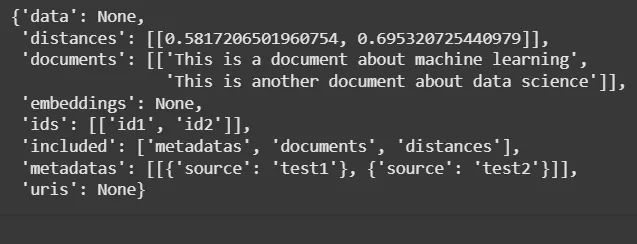
Output
**Note: The output attached are in the embedding format.
Use Cases
- **Semantic Search: Improve search engines by finding documents that are similar in meaning to a query.
- **Recommendation Systems: Suggest items based on vector similarity such as recommending products or content.
- **Retrieval-Augmented Generation (RAG): Provide context to language models by retrieving relevant documents to answer questions.
- **Anomaly Detection: Identify outliers by comparing vector embeddings to a known distribution.
Advantages
- **Scalability: Handles large volumes of vector data efficiently.
- **Flexibility: Supports various data types and integrates with multiple ML frameworks.
- **Ease of Use: Provides a simple API for developers to interact with.
- **Open-Source: Community-driven development keeps improving and providing support over time.
Limitations
- **Memory Usage: ChromaDB uses a lot of memory for vector operations especially when handling large-scale data as it relies mainly on in-memory storage.
- **Scalability Limits: It may need extra setup for very large datasets compared to enterprise-level databases like Milvus or Pinecone.
- **Indexing Performance: The indexing process can be slow for large datasets or high-dimensional vectors which may affect the time needed to prepare data for querying.