Build Chat App Using socket.io in Node.js (original) (raw)
Last Updated : 7 Apr, 2026
Socket.io is a JavaScript library that enables real-time, bidirectional, event-based communication between the client and server. It works on top of WebSocket but provides additional features like automatic reconnection, broadcasting, and fallback options.
Features of the Chat App
Create a real-time chat application using Socket.IO and Node.js. The application will feature
- Real-time communication between multiple users without the need for page reloads.
- Sending and receiving messages in real-time, instantly displaying messages across all connected clients.
- A simple and responsive chat interface built using HTML, CSS (Tailwind CSS), and JavaScript.
- Broadcasting messages to all clients in a chat room.
- Customization for both the username and the message body.
- A fully functional system where users can see messages as they are typed and sent in real-time.
Approach
Defines the implementation strategy for enabling real-time chat functionality using Socket.IO and Node.js.
- **Real-time communication: Use Socket.IO to establish bidirectional communication between client and server.
- **Server setup: Configure an Express.js server to handle connections and serve the client interface.
- **Message handling: Emit and listen for events to send and receive messages between clients via the server.
- **UI updates: Dynamically update the frontend upon receiving new messages without page reload.
- **Multi-user support: Utilize broadcasting to deliver messages to all connected clients in real time.
Setting Up Node.js Chat App Project
Creating a new folder called socket-chat-app. Open your command prompt and navigate to the folder we just created.
Step 1: Create Project Directory
mkdir chat-app && cd chat-app npm init -y
Step 2: Initialize Node.js Project
Now, Initialize the node package by typing in the following command in the terminal:
npm init -y
Step 3: Install Dependencies
This will create a package.json file for us so that we can install the necessary libraries. Now type in the command:
npm install express socket.io
Step 4: Create Project Files
Now, in the socket-chat-app folder, create two files - index.html and index.js:
touch index.html index.js
**Project Structure
Folder structure should look like this:
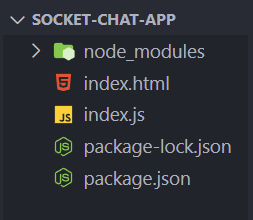
Folder Structure
The implementation of the above approach to creating a real-time chat application using socket.io and Node.js:
- HTML form with input fields for user name and message.
- Socket.io client library included using
- Initializes connection using let socket = io();
- Handles form submission and emits send name and send message events.
- Listens for send name and send message events to display messages.
- Uses Tailwind CSS CDN for styling. index.html `
GeeksforGeeks
Chat App using Socket io
` index.js ``
const express = require('express'); const app = express(); const { Server } = require('socket.io'); const http = require('http'); const server = http.createServer(app); const io = new Server(server); const port = 5000;
app.get('/', (req, res) => { res.sendFile(__dirname + '/index.html'); });
io.on('connection', (socket) => { socket.on('send name', (username) => { io.emit('send name', (username)); });
socket.on('send message', (chat) => {
    io.emit('send message', (chat));
});
});
server.listen(port, () => {
console.log(Server is listening at the port: ${port});
});
``
- **Express Web Server: The code uses Express to create a basic web server and an HTTP server with the http module.
- **Serving HTML: When users visit the root URL (/), the server sends index.html to the client.
- **Socket.IO Integration: Socket.IO enables real-time communication between the server and client.
- **Event Handling: The server listens for two events from the client: send name and send message, emitting these to all connected clients.
- **Server Setup: The server runs on port 5000 and logs a message when it starts, indicating it's ready for connections.
**Steps to run the application: Write the below code in the terminal to run the server
node index.js
**Output: Open your browser and open two tabs with the URL: http://localhost:5000 so that we have two clients that can chat with each other. Following is the output of our chat app: