How to install the previous version of Node and npm? (original) (raw)
Last Updated : 3 Jun, 2026
Node.js is a JavaScript runtime that lets you run JavaScript outside the browser. npm (Node Package Manager) comes bundled with Node.js and lets you install and manage reusable code packages. Each Node.js release ships with a specific default npm version, so the two are always linked.
- External packages your project relies on are called dependencies, listed in
package.json. Some packages require a minimum Node version to install or run correctly. - A package built for Node 20 may fail on Node 16, so version mismatches across teams or projects are a common source of bugs.
- Legacy projects often require stepping back to a specific Node version. Tools like nvm let you install and switch between multiple Node versions on the same machine without breaking anything.
**Note: npm is commonly referred to as “Node Package Manager” but it is not officially an acronym.
**Steps to Install the Previous Version of NodeJS and NPM
Follow these steps to install a specific Node.js version in windows as well as linux:
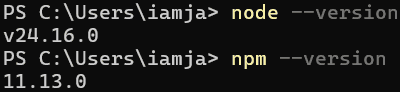
**Step 1: Check the installed version of Node and NPM on the computer use the following command respectively
node --version
npm --version
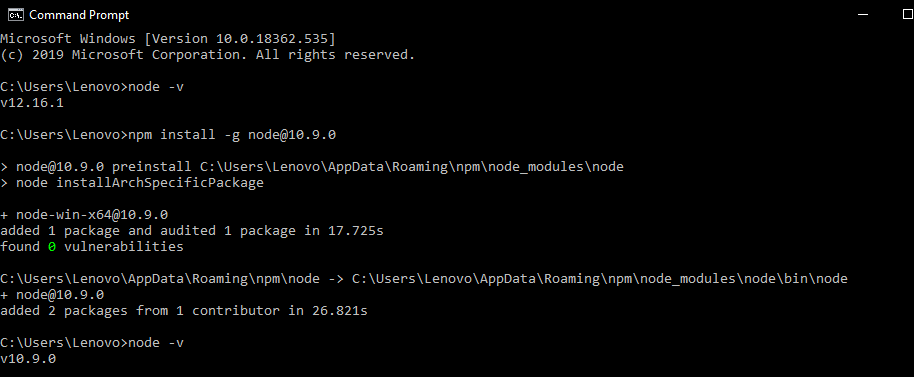
**Step 2: For installing the previous version of Node use the following command:
Windows
npm install -g node@version
Linux
sudo apt-get install nodejs=version-1chl1~precise1
**Example:
npm install -g node@10.9.0
sudo apt-get install nodejs=10.9.0-1chl1~precise1
**Step 3: To install previous version of NPM use the following command:
Windows
npm install -g npm@version
Linux
sudo apt-get install npm=version-1chl1~precise1
**Example:
npm install -g npm@4.0.0
sudo apt-get install npm=4.0.0-1chl1~precise1

Use Cases of Previous Node & npm versions
- **Compatibility with Legacy Projects: Older projects may rely on specific npm behavior or lockfile formats, so using a previous version keeps them running as intended.
- **Avoiding Breaking Changes: New npm releases can change dependency resolution or commands, so reverting helps maintain stability.
- **Debugging and Testing: Installing older versions helps reproduce issues, compare behavior, and identify version-specific bugs.