How to Integrate Stripe Payment Gateway in Node.js ? (original) (raw)
Last Updated : 12 Jul, 2025
Integrating Stripe in Node allows one to make and manage online payments. Stripe provides developer-friendly API to set up the payment gateway to handle secure transactions.
Payment gateways help the user to make their payments. There are many payment gateways available in the market like Razorpay, Google Pay, etc but the most popular among them is the Stripe payment gateway. Stripe is the premier option for online credit card processing and it is also the most popular premium payment gateway.
- It's easy to get started and easy to use.
- It is a widely used and popular module for processing payments.
- User-friendly services and highly secured.
Approach
**To integrate Stripe Payment Gateway in Node we will **install the Stripe package as a project dependency. Then, we set up environment variables for authentication, and API endpoints for processing payments, and handled the transactions.
**Steps to Setup Stript Payment Gateway in Node
**Step 1: Initialize a Node Project
Use this command to create a node project in the same folder
npm init
**Step 2: Install Stripe Module
You can visit the link Install stripe module. You can install this package by using this command.
npm install stripe
Step 3: Verify the Installation
After installing stripe module, you can check your stripe version in command prompt using the command.
npm version stripe
Step 4: Install other required modules
npm install ejs express body-parser
Project Structure:
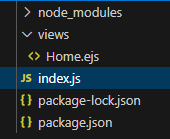
project structure
Step 5: Import Stripe
You need to include stripe module in your file by using these lines.
const stripe = require('stripe')('Your_Secret_Key');
To get your secret key, simply go to Stripe Official Website and create an account, then you can get your secret key as well as the publishable key.
HTML `
Stripe Payment DemoWelcome to Payment Gateway
JavaScript
// Filename - index.js
const express = require("express"); const bodyparser = require("body-parser"); const path = require("path"); const app = express();
const Publishable_Key = "Your_Publishable_Key"; const Secret_Key = "Your_Secret_Key";
const stripe = require("stripe")(Secret_Key);
const port = process.env.PORT || 3000;
app.use(bodyparser.urlencoded({ extended: false })); app.use(bodyparser.json());
// View Engine Setup app.set("views", path.join(__dirname, "views")); app.set("view engine", "ejs");
app.get("/", function (req, res) { res.render("Home", { key: Publishable_Key }); });
app.post("/payment", function (req, res) { // Moreover you can take more details from user // like Address, Name, etc from form stripe.customers .create({ email: req.body.stripeEmail, source: req.body.stripeToken, name: "Gourav Hammad", address: { line1: "TC 9/4 Old MES colony", postal_code: "452331", city: "Indore", state: "Madhya Pradesh", country: "India" } }) .then((customer) => { return stripe.charges.create({ amount: 2500, // Charging Rs 25 description: "Web Development Product", currency: "INR", customer: customer.id }); }) .then((charge) => { res.send("Success"); // If no error occurs }) .catch((err) => { res.send(err); // If some error occurs }); });
app.listen(port, function (error) { if (error) throw error; console.log("Server created Successfully"); });
`
**Steps to run the program
Run index.js file using below command
node index.js

Open browser and type this URL
Then you will see the Payment Gateway form as shown below

Then click on 'Pay with Card' button and then you will see the stripe payment form as shown below Fill this form with correct credit card details and click on 'Pay' button and then if no errors occur, then the following message will be displayed
Now go to your stripe dashboard and you can see the current payment details as shown below
So this is how you can integrate Stripe payment gateway in node.js. There are other payment gateways available in the market like Razorpay, Google Pay, etc.