Middleware in Express (original) (raw)
Last Updated : 15 Apr, 2026
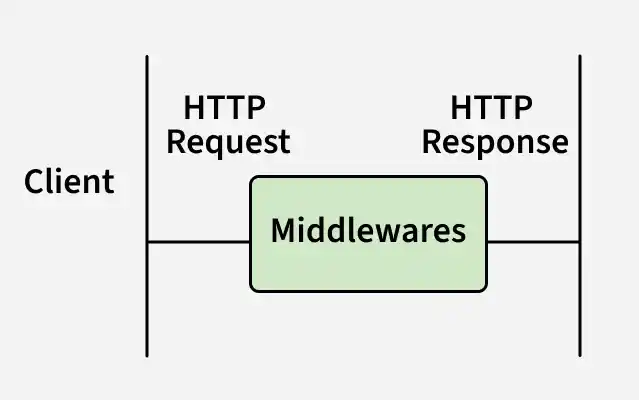
Middleware in Express.js are functions that run during the request–response lifecycle to process requests, modify responses, and control application flow.
- Executes custom logic for each request.
- Can read or modify req and res.
- May send a response and end the cycle.
- Uses next() to pass control to the next middleware.
**Syntax:
app.use((req, res, next) => { console.log('Middleware executed'); next(); });
- ****(req, res, next) => {}:** Middleware function to process the request and response before the final handler.
- **next(): Passes control to the next middleware if the request–response cycle isn’t ended.
Working of Middleware in Express.js
In Express.js, middleware functions are executed sequentially in the order they are added to the application.
- Request arrives at the server.
- Middleware functions are applied to the request, one by one.
- Each middleware either sends a response or passes control using next().
- If no middleware ends the cycle, the route handler is reached, and a final response is sent.
Types of Middleware
ExpressJS offers different types of middleware and you should choose the middleware based on functionality required.
1. Application-level Middleware
Application-level middleware runs across the entire Express application, handling common logic for all incoming requests.
- Registered using app.use() or app.METHOD().
- Executes for all routes and HTTP methods.
- Commonly used for logging, authentication, body parsing, and headers. JavaScript `
app.use(express.json()); // Parses JSON data for every incoming request app.use((req, res, next) => { console.log('Request received:', req.method, req.url); next(); });
`
2. Router-level Middleware
Router-level middleware applies to a specific router instance, allowing middleware logic to be scoped to a defined group of routes.
- Registered using router.use() or router.METHOD().
- Executes only for routes within that router.
- Ideal for modular route grouping (e.g., auth or user routes).
- Improves code organization and maintainability by isolating middleware to related routes. JavaScript `
const router = express.Router();
// Apply middleware to only this router's routes router.use((req, res, next) => { console.log('Router-specific middleware'); next(); });
router.get('/dashboard', (req, res) => { res.send('Dashboard Page'); });
app.use('/user', router); // The middleware applies only to routes under "/user"
`
3. Error-handling Middleware
Error-handling middleware captures and processes runtime errors during the request–response cycle to ensure stable application behavior.
- Defined with four parameters: err, req, res, next.
- Sends consistent error responses and prevents server crashes. JavaScript `
app.use((err, req, res, next) => { console.error(err.stack); // Log the error stack res.status(500).send('Something went wrong!'); });
`
4. Built-in Middleware
Express offers built-in middleware functions to handle common server tasks efficiently.
- express.static() serves static files like images, CSS, and JS.
- express.json() parses incoming JSON request bodies. JavaScript `
app.use(express.static('public')); // Serves static files from the "public" folder app.use(express.json()); // Parses JSON payloads in incoming requests
`
5. Third-party Middleware
Third-party middleware extends Express applications with additional functionality through npm packages.
- Developed by external contributors and installed via npm.
- Adds features like logging, security, and validation.
- Examples include morgan for request logging and body-parser for parsing request bodies. JavaScript `
const morgan = require('morgan'); app.use(morgan('dev')); // Logs HTTP requests using the "dev" format
const bodyParser = require('body-parser'); app.use(bodyParser.urlencoded({ extended: true })); // Parses URL-encoded bodies
`
Implement Middleware in Express
Below are the steps to implement middleware:
**Step 1: Initialize the Node.js Project
npm init -y
**Step 2: Install the required dependencies
npm install express
Step 3: Set Up the Express Application
JavaScript ``
// Filename: index.js const express = require('express'); const app = express(); const port = process.env.PORT || 3000;
app.get('/', (req, res) => { res.send('
Welcome to GeeksforGeeks
Tutorial on Middleware
app.listen(port, () => {
console.log(Listening on port ${port});
});
``
Step 4: Start the Application
node index.js
**Output:
When you navigate to http://localhost:3000/, you will see:
Welcome to GeeksforGeeksTutorial on Middleware
Middleware Chaining
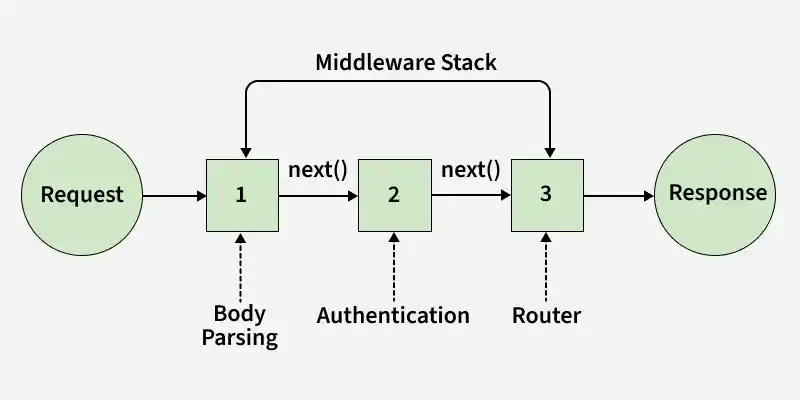
Express allows middleware functions to be chained and executed sequentially, processing a request step by step before sending a response.
- Middleware runs in order as a chain.
- Each middleware can process or modify the request.
- The final handler sends the response to the client.
- next() passes control to the next middleware in the chain.
Now let's understand this with the help of example:
JavaScript ``
const express = require('express'); const app = express();
// Middleware 1: Log request method and URL
app.use((req, res, next) => {
console.log(${req.method} request to ${req.url});
next();
});
// Middleware 2: Add a custom header app.use((req, res, next) => { res.setHeader('X-Custom-Header', 'Middleware Chaining Example'); next(); });
// Route handler app.get('/', (req, res) => { res.send('Hello, World!'); });
app.listen(3000, () => { console.log('Server is running on port 3000'); });
``
- **Middleware 1: Logs the HTTP method and URL of the incoming request.
- **Middleware 2: Sets a custom header X-Custom-Header in the response.
- **Route Handler: Sends a "Hello, World!" message as the response.
**Output:
When a client makes a GET request to http://localhost:3000/, the server responds with:
Hello, World!