Node Callback Concept (original) (raw)
Last Updated : 25 Apr, 2026
In Node.js, callbacks enable asynchronous, non-blocking execution, while methods like readFileSync() perform blocking operations. The fs module provides both synchronous and asynchronous approaches to handle file system tasks.
- **Callback Function: Executes after a task completes, enabling non-blocking processing.
- **Improves Scalability: Allows handling multiple requests without waiting for operations to finish.
- **readFileSync(): A synchronous method that blocks execution until the file is fully read.
- **Asynchronous Methods: Continue execution while file operations run in the background.
**Example: Code for reading a file synchronously (blocking code) in Nodejs. Create a text file inputfile1.txt with the following content:
Hello Programmer!!!
Learn NodeJS with GeeksforGeeks
JavaScript `
// Write JavaScript code const fs = require("fs"); const filedata = fs.readFileSync('inputfile1.txt'); console.log(filedata.toString()); console.log("End of Program execution");
`
**Output:
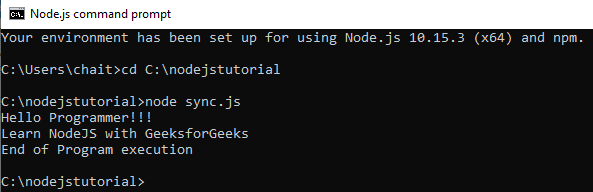
- The fs library is used to perform file system operations in Node.js.
- The asynchronous readFile() function allows the program to continue execution while the file is being read in the background.
- A callback function is executed after the file-reading operation is completed.
**Example : Code for reading a file asynchronously (non-blocking code) in Nodejs. Create a text file inputfile1.txt with the following content.
Hello Programmer!!!
Learn NodeJS with GeeksforGeeks
JavaScript `
// Write a JavaScript code const fs = require("fs");
fs.readFile('inputfile1.txt', function (ferr, filedata) { if (ferr) return console.error(ferr); console.log(filedata.toString()); } ); console.log("End of Program execution");
`
**Output:
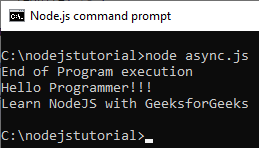
- The
fs.readFile()function reads the file asynchronously (non-blocking). - The program does not wait for the file to be read.
"End of Program execution"is printed first.- The file content is printed later when the callback runs.