Node Child Process (original) (raw)
Last Updated : 25 Apr, 2026
Node.js is single-threaded but uses the child_process module to create separate processes for executing external commands or heavy tasks without blocking the main event loop.
- Executes external scripts such as Python, Bash, or other Node.js files.
- Enables parallel execution by creating multiple child processes.
**The child_process module provides four methods to create child processes:
- **spawn: Starts a new process and streams data between parent and child.
- **exec: Executes a command in a shell and buffers the output.
- **execFile: Runs an executable file directly without using a shell.
- **fork: Creates a Node.js child process with built-in message communication.
Methods to Create Child Processes
The child_process module provides multiple methods to create and manage child processes for executing external commands and parallel tasks in Node.js.
1. spawn() method
The spawn() method launches a new process with a specified command and arguments, providing streams for input/output. It's ideal for handling large outputs or long-running processes.
JavaScript ``
const { spawn } = require('child_process'); const child = spawn('ls', ['-lh', '/usr']);
child.stdout.on('data', (data) => {
console.log(stdout: ${data});
});
child.stderr.on('data', (data) => {
console.error(stderr: ${data});
});
child.on('close', (code) => {
console.log(child process exited with code ${code});
});
``
**Output:
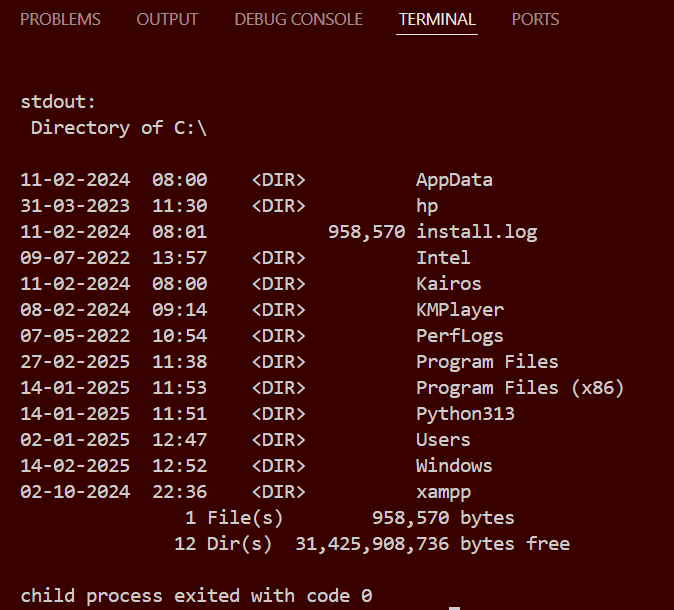
Node child Process
- spawn('ls', ['-lh', '/usr']): Executes the ls command with -lh and /usr as arguments.
- child.stdout.on('data', ...): Listens for data from the standard output.
- child.stderr.on('data', ...): Listens for data from the standard error.
- child.on('close', ...): Listens for the close event, indicating the process has finished.
2. fork() method
The fork() method is a special case of spawn() used specifically for spawning new Node.js processes. It establishes an IPC (Inter-Process Communication) channel between the parent and child processes, allowing them to communicate via message passing.
JavaScript ``
const { fork } = require('child_process');
const child = fork('child.js');
child.on('message', (message) => {
console.log(Message from child: ${message});
});
child.send('Hello from parent');
JavaScript
// Child.js
// Listen for messages from the parent process
process.on('message', (message) => {
console.log(Message from parent: ${message});
// Send a response back to the parent process.send('Hello from child'); });
``
**Output:
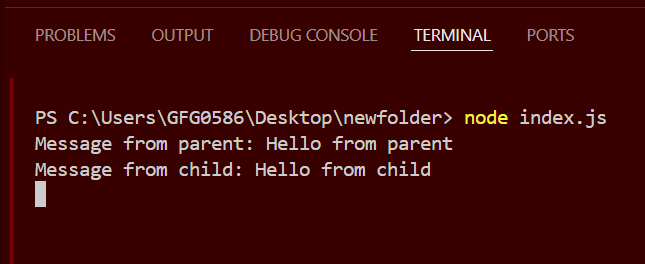
Fork method
- fork('child.js'): Spawns a new Node.js process running the child.js module.
- child.on('message', ...): Listens for messages from the child process.
- child.send('Hello from parent'): Sends a message to the child process.
3. exec() method
The exec() method runs a command in a shell and buffers the output, which is suitable for short-lived commands with small outputs.
index.js ``
const { exec } = require('child_process');
// Counts the number of directory in
// current working directory
exec('dir | find /c /v ""', (error, stdout, stderr) => {
if (error) {
console.error(exec error: ${error});
return;
}
console.log(stdout: No. of directories = ${stdout});
if (stderr != "")
console.error(stderr: ${stderr});
});
`` JavaScript `
// child_process const child = spawn('cmd', ['/c', 'dir']);
`
**Output:
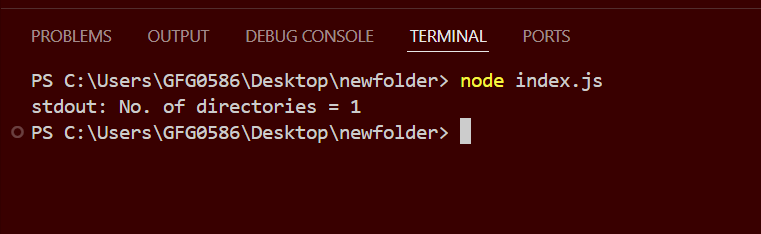
exec method
- exec('ls -lh /usr', ...): Executes the ls command with -lh and /usr as arguments.
- The callback receives error, stdout, and stderr as parameters.
- Logs the standard output and error to the console.
4. execFile() method
The execFile() method runs an executable file directly without spawning a shell, making it more efficient than exec() for running binaries and scripts directly.
JavaScript ``
const { execFile } = require('child_process');
execFile('node', ['--version'], (error, stdout, stderr) => {
if (error) {
console.error(execFile error: ${error});
return;
}
console.log(stdout: ${stdout});
if (stderr) {
console.error(stderr: ${stderr});
}
});
``
- execFile('node', ['--version'], ...): Executes the Node.js binary with the --version flag.
- The callback receives error, stdout, and stderr as parameters.
- Logs the standard output and error to the console.
Comparison of exec, execFile, spawn, and fork
| exec() | execFile() | spawn() | fork() |
|---|---|---|---|
| Uses shell and buffers output | Runs file directly without shell and buffers output | Uses shell and streams output | Creates Node.js process with message communication |
| No streaming | No streaming | Supports streaming | Supports IPC (message passing) |
| Best for small shell commands | Best for running binary files | Best for large outputs | Best for Node.js child processes |
Best Practices for Using Child Processes
- Use exec() for simple shell commands (when output size is small).
- Use execFile() for executing binary files (faster & safer).
- Use spawn() for handling large data or real-time output streaming.
- Use fork() for multi-processing and parallel execution in Node.js.
- Always handle errors properly (use stderr and error events).
- Use asynchronous methods whenever possible to avoid blocking the event loop.