Node First Application (original) (raw)
Last Updated : 25 Apr, 2026
NodeJS is widely used for building scalable and high-performance applications, particularly for server-side development. It is commonly employed for web servers, APIs, real-time applications, and microservices.
- Perfect for handling concurrent requests due to its non-blocking I/O model.
- Used in building RESTful APIs, real-time applications like chats, and more.
Creating Console-based Node Application
This section demonstrates how to execute JavaScript directly in Node.js using the console (REPL) without creating any files or project setup.
Running Node.js in the Console (No Setup Required)
Node.js lets you run JavaScript directly in the console using the REPL. Simply type node in the terminal to execute JavaScript interactively.
$ node
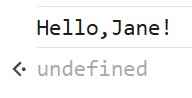
let name = "Jane";
console.log("Hello, " + name + "!");
**Output:
Node First Application
Creating Application with npm init and Installed Modules
Initialize a Node.js application using npm init and enhance its functionality by installing required modules.
**Step 1: Initialize a Node.js Project
mkdir my-node-app
cd my-node-app
npm init -y
**Step 2: Install Required Modules
We will install fs (for handling file operations) and path (for working with file paths).
npm install fs path
**Step 3: Create an index.js File
Create a simple HTTP server that reads and serves a file.
JavaScript `
import http from "http"; import fs from "fs"; import path from "path"; import { fileURLToPath } from "url";
const __filename = fileURLToPath(import.meta.url); const __dirname = path.dirname(__filename);
const server = http.createServer((req, res) => { const filePath = path.join(__dirname, "message.txt");
fs.readFile(filePath, "utf8", (err, data) => {
    if (err) {
        res.writeHead(500, { "Content-Type": "text/plain" });
        res.end("Error reading file");
    } else {
        res.writeHead(200, { "Content-Type": "text/plain" });
        res.end(data);
    }
});
});
server.listen(3000, () => { console.log("Server is running on port 3000"); });
`
**Step 4: Create a message.txt File
Create a message.txt file in the same directory and add some content:
JavaScript `
Hello, this is a Node.js application without Express!
`
**Step 5: Run the Application
node index.js
Creating Web-based Node Application
A web-based Node application consists of the following three important components:
- Import required module
- Create server
- Read Request and return response
**Step 1: Import required modules
Load Node modules using the required directive. Load the http module and store the returned HTTP instance into a variable.
**Syntax:
var http = require("http");
**Step 2: Creating a server in Node
Create a server to listen to the client's requests. Create a server instance using the createServer() method. Bind the server to port 8080 using the listen method associated with the server instance.
**Syntax:
http.createServer().listen(8080);
**Step 3: Read request and return response in Node
Read the client request made using the browser or console and return the response. A function with request and response parameters is used to read client requests and return responses.
**Syntax:
http.createServer(function (request, response) {...}).listen(8080);
**step 4: Create an index.js File
JavaScript `
var http = require('http');
http.createServer(function (req, res) {
res.writeHead(200, {'Content-Type': 'text/html'});

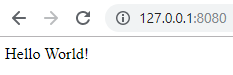
res.end('Hello World!');
}).listen(8080);
`
**Step 5: To run the program type the following command in terminal
node index.js
**Output:

Core Components of a Node-First Application
- **Backend (Node.**js with Express.js/NestJS/Koa.js): Handles API requests, database operations, and authentication.
- **Database (MongoDB, PostgreSQL, MySQL, Redis): Uses MongoDB (NoSQL) or SQL databases like PostgreSQL and MySQL.
- **Frontend (React, Vue.js, Angular): React.js, Vue.js, and Angular integrate smoothly with Node-powered backends.
- **Authentication & Security: Uses JWT (JSON Web Tokens), OAuth, or session-based authentication.
- **Real-Time Capabilities (Socket.io, WebRTC): Socket.io enables WebSocket communication for real-time apps.