Node.js Modules (original) (raw)
Last Updated : 17 Jan, 2026
In Node.js, modules help structure applications by encapsulating reusable code, improving maintainability and scalability.
- Variables share configuration values or constants.
- Functions provide reusable logic.
- Classes support object-oriented design.
- Objects group related data and utilities.
Types of Modules in Node.js
Node.js provides two primary module systems:
1. ES6 Modules (ECMAScript Modules - ESM)
ES6 Modules offer a modern and standardized way to structure Node.js applications. Unlike CommonJS, ESM uses import/export instead of require/module.exports.
Working of ES6 Modules
ES6 modules use import and export statements to enable static, standardized module loading in JavaScript.
- Uses import to import modules.
- Uses export to export functions, objects, or variables.
- Modules are loaded asynchronously, allowing better performance.
- Requires "type": "module" in package.json.
**Exporting and Importing Module (ES6 Modules - Named Export)
math.js `
//math.js
export function add(a, b) { return a + b; } export const PI = 3.1415;
app.js
import { add, PI } from './math.js'; console.log(add(2, 3));
`
Use Cases of ES6 Modules
**1. Default Export and Import
Default exports allow a module to expose a single main value that can be imported with a flexible name.
- Exports one primary value such as a function, object, or class.
- Import name can be chosen freely.
- More flexible than named exports. greet.js ``
//greet.js
export default function greet(name) {
return Hello, ${name}!;
}
`` app.js `
import greet from './greet.js'; console.log(greet('Node.js'));
`
**Output:

Default Export and Import
**2. Named Exports with Aliases
Named exports allow a module to expose multiple values that are imported using their declared names.
- Supports exporting multiple functions, objects, or variables.
- Import names must match the exported names.
- Aliases can be used during import for flexibility. operations.js `
export function multiply(a, b) { return 'Multiplication: ' + (a * b); }
export function divide(a, b) { return 'Division: ' + (a / b); }
app.js
import { multiply as mul, divide as div } from './operations.js'; console.log(mul(6, 3)); console.log(div(10, 2));
`
**Output:
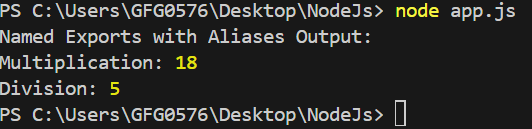
Named Exports with Aliases
**3. Dynamic Imports
Dynamic imports enable JavaScript to load modules at runtime instead of during initial execution.
- Improves performance by reducing initial load time.
- Allows conditional loading of modules.
- Useful for optimizing large applications. math.js `
export function add(a, b) { return a + b; }
export function multiply(a, b) { return a * b; }
app.js
async function loadMathModule() {
const math = await import('./math.js'); // Dynamically imports the module
console.log("Dynamic Imports Output:");
console.log("Addition:", math.add(5, 3));
console.log("Multiplication:", math.multiply(4, 3));
}
loadMathModule();
`
**Output:

Dynamic Imports
**Combining Default and Named Exports
ES6 modules support both default and named exports within a single module, enabling flexible and organized code structure.
- Allows a primary default export alongside multiple named exports.
- Improves code organization and reusability.
- Supports exporting functions, objects, and classes. person.js ``
export default class Person {
constructor(name) {
this.name = name;
}
sayHello() {
return Hello, I am ${this.name};
}
}
export const greet = (name) => Hi, ${name}!;
`` app.js `
import Person, { greet } from './person.js';
const user = new Person('Emma'); console.log(user.sayHello()); console.log(greet('Lucas'));
`
**Output:

Combining Default and Named Export
2. CommonJS Modules (CJS)
CommonJS is the default module system in Node.js that enables modular code by defining how modules are exported and imported.
- Uses module.exports to export values from a module.
- Uses require() to import modules.
- Supports exporting functions, objects, or variables.
- Designed for server-side JavaScript in Node.js.
**Syntax
//import
const module1 = require('./module1');
//export
module.exports = { module1, module2, ... };
Working CommonJS of in Node.js
CommonJS modules use require() and module.exports for dynamic module loading in Node.js.
- Uses require() to import modules.
- Uses module.exports to export functions, objects, or variables.
- Modules are loaded synchronously, meaning execution waits until the module is fully loaded.
- It is default in NodeJS, but not natively supported in browsers.
- Each module runs in its own scope, preventing variable conflicts.
Use Cases of CommonJS Modules
**1. Creating a Utility Module
A utility module provides reusable helper functions that simplify common operations across an application.
- Handles tasks such as string manipulation and date formatting.
- Supports number calculations and data transformations.
- Centralizes logging and error handling.
- Improves code reuse and maintainability. utils.js `
export function add(a, b) { return a + b; }
export function multiply(a, b) { return a * b; }
export function capitalize(str) { return str.charAt(0).toUpperCase() + str.slice(1); }
export function reverseString(str) { return str.split('').reverse().join(''); }
app.js
import { add, multiply, capitalize, reverseString } from './utils.js';
console.log("Utility Module Output:");
console.log("Addition:", add(10, 5));
console.log("Multiplication:", multiply(6, 3));
console.log("Capitalized:", capitalize("hello"));
console.log("Reversed String:", reverseString("Node.js"));
`
**Output:
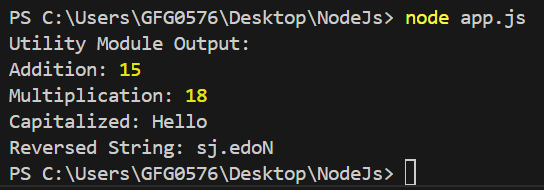
Creating a Utility Module
**2. Building a Configuration File
A configuration file in Node.js stores application settings and environment-specific values separately from the code.
- Holds environment variables and application settings.
- Stores API keys and database credentials securely.
- Enables environment-specific configurations (dev, test, prod).
- Improves maintainability and deployment flexibility. config.js `
const config = { appName: "My Node.js App", port: 3000, databaseURL: "mongodb://localhost:27017/mydatabase", apiKey: "1234567890abcdef", };
export default config;
app.js
import config from './config.js';
console.log("Building a Configuration File Output:"); console.log("Application Name:", config.appName); console.log("Server running on port:", config.port); console.log("Database URL:", config.databaseURL); console.log("API Key:", config.apiKey);
`
**Output:

Building a Configuration File
**3. Handling Routes in an Express App
Routing in Express.js defines how an application responds to client requests for different URLs and HTTP methods.
- Maps URLs to specific request handlers.
- Supports HTTP methods such as GET, POST, PUT, and DELETE.
- Enables structured request handling in web applications. routes.js `
const express = require('express'); const router = express.Router();
router.get('/', (req, res) => res.send('Home Page'));
module.exports = router;
server.js
const express = require('express'); const app = express(); const routes = require('./routes');
app.use('/', routes); app.listen(3000, () => console.log('Server running on port 3000'));
`
Module Caching in Node.js
When a module is loaded using require(), NodeJS caches it, preventing repeated loading and improving performance.
JavaScript `
require('./greet'); // First time - Loads module require('./greet'); // Second time - Uses cached version
`
To clear cache, use
JavaScript `
delete require.cache[require.resolve('./greet')];
`
Benefits of Using Modules in Node.js
Here are benefits of using Modules in Node.js:
- **Encapsulation: Keeps functionality isolated and exposes only what is necessary.
- **Reusability: Enables reuse across applications, reducing duplication.
- **Maintainability: Simplifies updates, debugging, and scaling.
- **Separation of Concerns: Assigns clear responsibilities to each module.