NodeJS REPL (READ, EVAL, PRINT, LOOP) (original) (raw)
Last Updated : 6 Apr, 2026
NodeJS REPL (Read-Eval-Print Loop) is an interactive shell that allows you to execute JavaScript code line-by-line and see immediate results. This tool is extremely useful for quick testing, debugging, and learning, providing a sandbox where you can experiment with JavaScript code in a NodeJS environment.
- **READ: You type some JavaScript code into the terminal, and REPL reads what you typed.
- **EVAL: REPL runs (evaluates) your code.
- **PRINT: REPL shows you the result of your code.
- **LOOP: REPL goes back to step 1, waiting for you to type more code.This loop continues until you quit REPL.
Getting Started with REPL
To start working with the REPL environment of NodeJS, follow one of these two methods:
Starting REPL in the Terminal or Command Prompt
- Open your terminal (for UNIX/Linux) or Command Prompt (for Windows).
- Type node and press 'Enter' to start the REPL.
node

open node repl
The REPL has started and is demarcated by the '>' symbol. Various operations can be performed on the REPL. Below are some of the examples to get familiar with the REPL environment.
Features of NodeJS REPL
Features of NodeJS REPL are discussed below:
1. Executing JavaScript Code
The REPL is a full-featured JavaScript environment, meaning you can run any valid JavaScript code inside it.
**Example:
const x = 10;
const y = 20;
x + y
30
You can declare variables, create functions, and run any code that would work in a regular JavaScript runtime.
2.Multi-Line Input
In case of complex logic (like loops or functions), the REPL supports multi-line input. When you enter a block of code, the REPL will continue reading input until the block is complete.
**Example:
function add(a, b) {
... return a + b;
... }
add(5, 10)
15
Here, the REPL waits for you to complete the function block before evaluating the code.
3. Underscore (_) Variable
The REPL provides a special variable _ (underscore) that stores the result of the last evaluated expression.
**Example:
3 + 3
6
_ * 2
12
In this case, the result of 3 + 3 is stored in _, which is then used in the next line to calculate 12.
4. Saving and Loading REPL Sessions
The REPL allows you to save the session output to a file and load previously saved sessions, making it easier to keep track of the code you've tested.
**Saving a Session: To save your REPL session to a file, use the .save command:
.save ./repl_session.js
**Loading a Session: You can load the saved session into a new REPL session using .load:
.load ./repl_session.js
5. Accessing NodeJS Core Modules
The REPL environment allows you to load and use NodeJS core modules, such as fs, path, http, etc., without needing to exit the REPL or write an entire script.
**Example:
const fs = require('fs');
fs.readFileSync('test.txt', 'utf8');
The fs (file system) module is loaded, and the REPL reads the content of a file named test.txt.
6. Error Handling in REPL
The REPL is forgiving of errors and will display helpful error messages without crashing the entire session. This makes it a safe environment for testing.
**Example:
console.log(foo);
ReferenceError: foo is not defined
Built-in REPL Commands
NodeJS REPL provides several built-in commands (REPL commands always start with a dot .).
- ****.help:** Displays a list of all available REPL commands.
- ****.break:** Breaks out of multi-line input or clears the current input.
- ****.clear:** Resets the REPL context by clearing all declared variables.
- ****.exit:** Exits the REPL session.
Arithmetical operations in REPL

Arithmetical operations in REPL
Operations using libraries of NODE

Math library methods gfg
**Note: Using 'math' shows error as the library is referenced as 'Math' in NODE and not 'math'.
Using variables in REPL
The keyword var is used to assign values to variables.

Using Variables in REPL
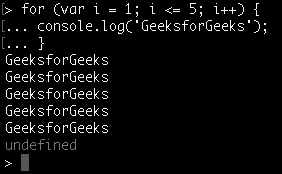
Using loops in REPL
Loops can be used in REPL as in other editors.
**Note: Use ctrl - c to terminate the command and ctrl - c twice to terminate the NODE REPL.
.help is used to list out all the commands.

Using .help in REPL